

Everything for seminar and conference.
Registration with no follow-up work
Participants register themselves through a registration link, with no access to the application. If the event is full, further registrations go onto the waiting list; if somebody cancels, the next one moves up automatically.
A program with time slots
Slots for modules, breaks, examinations and networking – with speakers, rooms and CPD learning units per item.
Prices & billing
The module deducts early booking, company and multiple-participant discounts itself at registration; invoicing happens individually or for all participants still open.
Attendance & certificates
Attendance per participant and program item – and from it certificates of participation with CPD points, individually or collected.
From registration to the certificate.
The Events module maps the complete course of an event, from creating it through program, speakers, participants and prices to attendance, certificates and invoicing. The view is built as an overview with detail tabs: first choose the event, then work on program, participants, prices, billing and attendance.
Participants and speakers come from the CRM. Through a public registration link, participants can also register themselves. The module creates the contact, checks the capacity and sends the confirmation by e-mail, without anyone in the house typing anything.
The module manages the capacity itself. Once the maximum number of participants is reached, further registrations land on the waiting list; if somebody cancels, the next one moves up automatically. The price is fixed as a snapshot at registration, worked out by rule from the base price and the early booking, company and multiple-participant discounts, each with a priority and a period of validity.
Invoicing goes through Orders & invoices, individually or collected for all participants still open, depending on the billing mode: immediately, by deposit or after the event. Cancellation fees run through an order type of their own, speaker fees through models recorded in advance, from a flat fee through to billing per learning unit.
Attendance is recorded per participant and program item, online participation included. From it come certificates of participation with a number, the name as printed and CPD points. Dates can be retrieved through the calendar, and an event can be linked to a business transaction from Rental.
Events in the application.

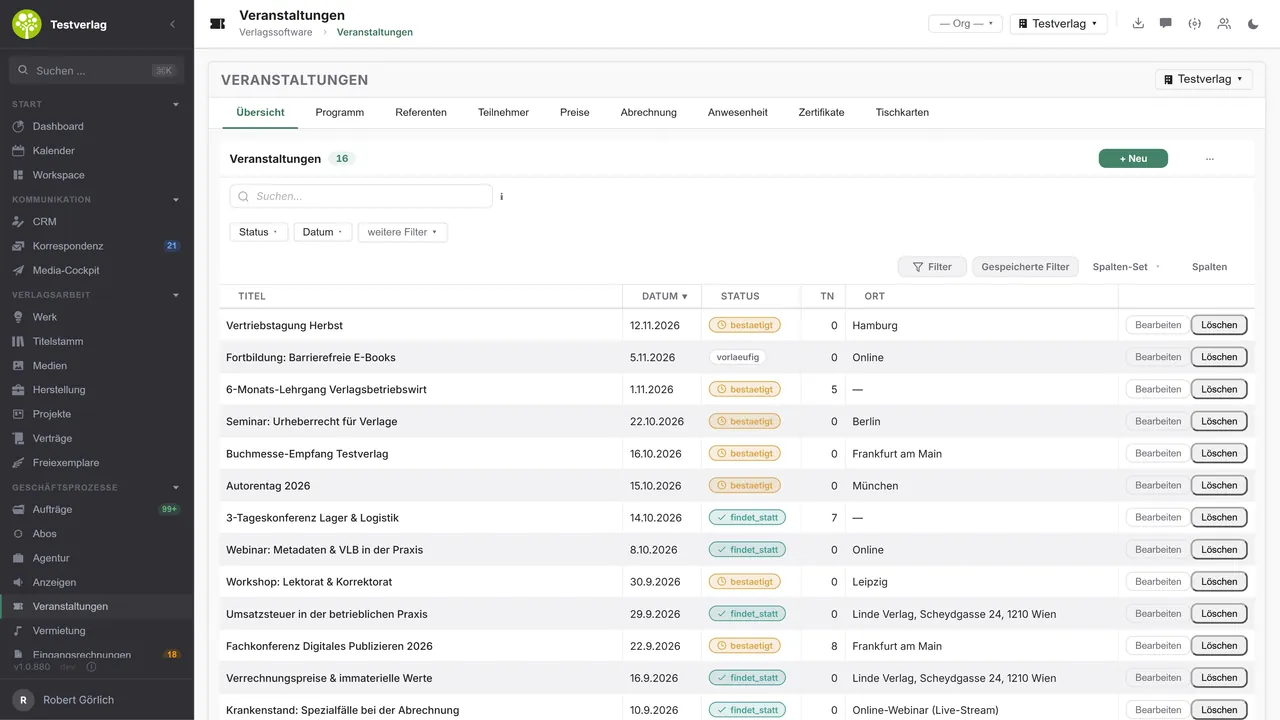

Every event at a glanceTitle, date, status, number of participants and place in one list – with full-text search, status and date filters, saved filters and selectable columns.
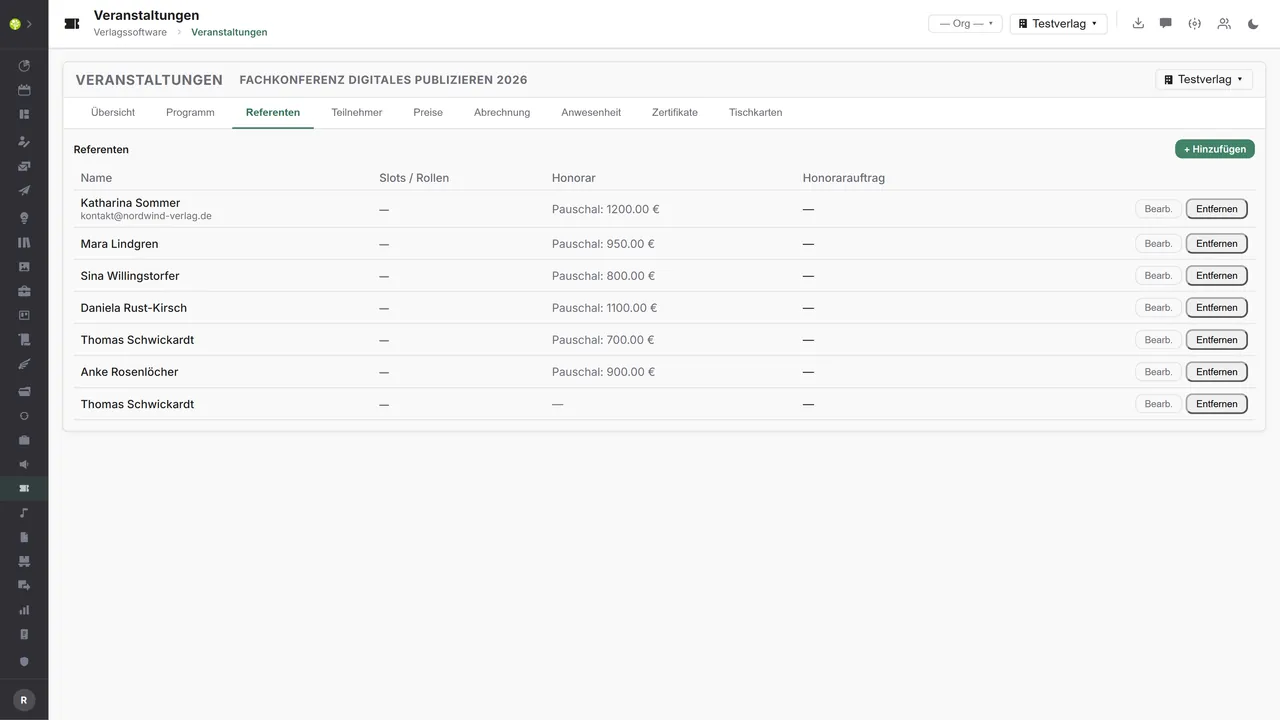
Speakers with a role and a feePer speaker the program slots assigned, the role and the fee model – here a flat fee per event; the fee order is created from it.
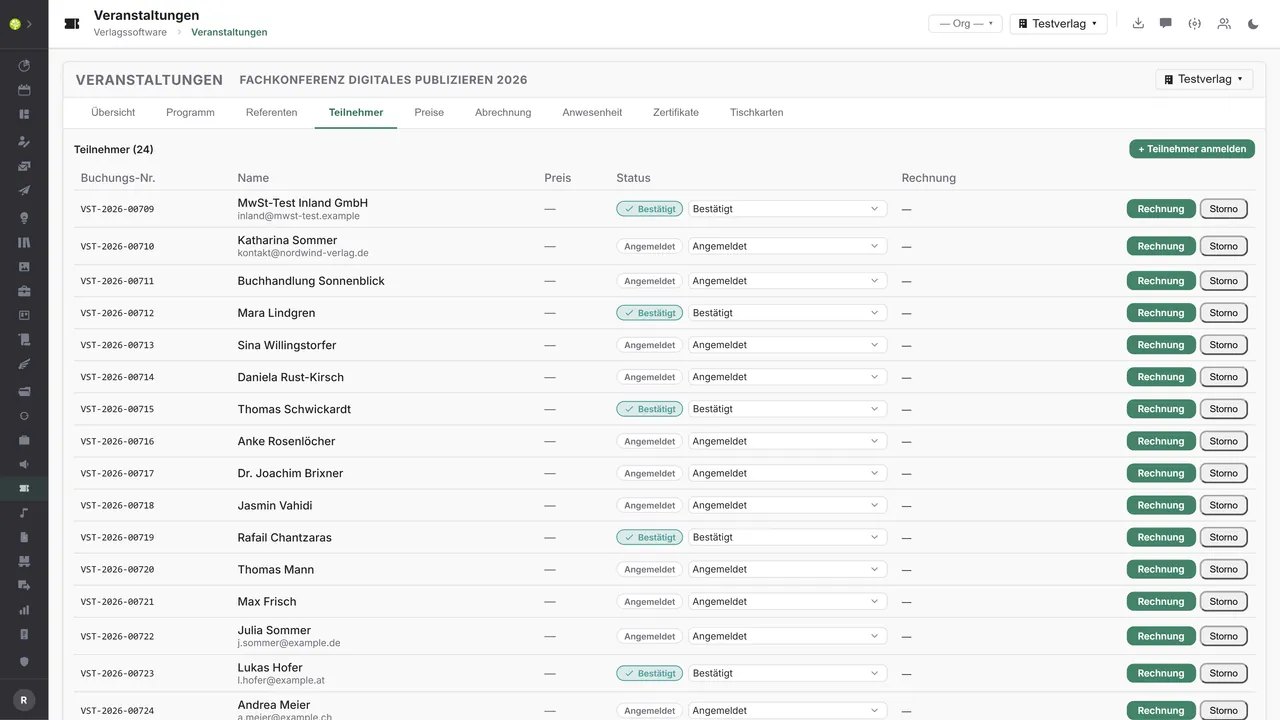
Participants, status and invoiceEvery registration with a booking number, the price fixed and a status – from registered through confirmed to canceled. Invoice and cancellation start straight from the row.
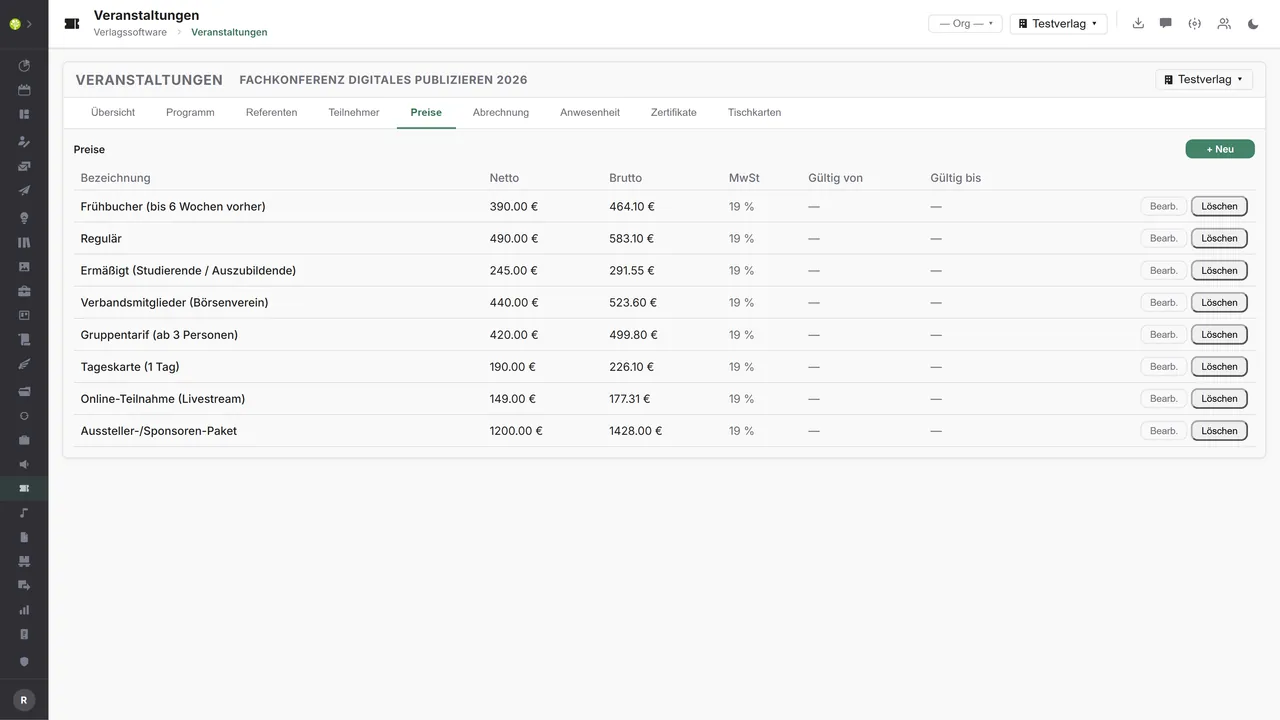
One price for every target groupEarly booking, standard, reduced, association rate, group rate, day ticket, online participation – net, gross, with a VAT rate and a period of validity.
See open.junixx at work. We show you on screen how the software fits your publishing workflows – with no obligation, and with time for your questions.
Book a demoImport and export through the API.
An event touches many external services: ticket sales, a webinar platform, a payment provider, calendars and the reporting of CPD points. Through the central open.junixx API the module can therefore be connected at both ends – registrations and payments in, dates, access and records out.

Import – from external services
Data that flows back into the module from outside:
- Bookings from ticketing platforms (Eventbrite, pretix, XING Events) → participants including a price snapshot
- Payment status from Stripe, PayPal or Mollie → confirm or cancel a registration
- Attendance reports from Zoom or Teams → set attendance automatically
- Participant lists by CSV/Excel → group registrations and company allocations

Export – to external services
Data the module passes outward:
- Dates per registration to Google, Outlook and Apple Calendar (iCal/ICS)
- Webinar access at Zoom, Teams, Webex or edudip including the join link
- Registration fees to Stripe, PayPal, Mollie or SEPA direct debit
- Attendance and CPD points as an Open Badge or to chambers and registers
Today the module sends registration confirmations by e-mail, provides dates through calendar endpoints of its own and creates orders and invoices in the order system; the external connectors can be added – depending on the kind of event – through the central API.
More on the interfaces
A detailed overview from the interface analysis: sources for import and possible targets for export – depending on the kind of event.
Import – from external services

| Source (external) | What is imported | Use in the module |
|---|---|---|
| Ticketing platforms (Eventbrite, pretix, XING Events, Ticket i/O) | Bookings: name, e-mail, ticket type, payment status | Create participants including a price snapshot automatically |
| Payment service providers (Stripe, PayPal, Mollie – webhooks) | Incoming payment and its status per registration | Status registered → confirmed, control invoice and cancellation |
| Webinar platforms (Zoom and Teams reports) | Actual participation, length of attendance | Set attendance automatically → entitlement to a certificate |
| Participant lists (CSV/Excel upload, XING and LinkedIn events) | Group registrations, company allocations | Bulk import instead of individual entry |
| Check-in and badge apps (QR scan on site) | An arrival scan per participant | On-site attendance with no paper list |
| Calendar services (room and resource calendars) | Room and speaker availability | Check slot planning against double booking |
| Feedback tools (Typeform, SurveyMonkey) | Ratings and NPS per event | A quality analysis at the event |
Export – to external services

| Purpose / trigger | External service (examples) | What is exported | Format / standard |
|---|---|---|---|
| A calendar entry for participants | Google Calendar, Outlook/Microsoft 365, Apple Calendar | The date (title, place/link, time) per registration | iCal/ICS, .ics attachment |
| Create webinar access | Zoom, Microsoft Teams, GoToWebinar, Webex, edudip | A meeting/registrant per participant, join link | REST/JSON, OAuth |
| Payment / registration fee | Stripe, PayPal, Mollie, GoCardless (SEPA direct debit) | The amount (price snapshot), participant, invoice reference | Payment API, webhooks |
| Certificates / records | Open Badges (Badgr/Credly), certificate platforms | Attendance + CPD points → a verifiable badge | Open Badges, PDF |
| Report CPD points | Chambers and registers (RbP nursing, medical and tax advisers' chambers, for instance) | The attendance list + points per person | CSV, chamber portal, EDI |
| E-mail / reminders | Brevo, Mailjet, Postmark, rapidmail | Invitations, reminders, follow-ups | SMTP/REST API |
| Feedback / evaluation | Typeform, SurveyMonkey, LamaPoll | The participant list → a survey invitation | REST/JSON |
| Accounting | DATEV / financial accounting | Registration fees, speaker fees | DATEV format (CSV/EXTF) |
Every feature of Events.
You will find the complete list in our brochure
What you see above is an excerpt. Every feature of this module – and of all the others – is collected in the open.junixx brochure. We will gladly send it to you, in print or as a PDF. And if you would rather watch than read: we are happy to show you open.junixx live on screen.
Get the brochureParticularly strong for these kinds of publishers.
The module has most effect where publishers pass on knowledge themselves: training courses with points, courses of study, and community formats with registration, billing and a certificate.



Connected to the publishing ecosystem
- VLB
- IDNV
- doctronic
- Amazon
- Bookwire
- Arvato / VVA
- Brocom
- Prolit
- Zeitfracht
- Magento
- WordPress /
WooCommerce - Shopify
- Shopware
- Wirth & Horn
- Diamant
- DATEV
- BMD
- Abacus
- DHL
- DPD
Get to know open.junixx.
Arrange an appointment with no obligation. We will show you how the Events module fits into your publishing routine.