

From the open item to the purchase order.
Order proposals from open items
Open third-party book items stand ready, bundled by supplier. You tick what is to go – the purchase order is created from it.
Purchase orders with a status flow
Draft, ordered, partial goods receipt, complete – marked in color, for the purchase order and for every single line.
Goods receipt into the warehouse or as a drop shipment
You decide per posting: into your own warehouse, or as a drop shipment straight to the recipient. Partial deliveries are provided for.
The purchase order PDF at the press of a button
Every purchase order becomes a PDF if you wish – open it or download it, with no detour through a second system.
Purchasing that begins at the order.
Selling third-party books means buying third-party books. So that this does not turn into a second set of books in Excel, the purchase order is created where the need comes from: at the open order item.
The proposals tab shows the open third-party book items from Orders & invoices, bundled per supplier, with title, ISBN, quantity and purchase price. You select the lines that are to go, and a purchase order is created from them. If a group has no supplier, you assign one first. Suppliers are not a second database but contacts from the CRM marked as a third-party publisher supplier.
A purchase order carries a number of its own, the supplier, the fulfillment mode and its items with a description, ISBN, quantity, purchase price and discount. You change the note and the expected date directly in the view, a further line can be added, with a reference to the order line and the ISBN from title data. The status runs from draft through ordered and partial goods receipt to complete, and whatever has been dealt with is canceled. Every line keeps its own state, so that a partial delivery does not block the whole purchase order.
When the goods arrive, they are posted to the purchase order, either into the warehouse, where a stock movement with a reference to the purchase order comes of it, or as a drop shipment straight to the recipient, with no detour by way of your own shelf. Partial deliveries are the normal case, not the exception: the purchase order then stands at partial goods receipt until the rest is there.
Facing outward, the purchase order goes out today as a PDF, generated on the server, in German or English, to open or to download. And everything stays separate per tenant: without a valid tenant reference the module answers no request.
Procurement in the application.

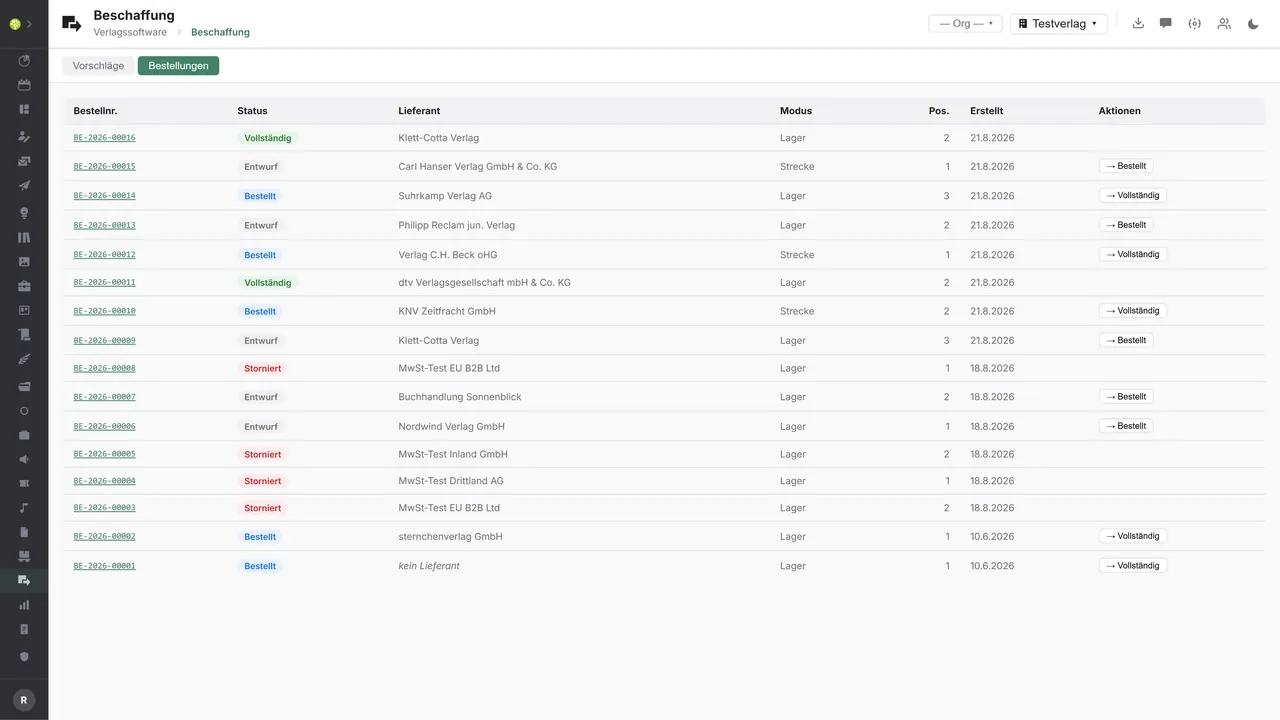

Every purchase order at a glanceOrder number, status, supplier, mode – warehouse or drop shipment –, the number of items and the date created. The next step stands as a button in the row: draft becomes ordered, ordered becomes complete.
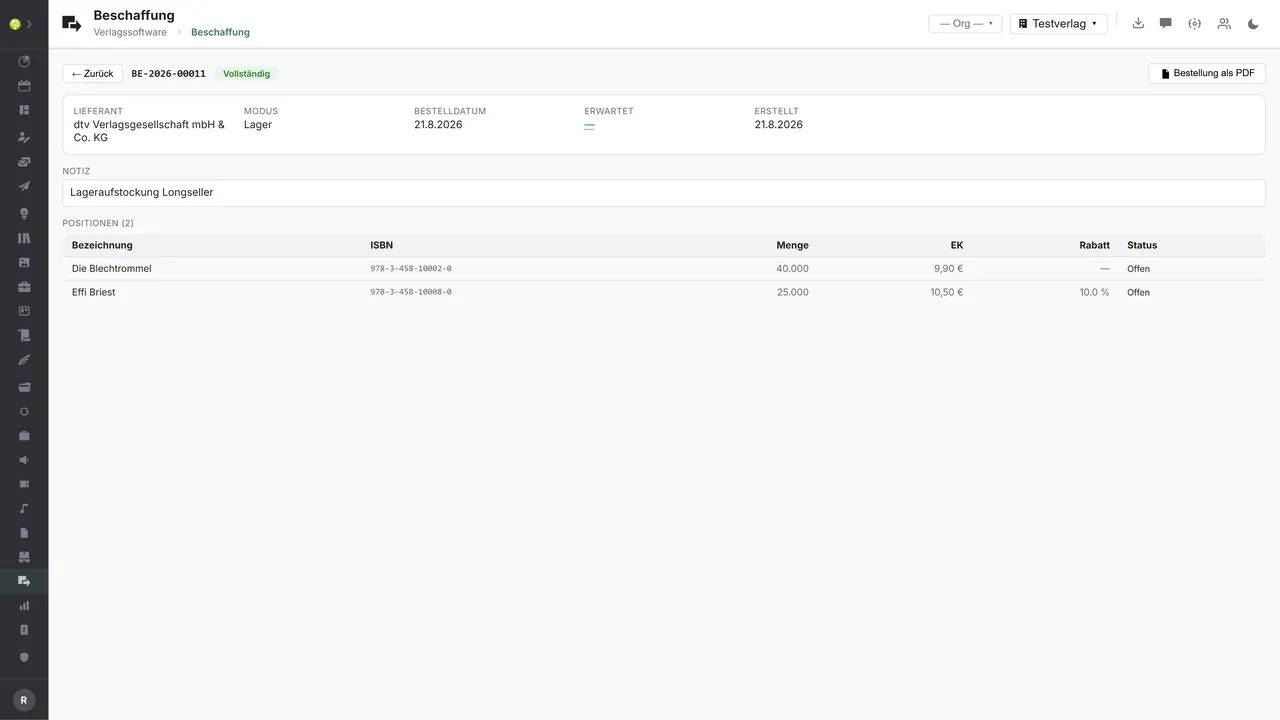
One purchase order in detailA header with supplier, mode, order and expected date, plus the note – beneath it the items with description, ISBN, quantity, purchase price, discount and line status. At the top right the purchase order as a PDF.
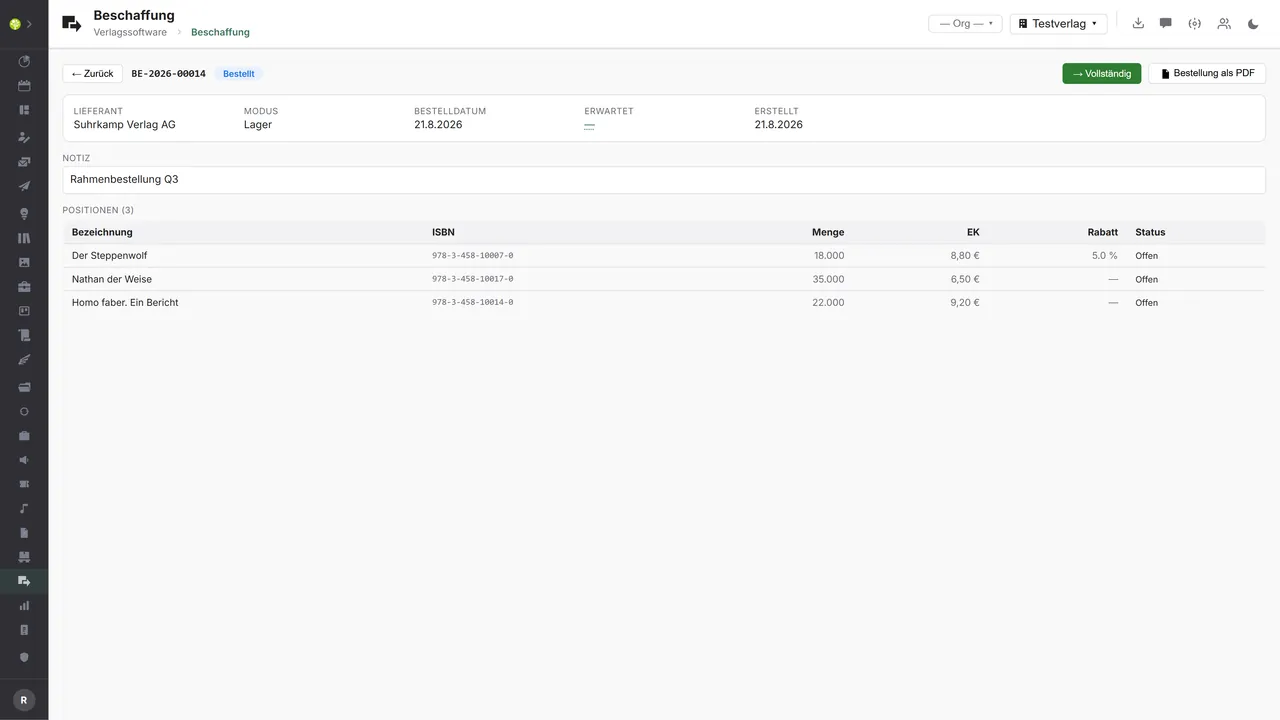
The transition stands beside itA purchase order with the status ordered: the note and the expected date can be edited right here, and the step to complete sits as a button in the header.

See open.junixx at work. We show you on screen how the software fits your publishing workflows – with no obligation, and with time for your questions.
Book a demoImport and export through the API.
No module is as close to an electronic connection as this one: the purchase order is fully structured – today it leaves the house as a PDF.

Import – from external services
Data flowing into the module from outside:
- The supplier's order confirmation and backorder report → a real order status instead of asking
- An advance shipping notice with shipment data → the goods receipt is prepared before the pallet arrives
- Availability, purchase prices and discount groups from the supplier's catalog → order proposals you can rely on
- The supplier's invoice as an e-invoice → purchase order, goods receipt and invoice can be reconciled

Export – to external services
Data the module passes outward:
- The purchase order as a PDF to the supplier → today the way out, in German or English
- ISBN, quantity, terms and delivery address to a wholesaler or another publisher → ordering with no retyping
- A drop shipment order with the end customer's delivery address → the supplier ships directly
- The order volume per supplier → a basis for purchasing analysis and negotiations on terms
Today the purchase order goes to the supplier as a PDF generated on the server – that is the only way out. EDIFACT purchase orders to wholesalers, the return channel with an order confirmation and an advance shipping notice, a catalog or price query and the reconciliation with the supplier's invoice are not connected today. The order data is already there fully structured for it – ISBN, quantity, purchase price, discount and mode –, and additions come through the central API.
More on the interfaces
Detailed overview from the interface analysis: sources for import and possible targets for export.
Import – from external services

| Source (external) | What is imported | Use in the module |
|---|---|---|
| A wholesaler or another publisher | Order confirmation and backorders | A real order status instead of manual upkeep |
| The supplier's advance shipping notice | Shipment data and tracking | Prepare the goods receipt |
| The supplier's catalog | Availability, purchase prices, discount groups | Better order proposals and costing |
| The supplier's invoice | The supplier's e-invoice | Reconciliation of purchase order, goods receipt and invoice |
Export – to external services

| Purpose / trigger | External service (examples) | What is exported | Format / standard |
|---|---|---|---|
| The purchase order to the supplier | KNV Zeitfracht, Libri, Umbreit, other publishers | ISBN, quantity, terms, delivery address | PDF (today), EDIFACT ORDERS, VVA |
| Drop shipping | Wholesaler, another publisher | The purchase order with the customer's delivery address | EDIFACT, REST API |
| Availability and price query | VLB and MVB, wholesalers' catalogs | An ISBN query | REST, EDIFACT PRICAT |
| Purchasing analysis | Controlling, financial accounting | The order volume per supplier | CSV |
Every feature of Procurement.
You will find the complete list in our brochure
What you see above is an excerpt. Every feature of this module – and of all the others – is collected in the open.junixx brochure. We will gladly send it to you, in print or as a PDF. And if you would rather watch than read: we are happy to show you open.junixx live on screen.
Get the brochureFor publishers who also sell other people's titles.
Anyone who supplies third-party books alongside their own list – to the specialist trade, in their own shop or to order – is buying in. That is exactly what this module is for.




Connected to the publishing ecosystem
- VLB
- IDNV
- doctronic
- Amazon
- Bookwire
- Arvato / VVA
- Brocom
- Prolit
- Zeitfracht
- Magento
- WordPress /
WooCommerce - Shopify
- Shopware
- Wirth & Horn
- Diamant
- DATEV
- BMD
- Abacus
- DHL
- DPD
Get to know open.junixx.
Arrange an appointment with no obligation. We will show you how Procurement fits into your publishing routine.