

Manage subscribers without a second system.
Three kinds of subscription, one of them open-ended
Magazine, bundle and standing order – the last of these with an open term. Bundles are made up of components with a price and a discount of their own.
Supplementary billing, pro rata
If quantity is added in the middle of a period, the module bills it by the remaining days – first as a preview without saving, then bindingly with an invoice.
Batch billing in runs
One run invoices many subscriptions at once – in the background, with a result status per subscription and an error count that shows where to look.
MRR and the renewal pipeline
Active subscriptions, monthly recurring revenue, renewals in the next 30 days, trial subscriptions running out and last month's cancellations.
A subscription lives longer than an invoice.
Subscriptions are not one-off transactions: they begin, they run, they are billed for additions, renewed and canceled at some point. This module carries them the whole way and hands over for invoicing to the same place as any other case.
A subscription belongs to an invoice recipient from the CRM and to a work or title from title data; the price follows from the title, the tiered price type and the quantity, with a preview while it is still being entered. It knows three kinds (magazine, bundle and standing order), and the standing order may run with no fixed end. Several line items can be kept under the same contract number; they inherit invoice recipient, delivery address, tenant, currency and calculation mode from the first subscription and are given consecutive numbers.
Around the master data lie the everyday cases. Dispatch and method of payment have fields of their own, and there are additional contacts for the ordering party and the document recipient. A temporary delivery address applies only for a period, for the summer or a sabbatical, say. On activation the module checks the free-subscription block and asks rather than overriding it. And digital access hangs on the subscription as entitlements, with an add-on code, serial numbers, a number of accesses and a term, created from templates, with a marker showing whether they have already been sent.
Two paths lead to an invoice. The individual one is supplementary billing: if quantity is added in the middle of a period, the module bills pro rata by the remaining days, takes the tier for the new total quantity into account and shows the result as a preview first, without saving. The bundled one is the billing run, a job across many subscriptions, with a period policy for the case of closed periods and options for a monthly invoice, totaling, collecting or individual treatment, as well as invoicing directly. It runs in the background and logs for every subscription what became of it. The invoices themselves are created in Orders & invoices and carry the tenant's number ranges.
Renewal happens with an eye ahead. The follow-on subscription is created at the press of a button, a safeguard prevents a double renewal, and the dashboard shows what is coming up in the next 30 days. Cancellation is recorded with a reason, a date, the end of delivery and the cancellation channel, plus the notice period and the supply-until date; trial subscriptions convert themselves if you wish, or run out with a reason of their own. Every change of status is in the history, beside the billing history with period, amount and a reference to the order created.
And because a subscription base is above all a number, the dashboard sums it up: active subscriptions, monthly recurring revenue, renewals and trial subscriptions running out in the next 30 days, cancellations in the last. Anyone wanting to look deeper will find the revenue in Reporting.
Subscriptions in the application.

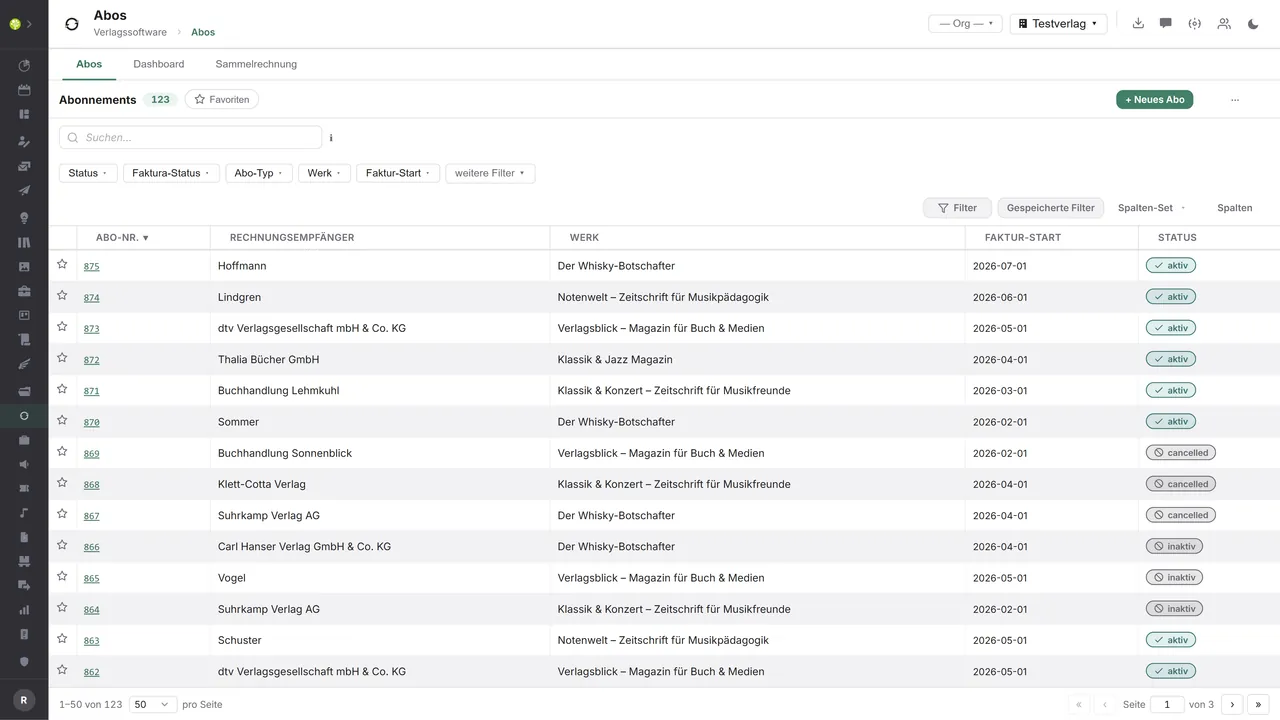

Every subscription at a glanceSubscription number, invoice recipient, work, billing start and status – with a favorite star per row, filters for status, invoicing status, subscription type and work, saved filters and selectable column sets.
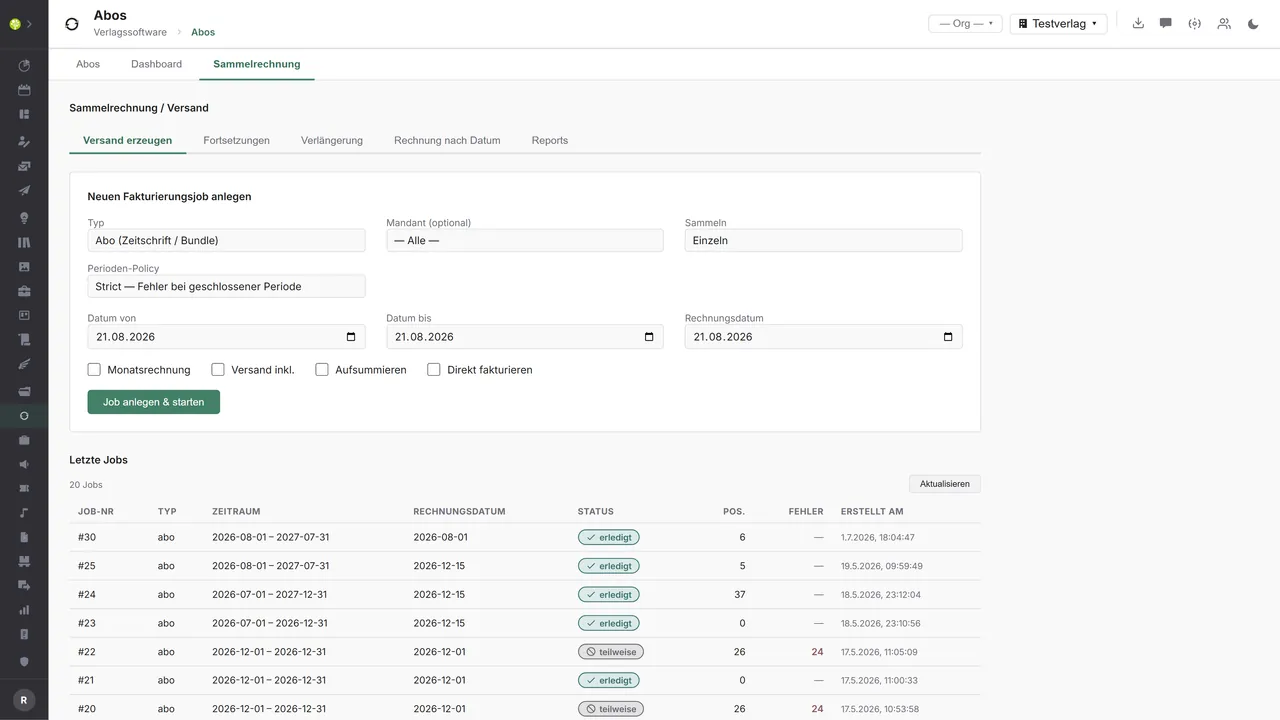
One run for many subscriptionsType, tenant, period and invoice date, plus the period policy and the switches for a monthly invoice, dispatch, totaling and invoicing directly – beneath them the latest runs with status, the number of line items and errors.
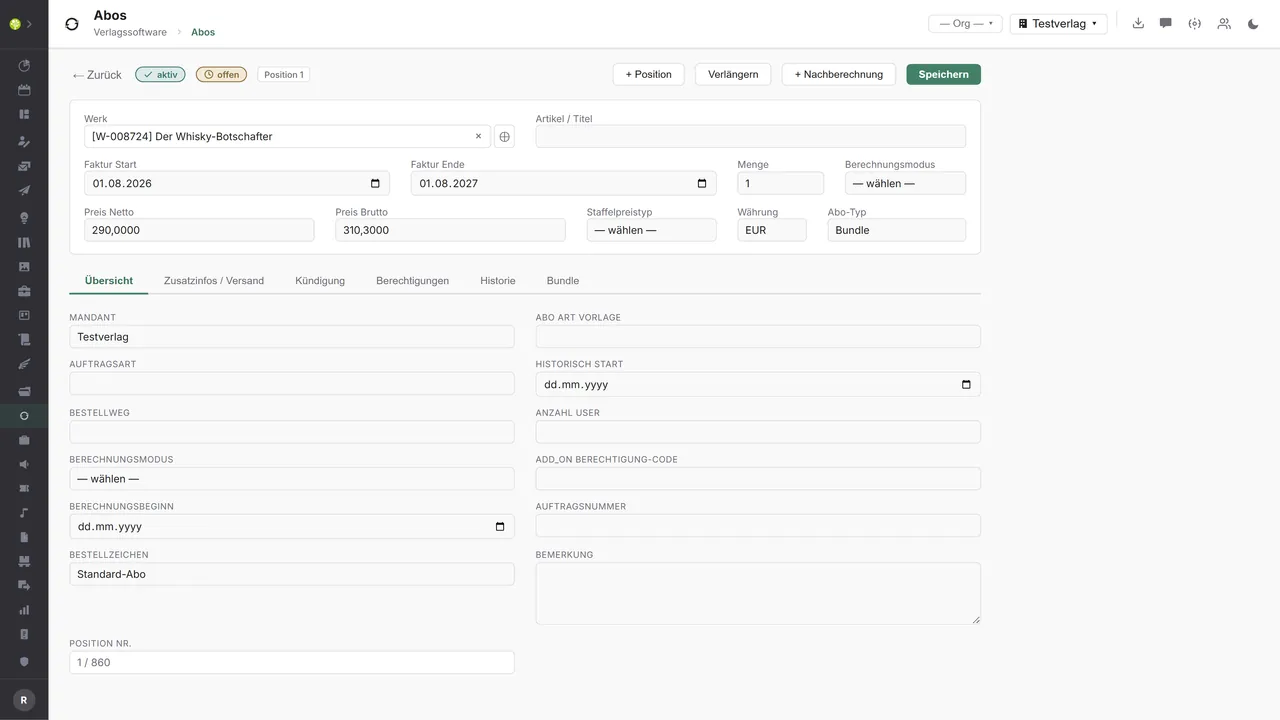
One subscription in detailWork, invoicing period, quantity, prices, currency and subscription type in the header; beneath them the tabs for additional information and dispatch, cancellation, entitlements, history and bundle. Renew and bill for additions sit beside them as actions.

See open.junixx at work. We show you on screen how the software fits your publishing workflows – with no obligation, and with time for your questions.
Book a demoImport and export through the API.
Subscriptions live on recurring payment and regular delivery. That is exactly where the leverage lies on the outside – in collection and in delivery.

Import – from external services
Data flowing into the module from outside:
- Incoming payments, direct debit returns and the dunning status from the bank or the payment service provider → the invoicing status is right by itself
- A payment provider's subscription events such as paid, failed, canceled → the subscription status follows the payment
- Delivery and return reports from the distribution service provider → wrong addresses show up before the customer calls
- New subscriptions and changes of address from the web shop or the customer account → created with no data entry

Export – to external services
Data the module passes outward:
- Amount, cycle and mandate to the bank or a payment service provider → recurring collection with no manual work
- Delivery addresses, print run and cycle to press wholesalers, a lettershop or the postal service → the issues go to the right address
- The access code and serial number per entitlement to the content platform → digital access delivers itself
- The invoices created, through invoicing to accounting → one path for subscription revenue and all the rest
Facing outward, everything runs today through invoicing: supplementary billing and billing runs create invoices in the orders module, and from there an e-invoice to ZUGFeRD and XRechnung as well as the DATEV batch are available platform-wide. The subscriptions module itself has no import and no export of its own; payment type and method of payment are free-text fields, and the entitlements carry their delivery channel but as yet no connection to a platform. Recurring collection through SEPA or a payment service provider, the return path of the payment events and the delivery list to distribution can be added through the central API.
More on the interfaces
Detailed overview from the interface analysis: sources for import and possible targets for export.
Import – from external services

| Source (external) | What is imported | Use in the module |
|---|---|---|
| Bank or payment service provider | Incoming payments, direct debit returns, dunning status | Invoicing status paid or open, control of the cancellation |
| Payment provider | Subscription events paid, failed, canceled | The subscription status follows the payment |
| Distribution service provider | Delivery and return reports | Delivery quality and complaints |
| Web shop or customer account | New subscriptions and changes of address | Creation with no data entry |
Export – to external services

| Purpose / trigger | External service (examples) | What is exported | Format / standard |
|---|---|---|---|
| Recurring collection | The bank's SEPA direct debit, Stripe, Mollie, GoCardless, PayPal | Amount, cycle, mandate and customer | SEPA pain.008, provider API |
| Delivery of the issues | Press wholesalers, lettershop, postal service | Delivery addresses, print run, cycle | CSV, REST API |
| Digital license delivery | Content platform, app | Access code and serial number per entitlement | REST API, e-mail |
| Accounting through invoicing | DATEV | The invoices and postings created | DATEV EXTF |
Every feature of Subscriptions.
You will find the complete list in our brochure
What you see above is an excerpt. Every feature of this module – and of all the others – is collected in the open.junixx brochure. We will gladly send it to you, in print or as a PDF. And if you would rather watch than read: we are happy to show you open.junixx live on screen.
Get the brochureFor publishers with continuing orders.
Magazines, loose-leaf works, standing orders, digital access – anywhere the customer does not buy once but stays on.




Connected to the publishing ecosystem
- VLB
- IDNV
- doctronic
- Amazon
- Bookwire
- Arvato / VVA
- Brocom
- Prolit
- Zeitfracht
- Magento
- WordPress /
WooCommerce - Shopify
- Shopware
- Wirth & Horn
- Diamant
- DATEV
- BMD
- Abacus
- DHL
- DPD
Get to know open.junixx.
Arrange an appointment with no obligation. We will show you how Subscriptions fit into your publishing routine.