

From the document to the posting.
The e-invoice is recognized on upload
The module reads ZUGFeRD, XRechnung and Factur-X itself, validates them and takes the fields into the document – with a warning if the gross amount differs.
The AI reads the document
Invoice number, date, due date, amounts and invoice issuer out of a PDF or an image – the extraction chooses between structured data and AI on its own.
Assign accounts, check, lock
Posting lines with a debit and a credit account, a tax key and a cost center. A document only jumps to “checked” once the mandatory fields are in place and the posting balances.
The DATEV batch at the press of a button
An export batch per period, created asynchronously and ready to download as EXTF CSV – beside it templates for BMD, Sage, Lexware and Diamant.
One document, and the posting is there.
A supplier's invoice comes in as a PDF, as XML or as a photo, and goes out as a posting. The module carries it from the upload through account assignment and checking into the DATEV batch, separately per tenant.
On upload, the module looks for itself. If there is an e-invoice inside the PDF, it reads the data, validates it and shows it in a card of its own. Taking it into the document is one click, and if the gross differs from the amount recorded, it says so. For documents with no structure the AI takes over and reads the number, date, due date, amounts and invoice issuer out of a PDF or an image. Every file is given a checksum: the same document uploaded twice is rejected, with a reference to the number that already exists.
The document carries a type, a number, the document, receipt and due dates, amounts, currency and payment terms; the in-house number is assigned by the module consecutively per tenant and year. The status goes from draft through “under review” to checked and exported. Whatever is exported or canceled stays locked, and every change is in the log with the field, the user and the IP address.
The suppliers sit beside it as creditors, with an address, a VAT ID, a creditor number and bank details, along with a default account assignment that is suggested straight away for the next document. Alternative spellings stand as aliases, searching runs across name, alias, number, VAT ID or IBAN, and a new creditor is created by a contact from the CRM.
Account assignment happens in posting lines: a debit and a credit account, a tax key and a rate, net, gross and tax, a posting text, plus project, title, cost center, cost unit and cost type. The control total shows the remaining amount, and “as last time” takes over the account assignment of the previous document. Printing and typesetting costs can be split directly across the projects and print runs of Production, with a check against the remaining headroom or, with a reason, without being counted into the unit cost.
At the end stands the DATEV batch: name, financial year, period, adviser and client number; it is created through a queue and lies ready as EXTF CSV. Documents with a contract reference appear in Contracts & royalties in the postings tab, named as an advance payment, a license, a KSK levy or a tax deduction. And what comes in here leaves the house in Orders & invoices as an outgoing invoice, with the same e-invoicing technology, only in the other direction.
Which AI model does the work here is your decision: your own provider, your own key – or, if you prefer, a model on your own premises, in which case your texts never leave your network.One connection, three ways
Incoming invoices in the application.

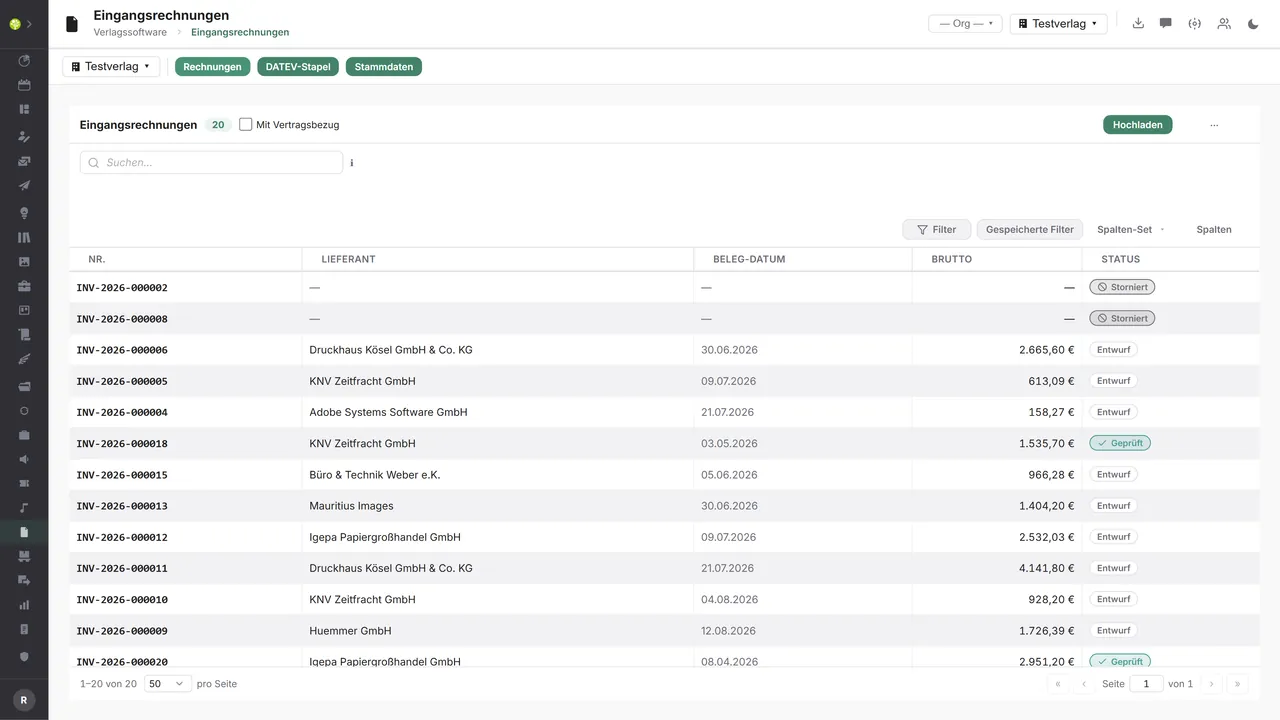

Every document per tenantNumber, supplier, document date, gross and status – filterable by status, supplier, period and contract reference, plus a free-text search and the upload right beside it.
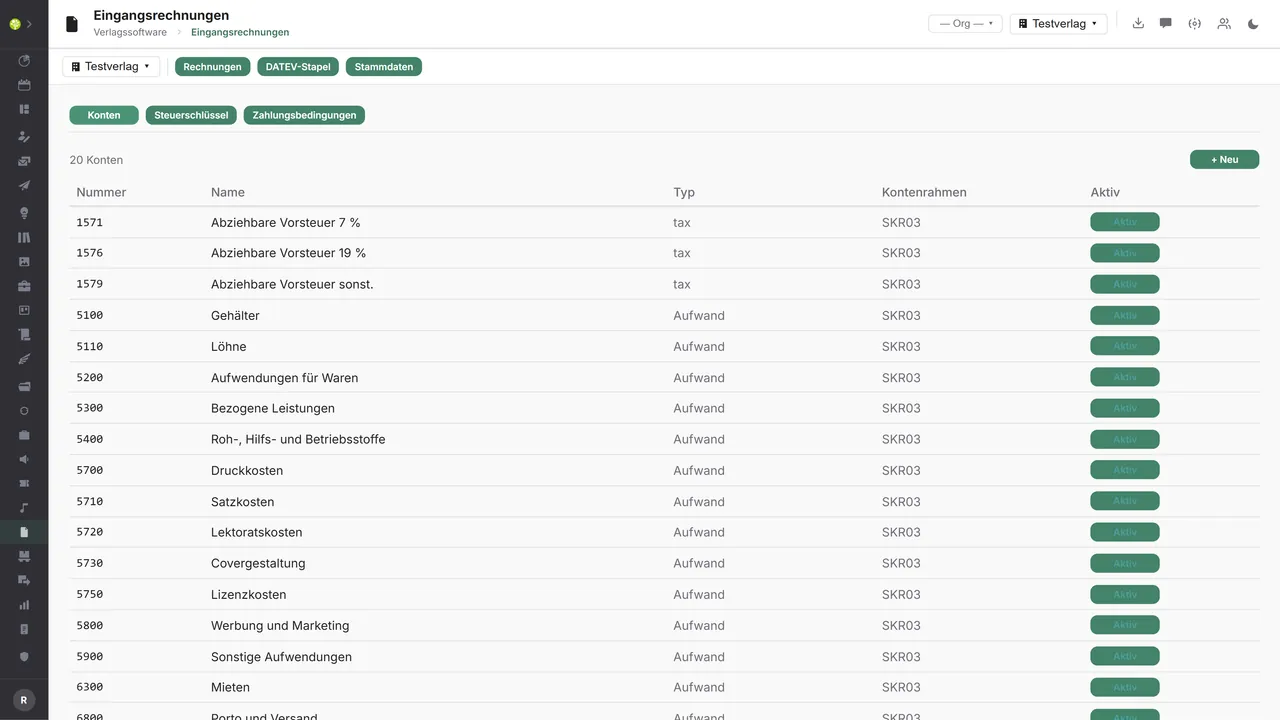
The tenant's general ledger accountsNumber, name, type and chart of accounts – here SKR03 with input tax, printing, typesetting, editorial and license accounts, each one separately activatable.
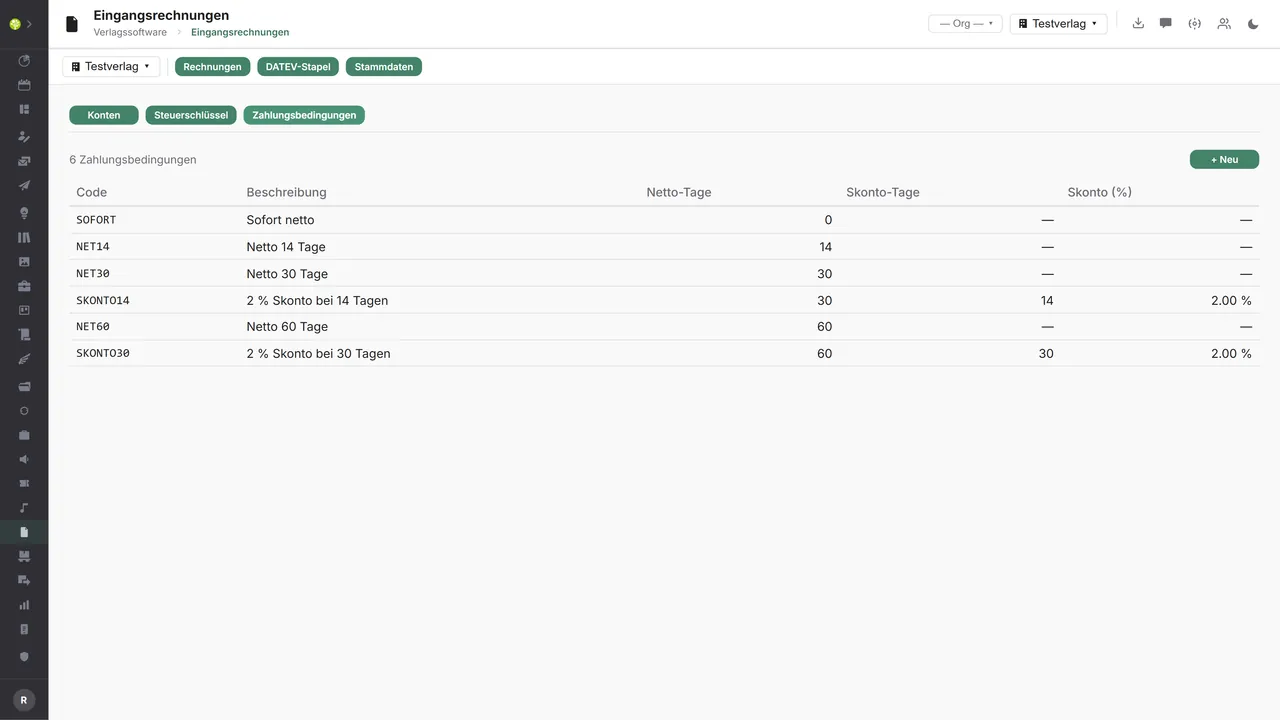
Payment terms with an early payment discountCode, description, net days, discount days and discount percent – as a default at the supplier and at the individual document.

See open.junixx at work. We show you on screen how the software fits your publishing workflows – with no obligation, and with time for your questions.
Book a demoImport and export through the API.
The path from the invoice to the posting is already well connected on the outside: the e-invoice comes in, DATEV goes out. What remains open is payment transactions.

Import – from external services
Data flowing into the module from outside:
- Structured invoice data from ZUGFeRD, XRechnung and Factur-X → recording with no typing
- CII XML and a validation report from the validation services → reliable extraction and checking
- Fields read out by the AI from a PDF or an image → unstructured documents with no data entry either
- Incoming invoices through a Peppol access point → invoices arriving with no detour by mail

Export – to external services
Data the module passes outward:
- The posting batch, creditors and splits to DATEV – and to BMD, Sage, Lexware or Diamant
- Transfers for invoices due to the bank
- The document PDF with its metadata into an audit-proof archive
- Documents and account assignment as a package to the external tax adviser
Today the module is already wired up on the outside: ZUGFeRD, XRechnung and Factur-X are read through the Mustang service and validated through the KoSIT validator, field extraction runs through Anthropic Claude, and the posting batch goes out as DATEV EXTF – beside it stand templates for BMD, Sage, Lexware and Diamant. Payment transactions through SEPA and FinTS, the Peppol inbound path and an archive connection can be added through the central API.
More on the interfaces
Detailed overview from the interface analysis: sources for import and possible targets for export.
Import – from external services

| Source (external) | What is imported | Use in the module |
|---|---|---|
| E-invoice (ZUGFeRD, XRechnung, Factur-X) | Structured invoice data | Automatic recording and a posting proposal |
| Mustang and KoSIT service | CII XML out of the PDF, a validation report | Reliable extraction and checking |
| Anthropic Claude | Fields read out by the AI from a PDF or an image | Recording of unstructured documents |
| The Peppol network | Incoming e-invoices through an access point | Invoices arriving directly |
| Bank (account transactions) | Payment status and reconciliation | Open items, a payment recognized |
Export – to external services

| Purpose / trigger | External service (examples) | What is exported | Format / standard |
|---|---|---|---|
| The posting to financial accounting | DATEV, BMD, Sage, Lexware, Diamant | Posting batch, creditors, splits | DATEV EXTF, preset CSV |
| Payment order | The bank through SEPA, FinTS or EBICS | Transfers for invoices due | pain.001, FinTS |
| Document archive | DMS and GoBD archive | The document PDF with metadata | PDF/A, API |
| Checking and approval | External tax adviser | Documents including the account assignment | ZIP, CSV, PDF |
Every feature of Incoming invoices.
You will find the complete list in our brochure
What you see above is an excerpt. Every feature of this module – and of all the others – is collected in the open.junixx brochure. We will gladly send it to you, in print or as a PDF. And if you would rather watch than read: we are happy to show you open.junixx live on screen.
Get the brochureInvoices come in at every publisher.
Printers, paper, editorial work, licenses, royalties, service providers – only the cost types differ; the path to the posting is the same.






Connected to the publishing ecosystem
- VLB
- IDNV
- doctronic
- Amazon
- Bookwire
- Arvato / VVA
- Brocom
- Prolit
- Zeitfracht
- Magento
- WordPress /
WooCommerce - Shopify
- Shopware
- Wirth & Horn
- Diamant
- DATEV
- BMD
- Abacus
- DHL
- DPD
Get to know open.junixx.
Arrange an appointment with no obligation. We will show you how Incoming invoices fit into your publishing routine.