

Maintain once, use everywhere.
One level above the titles
Every work carries a work number from the number range and gathers original data, contributors, texts and assessments – from it come one or many editions in title data.
Inherit contributors instead of retyping them
A new title beneath the work takes on its contributors automatically – with role, name forms, ISNI, ORCID and GND. At the title they stay freely editable afterwards.
One text, every edition
Description, short text, blurb and author biography are maintained at the work and passed to every title belonging to it – mapped to the ONIX text types.
Sheet music and rights in one place
The catalog-of-works entry and the instrumentation apply to every edition without an override of its own; the participants carry an IPI number, a share and a rights category for reporting to the collecting society.
One work, many editions.
A work describes the substance from which one or more editions come: a novel as hardcover, paperback and e-book, a symphony as a score, a set of parts and a study score. On saving, the work draws its number from the number range; the titles from title data hang beneath it.
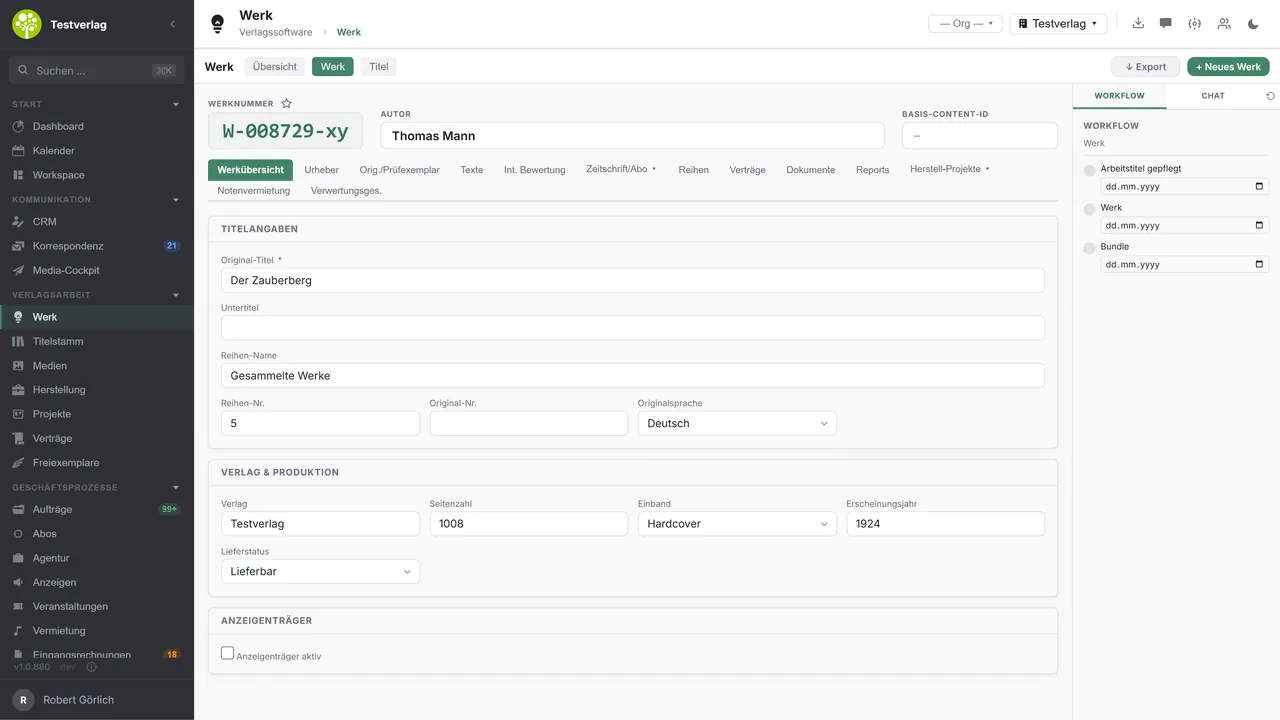
The work list carries work number, work title, author, original title, year of publication, hire, rights category and performance duration. Searching runs across title, author and work number, filtering by genre, editor, tenant and date created, with favorites and an export besides. The work header carries work number, author and base content ID; the tabs beneath it range from the work overview through contributors, original and inspection copy data, texts, internal assessment and AI review to magazine/subscription, series, contracts, documents, production projects, sheet music rental and collecting societies. A panel of its own, “Titles”, lists the linked editions and creates new ones directly beneath the work.
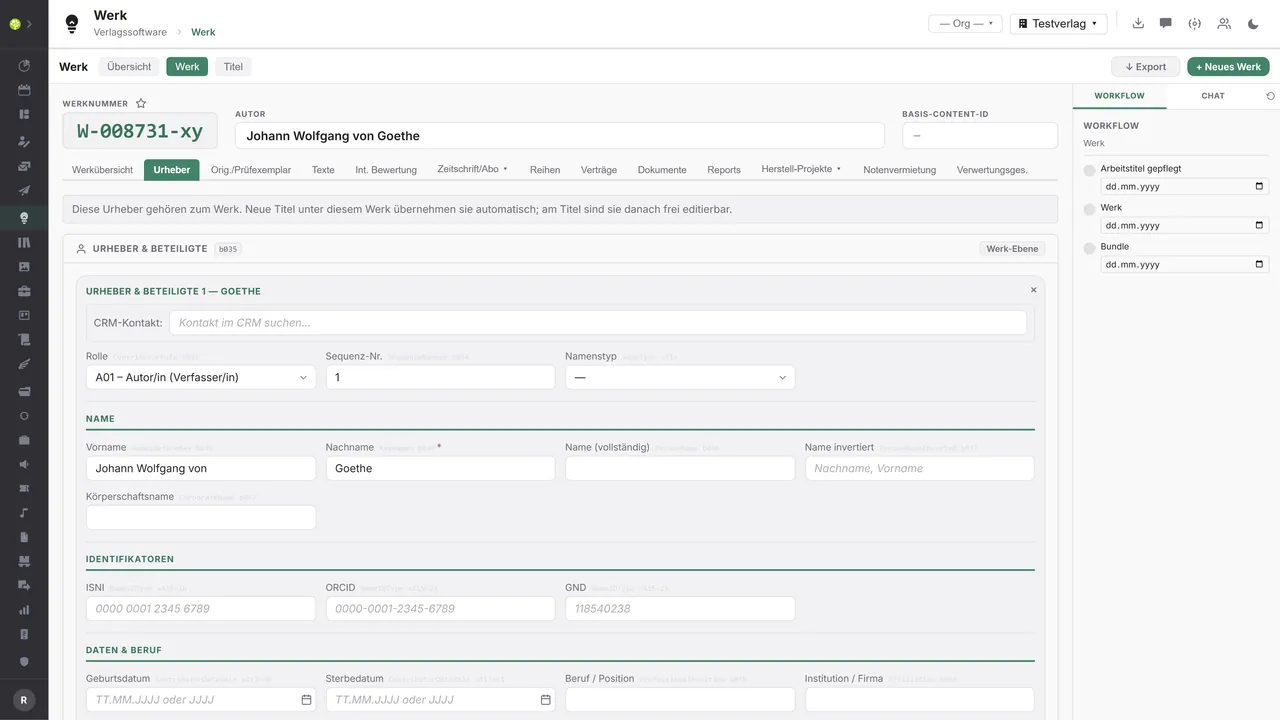
The contributors belong to the work, not to the individual edition, with a role from the ONIX code list, first name, last name and inverted name form, corporate name, the identifiers ISNI, ORCID and GND as well as dates and profession. Whoever creates a title beneath the work has them in the title straight away and can change them there without changing the work. The contact comes from the CRM.
For licensing and translation work, the original/inspection copy tab records where a work comes from, with the original title and original publisher, the type of manuscript and the way it arrived, genre, editor, the start and end of the review period, the date the manuscript was sent, return postage, original EAN, publication date, year and place, original series and web address, plus the descriptive texts, in HTML too and with a character count.
The work texts can be created from a template and passed to every title of the work; the mapping to the ONIX text types for description, short text and blurb sits behind it. The internal assessment stays internal, with an assessment text and a grade from 1 to 6, along with the original title and the author or pseudonym. Each person edits only their own. Anyone who wants a submitted manuscript pre-screened automatically will find the Manuscript review in the “AI review” tab: a recommendation, the fit with your own publishing profiles and editorial notes, from which the grade and the assessment text can be pre-filled.
If a work is an advertising vehicle, the magazine section is added, with an advertising type from the magazine through to the festival catalog, publication frequency, advertising deadline lead time, a standard print run and extent, a maximum share of advertising and a work discount with a reason. Then the issue list with bulk planning, bundles through an assistant (volume year, half-year, quarter, themed run) and a price list with overrides per issue. Activation creates the matching advertising object in Advertising.
With sheet music, the work carries the catalog-of-works entry, the structured instrumentation and the rental settings, that is hire active, rights category and tariff code. The catalog entry and the instrumentation apply to every edition without an override of its own; the free-text instrumentation is generated by rule in German and English. For the collecting societies, the work carries its participants with a role (composer, lyricist, arranger, publisher, sub-publisher) along with IPI number, share and rights category.
And the work gathers what otherwise lies scattered across the individual editions, among it contracts with contract type, status, partner and term from Contracts & royalties, series with ISSN and volume number, linked projects from Production and the files from Media. From every row you go straight into the case.
Unpublished manuscripts are the most sensitive asset in the house. Wherever open.junixx uses AI, you decide on the provider – with a model on your own premises if you wish, and then no text leaves your network.One connection, three ways
The work in the application.

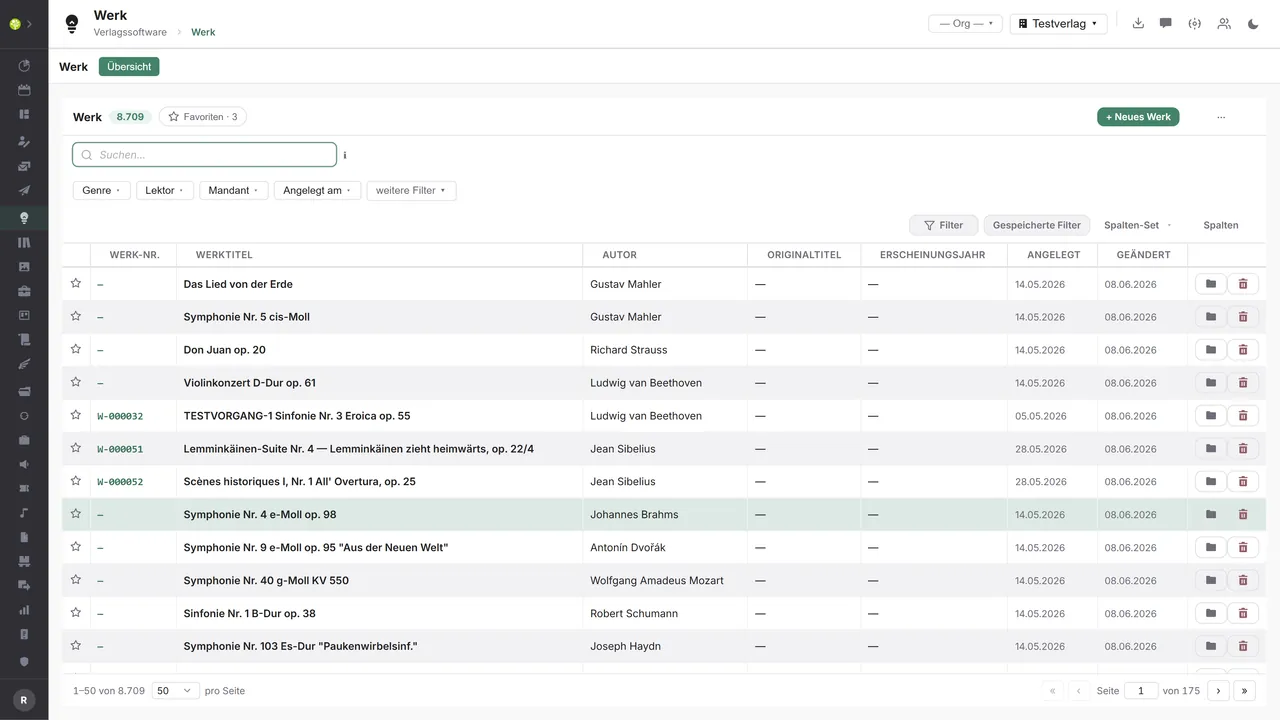

Every work in one listWork number, work title, author, original title and year of publication – searched across title, author and work number, filtered by genre, editor, tenant and date created.
The work header and its tabsAt the top the work number, author and base content ID, beneath them the tabs from the work overview through to the collecting societies. The title details carry the original title, series and original language, below them publisher and production – on the right the work's workflow.
Contributors at the work, not at the titleA role from the ONIX code list, every name form, the identifiers ISNI, ORCID and GND, plus dates and profession. The note at the top says what follows from it: new titles beneath this work take on the contributors automatically.

See open.junixx at work. We show you on screen how the software fits your publishing workflows – with no obligation, and with time for your questions.
Book a demoImport and export through the API.
At work level it is about rights, contributors and the identity of the work – and so the work hangs on collecting societies, authority databases and the network for performance material.

Import – from external services
Data flowing into the module from outside:
- Composer and work authority data from Wikidata and Open Opus → enrich the catalog of works
- Person identifiers from GND, VIAF, ISNI and ORCID → unambiguous, standardized contributors
- IPI and IPN numbers of the participants from the CISAC database → correct reporting of shares
- Confirmed work numbers and status from the collecting society → confirm the registration

Export – to external services
Data the module passes outward:
- Work registration with GEMA, VG Musikedition and international societies – work, participants with IPI, shares, ISWC
- Work and catalog data to the Zinfonia hire network
- Work and person authority data to GND, MusicBrainz, IMSLP and RISM
- Work and rights details to sub-publishers and original publishers for clearing a subhire
The online lookup at Open Opus and Wikidata, the external identifiers at the work (ISWC, ISRC, ISMN, MusicBrainz MBID, Wikidata QID, GND, IPI), the Zinfonia outbound queue and work registration as CWR and IWA XML belong to the module. Further societies and authority data services can be added through the central API.
More on the interfaces
Detailed overview from the interface analysis: sources for import and possible targets for export.
Import – from external services

| Source (external) | What is imported | Use in the module |
|---|---|---|
| Wikidata, Open Opus | Composer and work authority data (QID, MBID, Open Opus ID) | Enrich the catalog of works |
| GND, VIAF, ISNI, ORCID | Person identifiers | Unambiguous contributors, standardization |
| CISAC and IPI database | IPI and IPN numbers of the participants | Correct reporting of shares to the collecting society |
| Collecting societies (GEMA, VG Musikedition) | Confirmed work numbers and status | Confirm the registration with the collecting society |
| RISM, IMSLP, MusicBrainz | Work and source details, recordings | Musicological depth |
Export – to external services

| Purpose / trigger | External service (examples) | What is exported | Format / standard |
|---|---|---|---|
| Work registration | GEMA, VG Musikedition, GVL; SUISA, AKM, ASCAP/BMI | Work, participants with IPI, shares, ISWC | CWR, IWA XML, collecting society portal |
| Sheet music hire network | Zinfonia | Work and catalog data | Zinfonia API (outbox) |
| Authority data contribution | GND (DNB), MusicBrainz, IMSLP, RISM | Work and person authority data | OAI, API |
| Rights and licensing partners | Sub-publishers and original publishers (subhire) | Work and rights details | Structured export |
| Data export | Analysis, data exchange | Works with their sub-tables | Export dialog, CSV |
Every feature of the Work module.
You will find the complete list in our brochure
What you see above is an excerpt. Every feature of this module – and of all the others – is collected in the open.junixx brochure. We will gladly send it to you, in print or as a PDF. And if you would rather watch than read: we are happy to show you open.junixx live on screen.
Get the brochureParticularly strong for these kinds of publishers.
Anywhere a piece of content appears in several editions – as hardcover and paperback, as a magazine's run of issues, or as a score, a set of parts and a study score.



Connected to the publishing ecosystem
- VLB
- IDNV
- doctronic
- Amazon
- Bookwire
- Arvato / VVA
- Brocom
- Prolit
- Zeitfracht
- Magento
- WordPress /
WooCommerce - Shopify
- Shopware
- Wirth & Horn
- Diamant
- DATEV
- BMD
- Abacus
- DHL
- DPD
Get to know open.junixx.
Arrange an appointment with no obligation. We will show you how the Work module fits into your publishing routine.