

A home for every image.
AI tagging & alt texts
After upload, the AI assigns keywords and writes alt texts in several languages – both can be overwritten. And searching works by meaning: “orchestral string quartet” finds images whose file names say nothing of the sort.
Linked to titles
Every asset can be assigned to titles, contacts and works, and opened from the title or the contact. The “Usage” tab shows the reverse – where an asset is in use, before anyone deletes it.
Rights & licenses with expiry dates
The image itself holds the agency, photographer, image ID, price, print-run limits and deadlines. Before expiry, the expiring rights list speaks up with a warning, the number of days and a jump to the asset – acknowledge or mark as done.
Versioning with restore
Resized, watermarked, re-uploaded – every change raises the version. The history records date, editor and note; an earlier version can be restored, and the current state is saved first.
An asset is more than a file.
A cover is not just a JPEG. It has a photographer, an agency, a price, a license period and, eventually, an expiry date. It exists in five sizes for five channels, it appears in three titles and in a social media post, and somebody cropped it last year. If those details are not attached to the file, they sit in a spreadsheet beside it – and after six months that spreadsheet is wrong.
The media library holds both together: the file and everything known about it. It manages images, documents, PDFs, archives, e-book files, audio and video, detecting the format itself along with the matching ONIX code. The collection can be opened as a whole or filtered to a single title or contact. A title's media are the same media – just seen from the perspective of title data.
The overview is a list like the others in the system, with full-text search, filters for content type, format, status, title reference and date created, saved filters, selectable column sets and a favorite star on every row. Upload sits directly above it: choose the file, set content type, format and status, then save. Above that runs the AI bar with two fields, tag search on the left, search by meaning on the right. Alongside the overview, the expiring rights list is the second view.
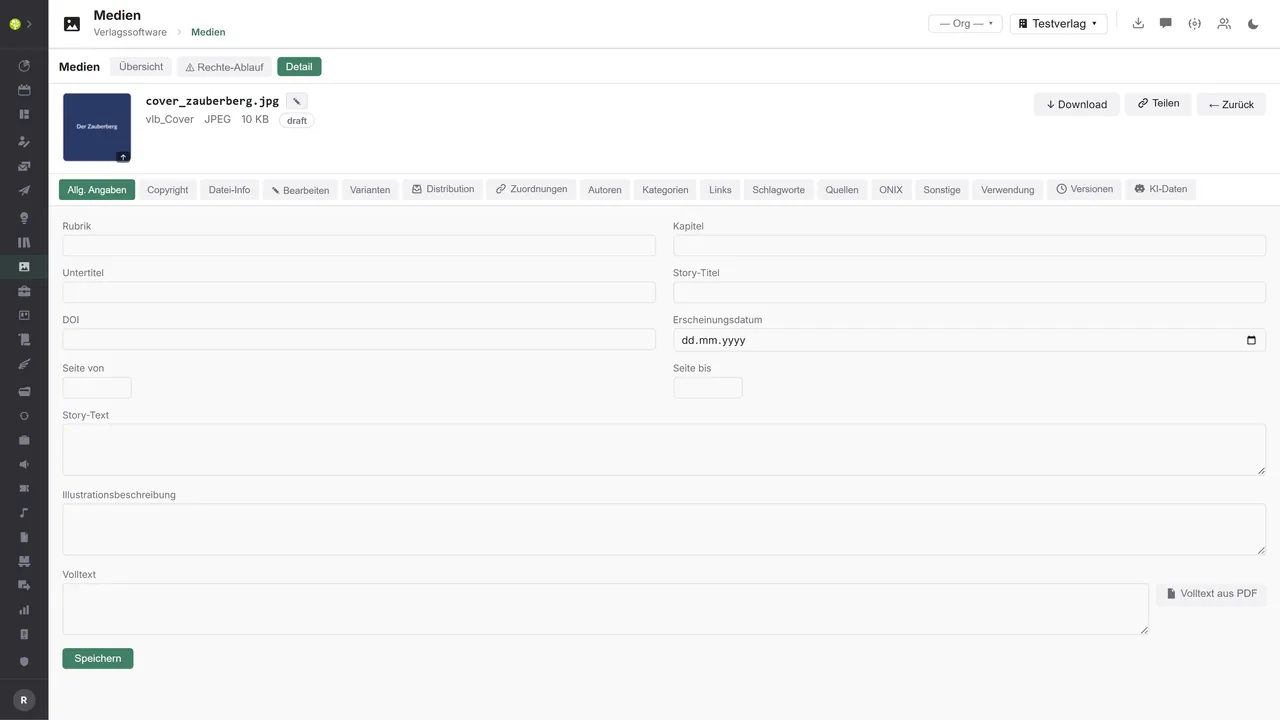
A single asset opens into tabs, and the row of them is long: general details, copyright, file info, edit, variants, distribution, assignments, contributors, categories, links, keywords, sources, ONIX, other, usage, versions, AI data. At the top sit the preview, file name, format, size and status (draft, review, approved, archived), plus download and share.
File info is not a display but a form, holding IPTC Core, XMP, EXIF including GPS and the PDF metadata, editable field by field, with headline, alt text, keywords, credit, creator and rights. For PDFs, the full text can be pulled out of the file. The editorial side beside it is cut to the trade, with contributors by role and share, categories to VLB, Thema, BISAC, genre and product group, keywords, sources, DOI, related products, e-content with format and DRM, production details, and an ONIX tab of its own with resource type, audience, mode and the flag for the ONIX export.
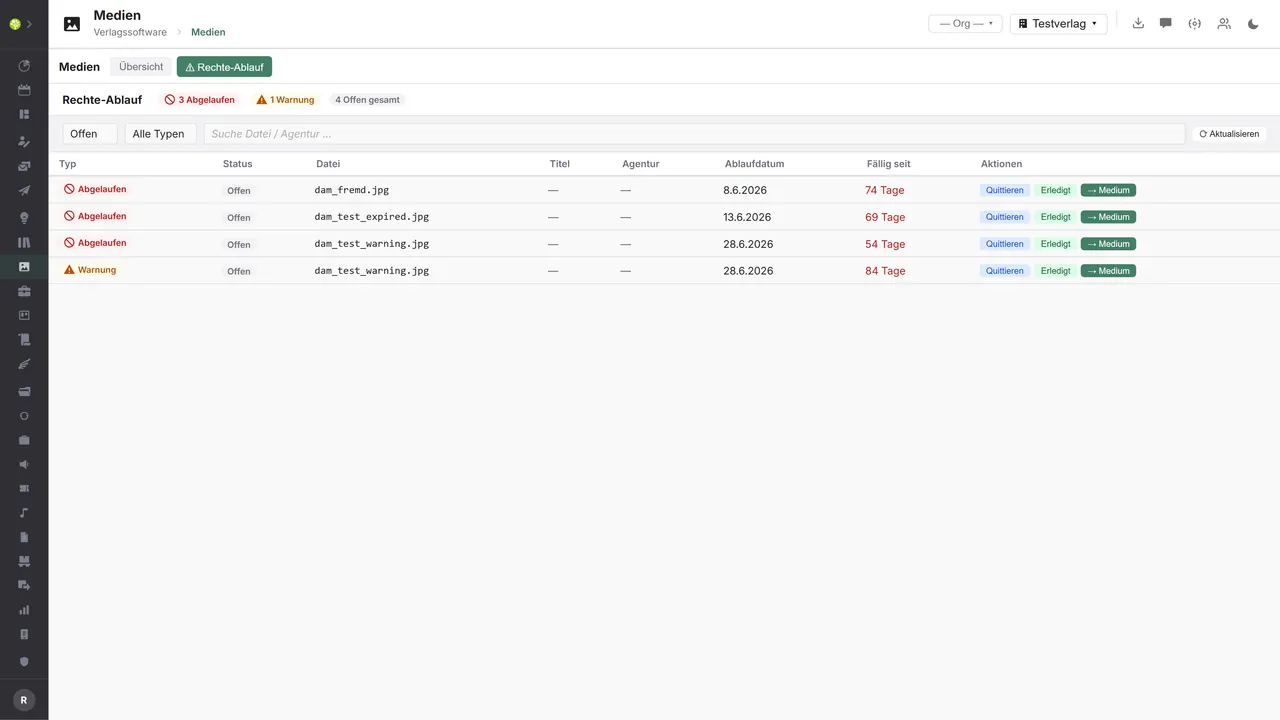
Copyright is the tab with money attached: license obligation, image ID at the agency and in-house, copyright notice, picture agency, photographer and designer as contacts from the CRM, web link to the agency, net price, country and place, and print-run limits from and to, plus four dates: ordered, expiry, advance warning, invoice. From the expiry and warning dates comes the expiring rights list, holding expired entries and warnings, each row with file, agency, expiry date and the days since it fell due, with status open, acknowledged or done, and a jump to the asset. The totals sit at the top: three expired, one warning, four open.
Editing happens inside the system, not beside it. Images can be resized while keeping their aspect ratio, converted to JPEG, WebP or PNG at a chosen quality, and given a watermark with text, position and opacity. PDFs can have a page range extracted, a watermark applied and be compressed. Every change is applied to the original and raises the version; the history keeps each version ready to download and to restore. Alongside that sit the variants: presets per tenant with maximum width and height, target format and quality, generated at upload if you wish. Web, catalog and social media each get their format without anyone cropping by hand.
Where an asset goes is governed by distribution. Selected assets can be downloaded as a ZIP, as originals or as a variant, with unique file names and as a background job if needed. Public share links can be created per asset with an expiry date, a download limit, a password and a note, and can be revoked at any time. And distribution profiles push a file out over SFTP, FTP, FTPS, S3 or HTTP, triggered by hand or automatically as soon as an asset is approved, with templates and a job history.
What makes deleting safe is the usage tab. For any asset it shows the direct title reference, the linked titles, CRM contacts, contracts, production, works and social media posts from the Media Cockpit. Anyone trying to delete an asset still in use is shown how many uses there are – and can still confirm the deletion.
The media library in the application.

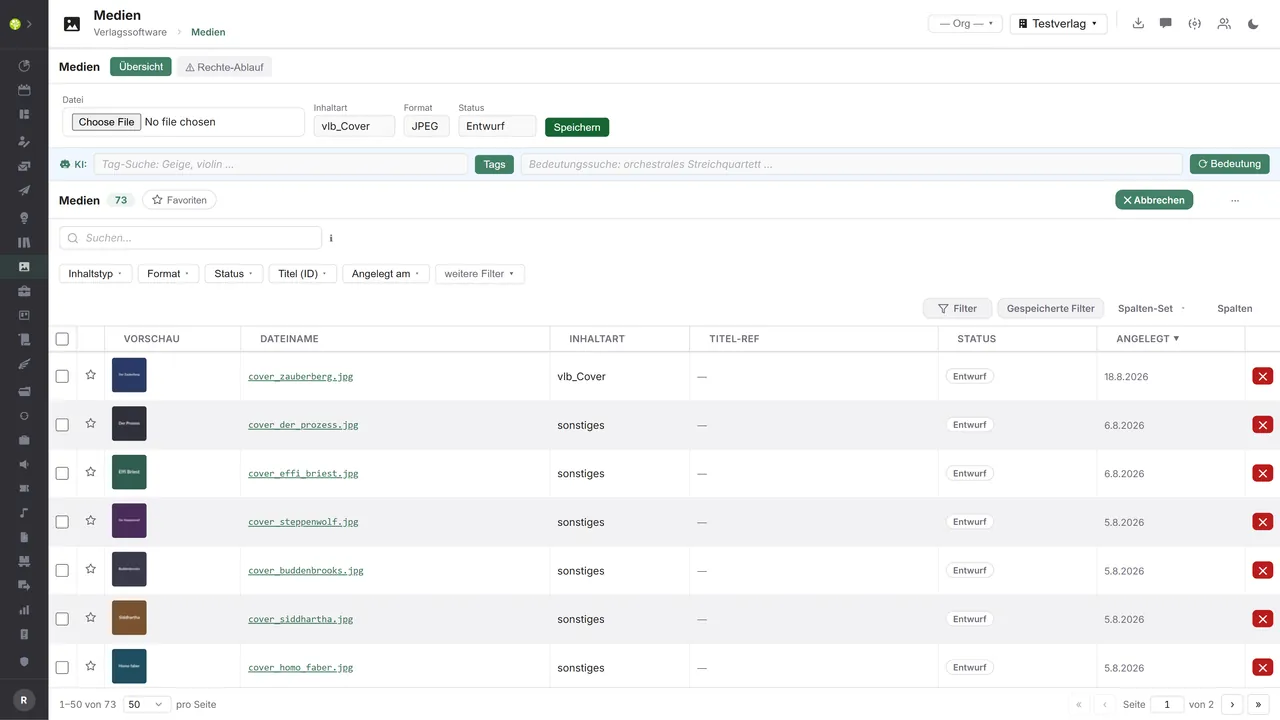

Uploading without detoursThe upload bar unfolds above the list: choose the file, set content type, format and status, save. Below it the overview with preview, file name, content type, title reference, status and date created.
Everything about one assetPreview, file name, format, size and status in the header, and below them the tabs: copyright, file info, edit, variants, distribution, assignments, contributors, categories, ONIX, usage, versions, AI data.
Deadlines before they get expensiveExpired rights and warnings with file, agency, expiry date and days since due – plus the actions acknowledge, done, and the direct jump to the asset.

See open.junixx at work. We show you on screen how the software fits your publishing workflows – with no obligation, and with time for your questions.
Book a demoImport and export through the API.
No other module already delivers as much outward: share links, ZIP packages and distribution profiles over SFTP, S3 and HTTP. The way in – license data from the picture agencies – is next.

Import – from external services
Data flowing into the module from outside:
- Keywords, alt texts and embeddings from the AI services → tagging, accessibility and search by meaning
- Image with license data from picture agencies and stock services → the copyright tab and the deadlines fill themselves on purchase
- IPTC, XMP and EXIF from the uploaded file → file info pre-filled instead of typed out
- Match reports from image rights monitoring → unlicensed third-party use becomes visible on the asset

Export – to external services
Data the module passes outward:
- File and variant over SFTP, FTP, FTPS, S3 or HTTP → triggered by hand or automatically on approval
- Share link with password, expiry and download limit → press and partners get exactly one file, and not for ever
- Cover and interior as an ONIX media resource to the trade and VLB → the flag for it sits on the asset
- Variants, alt text and credit to website, shop or CDN → one image, every channel in its own size
In place and in use: distribution profiles with the transport routes SFTP, FTP, FTPS, S3 and HTTP, triggered by hand or on approval, plus templates and a job history; the ZIP export of whole selections with a choice of variant, synchronous or as a background job; share links with password, expiry, download limit, revocation and a counter; the generic export to CSV, JSON, XML, XLSX and PDF; and the AI services for tags, alt texts and embeddings through the internal gateway. What is missing sits on the purchasing side: the fields for IPTC, XMP and EXIF exist but are not read automatically from the file; and there is no connection to picture agencies from which image ID, photographer, price and license period including expiry would be taken over. Those two routes are exactly what would turn the expiring rights list into real license protection.
More on the interfaces
Detailed overview from the interface analysis: sources for import and possible targets for export.
Import – from external services

| Source (external) | What is imported | Use in the module |
|---|---|---|
| AI vision and embedding services (in place) | Auto tags, multilingual alt texts, image vectors | Tagging, alt text, search by meaning, similar images, duplicates |
| Picture agencies and stock services | Image, image ID, photographer, credit, license period, price | Fill the copyright tab, set expiry and warning dates |
| IPTC, XMP and EXIF from the file | Embedded metadata on upload | Pre-fill file info instead of entering it by hand |
| Image rights monitoring | Match and usage reports for your own images | Document and pursue third-party use on the asset |
| Photographers and designers | New assets with credit and rights details | Direct intake instead of email attachments, linked into the CRM |
| Metadata standards (IPTC PLUS, C2PA) | License, origin and authenticity details | Clear rights, provenance, AI labeling |
| Prepress check | Resolution, ICC profile, CMYK check result | Assess print readiness per variant |
Export – to external services

| Purpose / trigger | External service (examples) | What is exported | Format / standard |
|---|---|---|---|
| Distribution profile (in place) | Partner server, cloud storage, website | Original or variant, a template per target | SFTP, FTP, FTPS, S3, HTTP |
| Share link (in place) | Press, agency, trade partner | One file or variant, credit, deadline | Public link with password and limit |
| Package delivery (in place) | Trade, press, service providers | A selection as a package, optionally as a variant | ZIP, async job with a download token |
| Asset delivery to the trade | KNV Zeitfracht, Libri, VLB-TIX, Umbreit | Cover and interior with their resource details | ONIX for Books (Media Resources), CSV |
| Website, shop, CDN | Cloudflare, CloudFront, imgix, Cloudinary | Renderings, alt text, credit | S3 and HTTP push, CDN origin |
| External DAM, MAM or PIM | Bynder, Canto, Censhare, Picturepark | Assets with IPTC and XMP metadata | Embedded XMP, SFTP, REST |
| Image costs into accounting | DATEV, financial accounting | License and image costs per asset | DATEV format (CSV, EXTF) |
| Translation and accessibility | Across, memoQ, Phrase, accessibility providers | Alt texts, captions, keywords per language | XLIFF, CSV, API |
Every feature of the media library.
You will find the complete list in our brochure
What you see above is an excerpt. Every feature of this module – and of all the others – is collected in the open.junixx brochure. We will gladly send it to you, in print or as a PDF. And if you would rather watch than read: we are happy to show you open.junixx live on screen.
Get the brochureEvery publisher needs images.
Covers, author portraits, interiors, advertising visuals, press images, jacket designs – no house works without them. And every house has a folder somewhere in which nobody knows any more which version is the current one.






Connected to the publishing ecosystem
- VLB
- IDNV
- doctronic
- Amazon
- Bookwire
- Arvato / VVA
- Brocom
- Prolit
- Zeitfracht
- Magento
- WordPress /
WooCommerce - Shopify
- Shopware
- Wirth & Horn
- Diamant
- DATEV
- BMD
- Abacus
- DHL
- DPD
Get to know open.junixx.
Arrange an appointment with no obligation. We will show you how the media library fits into your publishing routine.