

Communication that follows a plan.
Three views, one plan
The calendar schedules, the timeline plans campaigns, the press quote queue hands quotes on – all three share the same filter bar for period, sources, platforms and status.
Approval before anything goes out
Every post runs from the idea through draft and review to approval – and if two posts for the same platform sit too close together, the cockpit reports the conflict by itself.
Eleven platforms, one editor
From Instagram and TikTok through LinkedIn and X to the newsletter: caption, hashtag sets, assets from the title's media, a call to action and UTM parameters in one place.
The AI writes the first draft
Caption variants in a tone of voice you choose, hashtag and headline suggestions, an image brief and a guideline check – right in the editor.
One timeline for every channel.
The Media Cockpit is the planning center for everything that goes out. It shows social media posts together with promotional material, press dates, reviews, advertising and publication dates on one shared timeline, and every post hangs on a title from title data.
Three views share the same filter bar: the calendar schedules by day, week, month or agenda; the timeline plans in lanes (grouped by title, series, platform or owner), with zoom levels from two weeks to three months. Anyone moving a campaign is asked whether the posts belonging to it should move with it.
A post is created in the editor, with a caption and a character counter per platform, hashtags individually or as a saved set, assets from the title's media, which come from Media and are checked against the platform's format requirements, plus a call to action with automatically generated UTM parameters and a preview of how the post will look.
Nothing goes out without approval. The path runs from the idea through draft and review to approved, scheduled and published. Only those with the right to do so may approve; several posts can also change status together. And if two posts for the same platform sit too close together, the cockpit marks the conflict in the calendar and in the timeline before anyone notices it.
The same AI that works in search and correspondence helps with the writing, with caption variants, hashtags, headlines, an image brief and a guideline check. After that come the figures: reach, impressions, likes, comments, shares, clicks and conversions per post, totaled per title and campaign, with an engagement rate per platform and the five strongest posts.
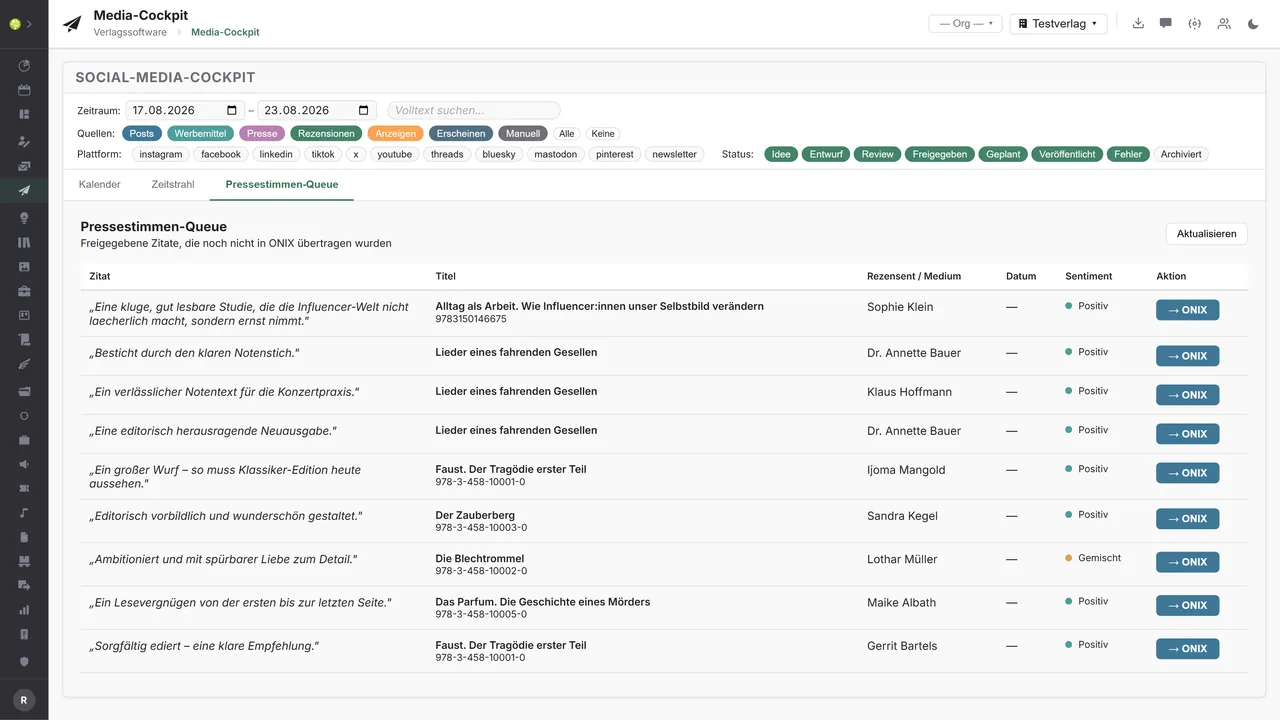
The third view is the press quote queue: approved quotes with title, reviewer, outlet and sentiment that are not yet in the title data. One click transfers them to ONIX. Scheduled and published posts appear in the calendar, advertising dates come from Advertising, and a task in bryve can be created for every post. The profiles themselves are connected by the cockpit through Buffer.
Which AI model does the work here is your decision: your own provider, your own key – or, if you prefer, a model on your own premises, in which case your texts never leave your network.One connection, three ways
The cockpit in the application.

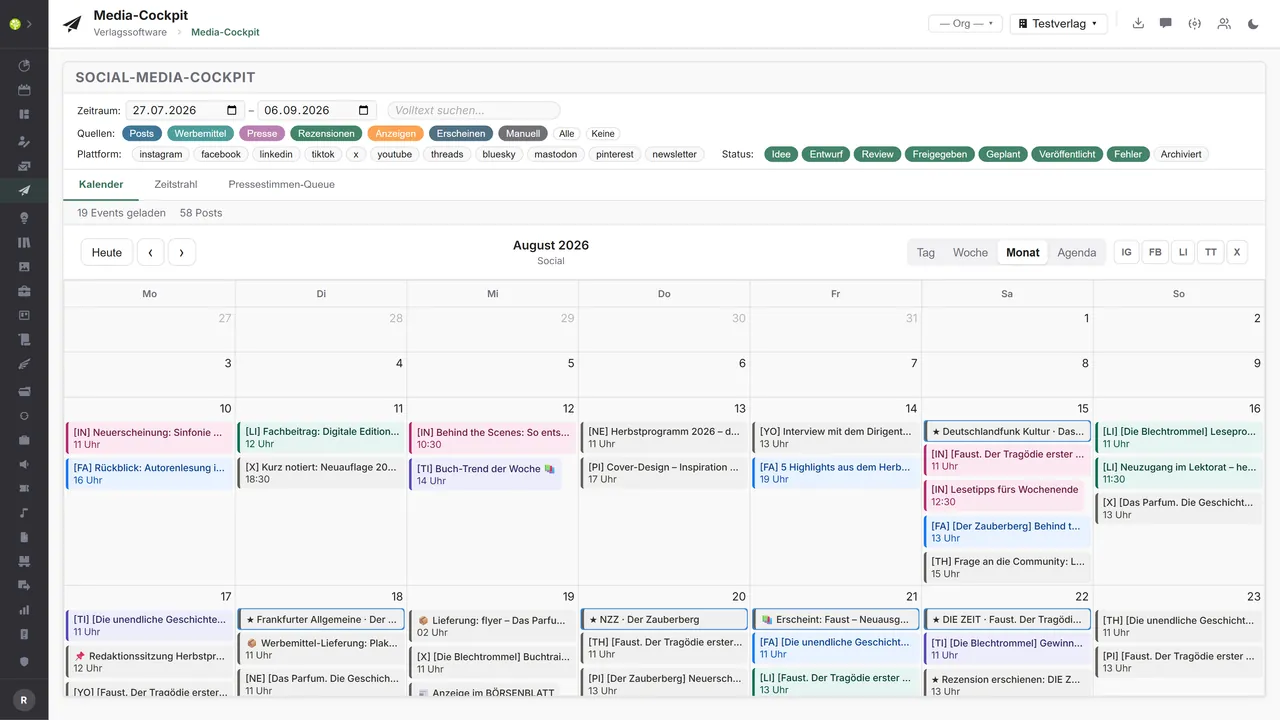

Everything on one timelineThe month with posts and pipeline events: the code shows the platform, the color the source – promotional material, press, reviews, advertising and publication dates included.
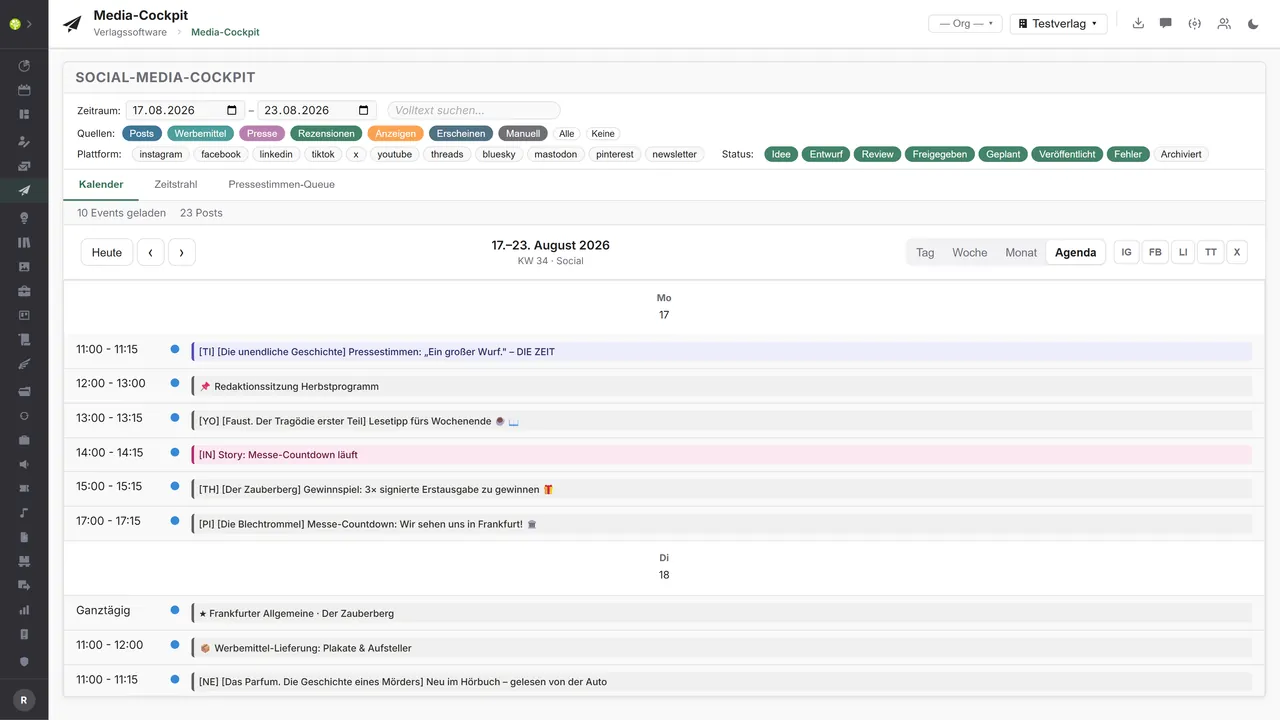
The week as a listEvery entry with time, platform code and title – from the Instagram story to the delivery of promotional material and the review in the daily paper.
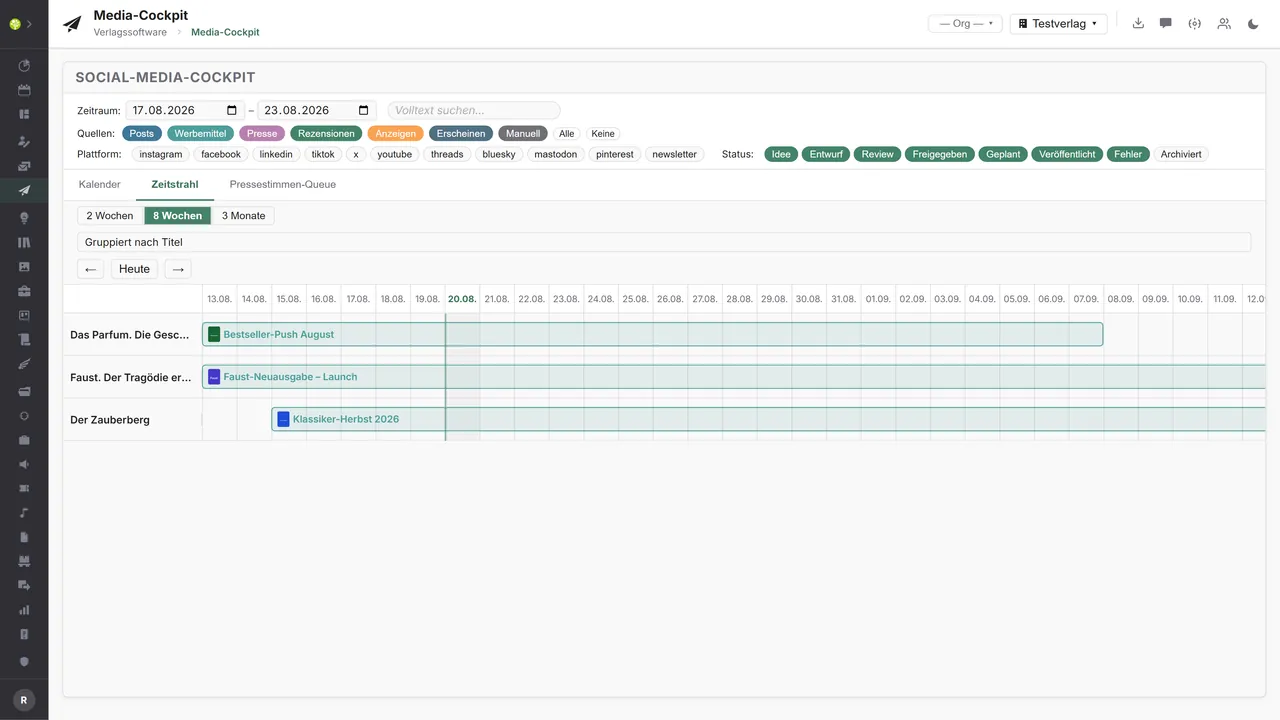
Campaigns in lanesTwo weeks, eight weeks or three months; grouped by title here, with campaign bars, a today line and drag and drop – when something moves, the cockpit asks whether the posts should go too.
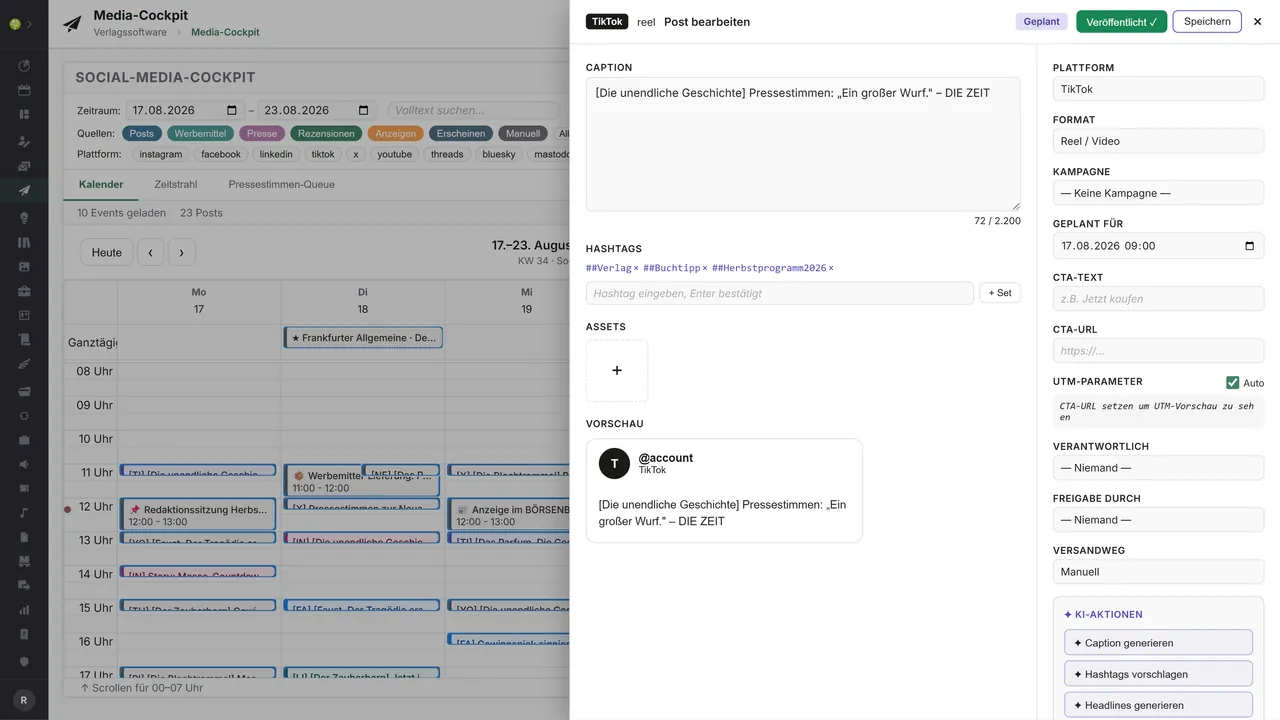
The editor for the postCaption with a character counter, hashtags as a set, assets, call to action and UTM – on the right platform, format, campaign, date and owners, beneath them the AI actions.
Quotes on their way into the title dataApproved review quotes with title and ISBN, reviewer, outlet and sentiment – the ONIX button transfers them into the title's metadata.

See open.junixx at work. We show you on screen how the software fits your publishing workflows – with no obligation, and with time for your questions.
Book a demoImport and export through the API.
The cockpit plans when which post is to appear with which image. Facing outward it is about the last mile: publishing, fetching the figures back, collecting press quotes.

Import – from external services
Data flowing into the module from outside:
- Reach, interactions and clicks from the platforms' insights → success right at the planned post
- The publication time and error messages from the scheduler → the status changes by itself
- Mentions and reviews from media monitoring and clipping → the press quote queue fills itself
- Click figures from link tracking and short URLs → measure the effect across every channel

Export – to external services
Data the module passes outward:
- The post with its media and date to the platform interfaces of Meta, LinkedIn, X, TikTok and YouTube
- Scheduled posts as a queue to Buffer, Hootsuite, Later or Metricool
- Title and campaign content as building blocks to newsletter services
- Post and campaign performance to a data warehouse and reporting
Today the cockpit plans, checks and documents: the profiles are connected through Buffer by OAuth, the writing help runs through our own AI layer, figures are recorded per post and the status “published” is set when it appears. The connectors for the individual networks and the reimport of the insights can be added through the central API.
More on the interfaces
Detailed overview from the interface analysis: sources for import and possible targets for export.
Import – from external services

| Source (external) | What is imported | Use in the module |
|---|---|---|
| Platform insights (Meta, LinkedIn, X, TikTok, YouTube) | Reach, likes, comments, clicks per post | Success at the planned post, confirm publication |
| Scheduler (Buffer, Hootsuite, Metricool) | The actual publication time, errors | Status from scheduled to published, or an error |
| Media monitoring and clipping (Landau Media, PMG, Talkwalker) | Published mentions, reviews, social mentions | Feed the press quote queue automatically |
| Social listening (Meta Mentions, X Search, Mention.com) | Comments and mentions about titles and series | Gather reactions, plan replies |
| Link tracking and short URLs (Bitly, UTM) | Click figures per post link | Measure the effect across channels |
Export – to external services

| Purpose / trigger | External service (examples) | What is exported | Format / standard |
|---|---|---|---|
| Publishing (Meta) | Instagram and Facebook | Text, assets, date as a post, reel or story | Graph API (OAuth), REST/JSON |
| Publishing (other networks) | LinkedIn, X, TikTok, YouTube, Pinterest, Threads, Bluesky, Mastodon | The post with its media | REST/JSON, AT Protocol, ActivityPub |
| Scheduler (network-neutral) | Buffer, Hootsuite, Later, Metricool, Publer | Scheduled posts as a queue | Partner API, CSV bulk |
| Newsletter and e-mail | Mailchimp, CleverReach, Brevo, rapidmail | Title and campaign content as building blocks | REST/JSON, RSS-to-email |
| Reporting | Data warehouse, analysis tools | Post and campaign performance | CSV, JSON, OData |
Every feature of the Media Cockpit.
You will find the complete list in our brochure
What you see above is an excerpt. Every feature of this module – and of all the others – is collected in the open.junixx brochure. We will gladly send it to you, in print or as a PDF. And if you would rather watch than read: we are happy to show you open.junixx live on screen.
Get the brochureParticularly strong for these kinds of publishers.
Anywhere titles need attention and several channels are played at once – without anyone losing track of dates and approvals.

Connected to the publishing ecosystem
- VLB
- IDNV
- doctronic
- Amazon
- Bookwire
- Arvato / VVA
- Brocom
- Prolit
- Zeitfracht
- Magento
- WordPress /
WooCommerce - Shopify
- Shopware
- Wirth & Horn
- Diamant
- DATEV
- BMD
- Abacus
- DHL
- DPD
Get to know open.junixx.
Arrange an appointment with no obligation. We will show you how the Media Cockpit fits into your publishing routine.