

Title data the trade understands.
The full ONIX 3.0 scope
Title and language, publisher and imprint, product identifiers, product form, prices and availability – held as mandatory sections, not as free-text fields.
VLB, trade and shop in one flow
Import and export ONIX, submit to VLB or reconcile from it, and synchronize to every active shop on saving.
AI search and AI assistant
Search the catalog in natural language; fill fields from templates and examine reviews for sentiment and quotable passages.
360° marketing and figures on the title
Promotional material, press, reviews, advertising and posts in one calendar with conflict warnings – beside them revenue, ABC class and backorders.
One title, all its metadata.
A title in the title data is one specific edition, identified by item number and EAN or ISBN. The detail view organizes everything that belongs to it into sections: first the mandatory areas, then content and contributors, classification, special areas, marketing, analytics and administration. The title header shows cover, title, item number, EAN and the categories assigned.
Optionally the title hangs beneath a work. Editions of one work then share contributors, texts and, for sheet music, the music metadata. “Update from work” adds or replaces fields, each time with a comparison view, and inheritance can be controlled field by field.
Titles belong to a list and appear in seasonal catalogs. A catalog carries a name, a code and a season; the titles in it get a page, a position, a marker for new title, a predecessor and a note. “Renumber” assigns the positions on each page in steps of ten, so that a title can later be slotted in between without shifting everything. On the title itself the list is a field of its own and serves as a filter in lists and selection fields; page and position stay read-only there and are maintained in the catalog. And both travel into the sales rep app. Anyone selling in the field always has the catalog with them.
Two things carry the title data beyond the single edition. Bundles combine several titles into one unit, with a number, a pricing mode and a versioned parts list. If someone changes the composition after orders have already been placed against it, a new version is created automatically, and existing orders keep the version they were created with. A bundle is entered in Orders & invoices as a single line item that resolves into its components, with individual parts deselectable. And page allocation divides a title into chapters, each with its own document, as the basis for weighted chapter shares in Contracts & royalties.
A price is more than a number. It comes with a price type, a country, a VAT group, net and gross (whichever is not entered is calculated), a validity period, fixed-price status, tiered prices by quantity, customer group and order type, as well as bundle prices with their component products. Availability holds the publishing status, the availability itself, every date from announcement to remaindering, and the sales rights per country and region.
Contributors come from the CRM. The contact can be linked, a pseudonym chosen and fields taken over selectively, including ISNI, ORCID and GND. Classification follows WGSneu, Dewey, Thema codes and BIC, with keywords and mandatory entries for readership, age recommendation and warnings. Media files carry rights, copyright, alt text and IPTC details.
The title data leads outward along several routes. ONIX 3.0 can be imported or exported as a file, submitted to VLB (individually, in a batch or automatically on a status change), and titles synchronize to every active shop on saving. Categories and web categories govern where a title appears in the shop.
For marketing, every title carries a 360° calendar with promotional material, press inquiries, reviews, advertising, campaigns, social media posts and the publication date side by side in lanes, including a warning when dates collide. Quotations from reviews can be approved and taken into the ONIX data, and posts can be published through the Buffer connection.
And the title data stays connected to the processes. Order figures and backorders come from Orders & invoices, stock levels and movements from the warehouse, projects from production. The complimentary copy letter creates a draft in correspondence, with a delivery note order alongside if you wish.
Which AI model does the work here is your decision: your own provider, your own key – or, if you prefer, a model on your own premises, in which case your texts never leave your network.One connection, three ways
Title data in the application.

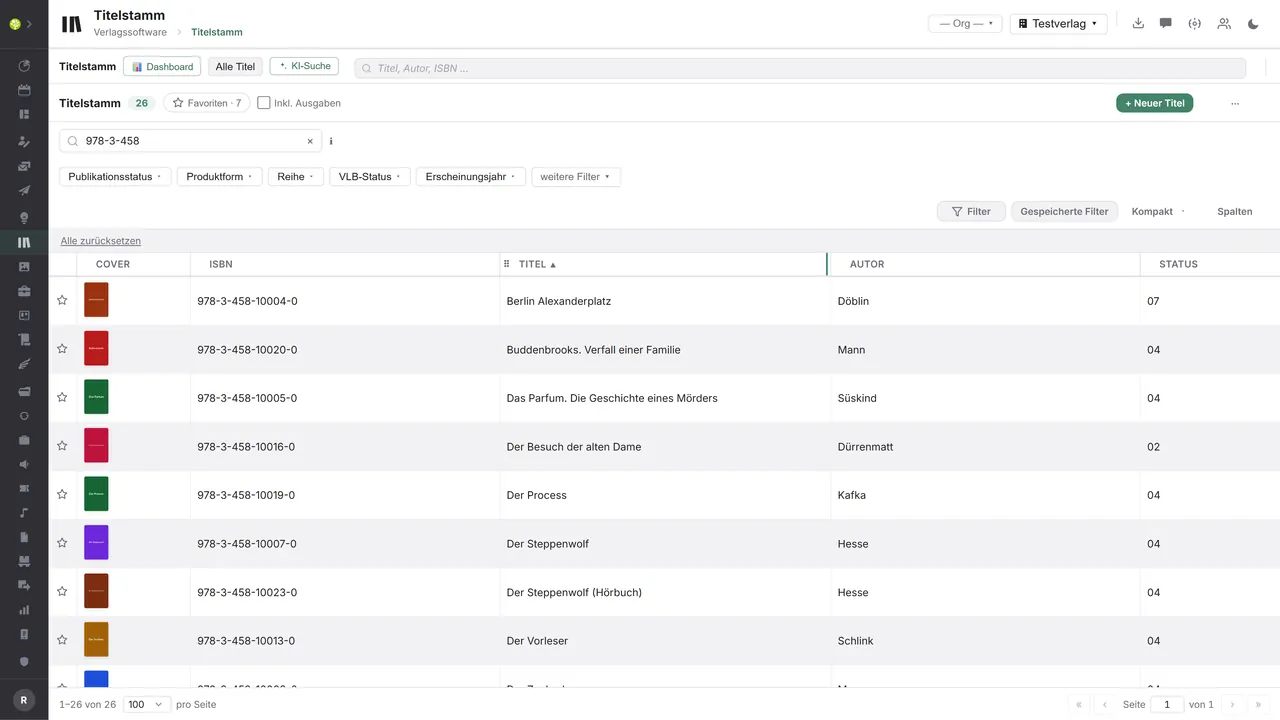

The whole catalog in one listSearch across title, author and ISBN, filters for publishing status, product form, series, VLB status and year of publication – plus favorites, column sets and the AI search.
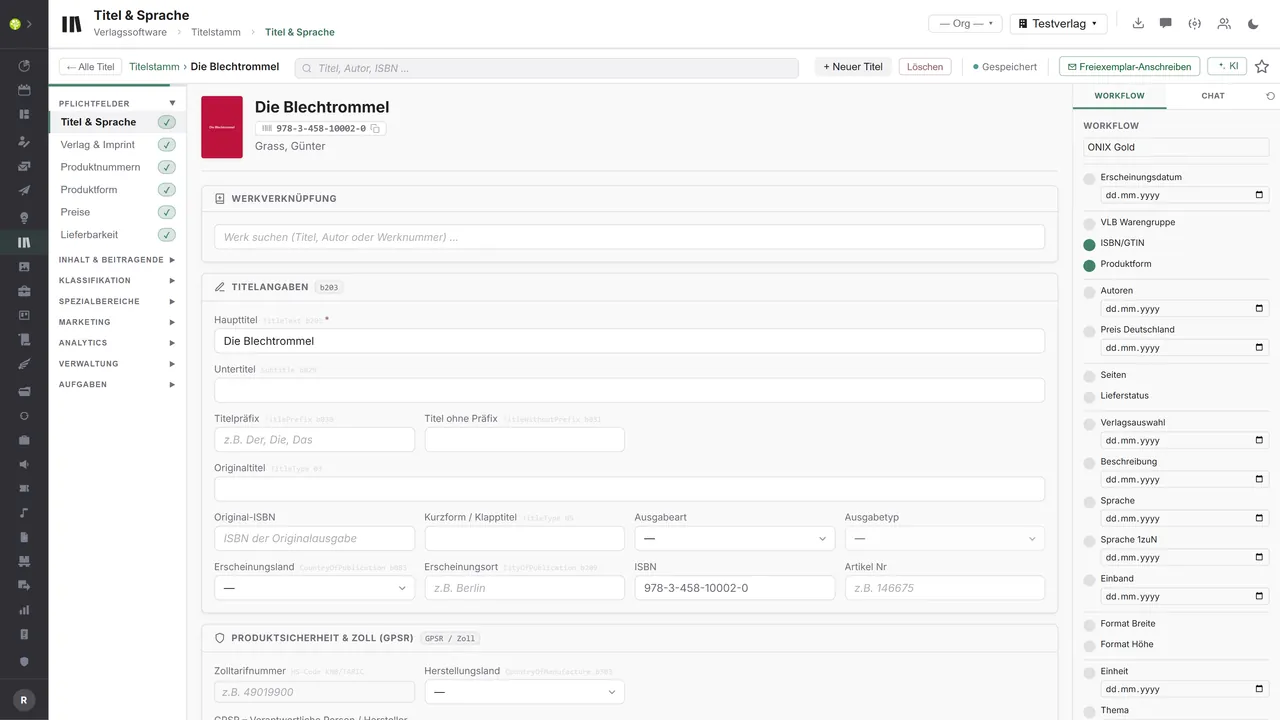
Every field in its placeOn the left the sections with checkmarks for completed mandatory areas, in the middle the title details with their ONIX field codes beside them – on the right the “ONIX Gold” workflow, showing what is still missing for trade-ready data.
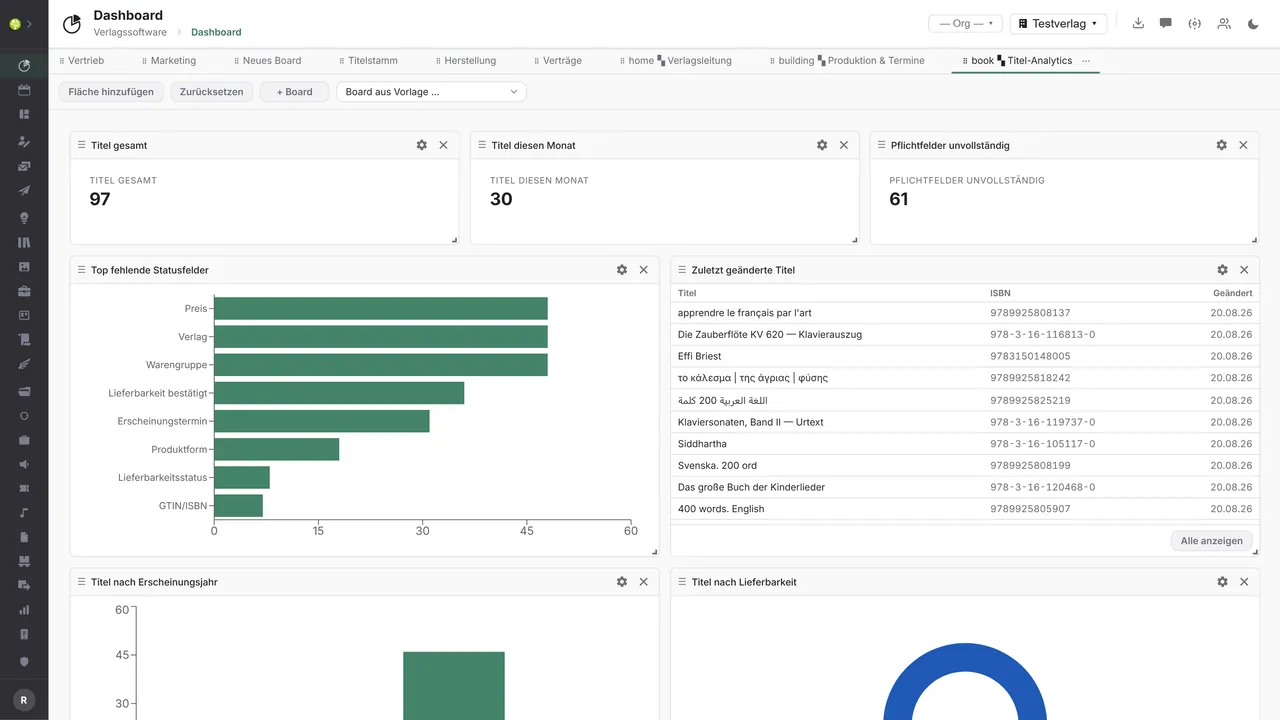
What is missing is on the boardA board of its own for title analytics: titles in total and this month, incomplete mandatory fields, the status fields most often missing, recently changed titles, and titles by year and availability.

See open.junixx at work. We show you on screen how the software fits your publishing workflows – with no obligation, and with time for your questions.
Book a demoImport and export through the API.
Title data is trade data: it has to reach the places where the trade, libraries and shops expect it – and authority data and third-party metadata come back from there.

Import – from external services
Data flowing into the module from outside:
- Metadata from VLB by GTIN → field comparison, adoption and cover reconciliation
- Third-party ONIX files → bulk import and update with a preview
- Authority data from the German National Library → GND, subject indexing, DDC
- Code lists and person identifiers (Thema, BIC, WGS, GND, ISNI) → consistent subject classification

Export – to external services
Data the module passes outward:
- Title metadata as ONIX 3.0 to MVB and VLB – individually, in a batch or on a status change
- Title, price and availability data to wholesalers and bookshop platforms
- Title metadata to the German National Library
- Title feeds to international data pools such as Nielsen, Bowker, Google Books or Amazon
ONIX 3.0 import and export, the VLB connection with search, reconciliation, push and cover sync, the Thema code list, the authority data services in the sheet music field, and the shop and Buffer connections are all part of the module. Further data pools can be added through the central API – the format is already settled with ONIX 3.0.
More on the interfaces
Detailed overview from the interface analysis: sources for import and possible targets for export.
Import – from external services

| Source (external) | What is imported | Use in the module |
|---|---|---|
| VLB (REST API) | Third-party and own metadata by GTIN, field comparison | Enrichment, reconciliation, cover pull |
| Third-party ONIX files | Title metadata | Bulk import and update |
| German National Library (SRU, OAI-PMH) | GND, subject indexing, DDC | Enrich authority data and classification |
| Classification and authority data (Thema, BIC, WGS, GND, ISNI) | Code lists, person identifiers | Consistent subject classification |
| Cover and reading sample services | Cover images, look-inside samples | Marketing material on the title |
Export – to external services

| Purpose / trigger | External service (examples) | What is exported | Format / standard |
|---|---|---|---|
| VLB submission | MVB / VLB | Title metadata | ONIX 3.0 over SFTP |
| Trade and wholesaler data pool | KNV Zeitfracht, Libri, Umbreit, bookshop platforms | Title, price and availability data | ONIX 3.0, EDIFACT PRICAT |
| National bibliography | German National Library | Title metadata, and e-book deposit where applicable | ONIX, MARC21, DNB interface |
| International data pools | Nielsen BookData, Bowker, Google Books, Amazon | Title feed | ONIX 3.0 |
| Barcode for prepress | Barcode service, printer | EAN-13 or GTIN barcode for the cover | EPS, PNG, SVG |
Every feature of Title data.
You will find the complete list in our brochure
What you see above is an excerpt. Every feature of this module – and of all the others – is collected in the open.junixx brochure. We will gladly send it to you, in print or as a PDF. And if you would rather watch than read: we are happy to show you open.junixx live on screen.
Get the brochureParticularly strong for these kinds of publishers.
Anywhere titles are submitted to the trade – and for sheet music with a special area of its own for instrumentation, work reference and part titles.




Connected to the publishing ecosystem
- VLB
- IDNV
- doctronic
- Amazon
- Bookwire
- Arvato / VVA
- Brocom
- Prolit
- Zeitfracht
- Magento
- WordPress /
WooCommerce - Shopify
- Shopware
- Wirth & Horn
- Diamant
- DATEV
- BMD
- Abacus
- DHL
- DPD
Get to know open.junixx.
Arrange an appointment with no obligation. We will show you how Title data fits into your publishing routine.