

Write, send, prove it arrived.
Letter, e-mail and fax in one place
One editor with variables, text blocks and a signature – as a DIN 5008 PDF, by e-mail or printed, each from the same draft.
The AI assistant in the editor
More formal, more informal, shorter, more detailed, corrected or translated – at the press of a button or with an instruction of your own.
Mail merge and dunning run
Apply one template to a list of recipients, up to 2,000 per run; graduated payment reminders are created automatically.
Traceable through to delivery
From the queue through delivered to opened and clicked – and switchable off where no tracking is wanted.
All the written communication in one module.
Correspondence gathers a tenant's written communication. Letters, e-mails and faxes are created as a draft, designed in the editor and then sent, filed as a PDF or printed. Incoming e-mails land in an inbox of their own. Every case follows the same status path: draft, queue, sent, delivered or error, and archived at the end.
Recipients come from the CRM. Customer number, company, address and salutation are taken over automatically and can still be overwritten for the individual case. If only an e-mail address is recorded at the contact, the module notices and suggests sending by e-mail. And if the contact's language does not match the language of the letter, it warns before the letter goes out.
A reference to an order, an invoice, a delivery note, a title or a production project turns document data into variables. The document number and the net and gross amounts are then in the text automatically, without anyone having to type them. Added to that are placeholders for recipient, sender, publisher and date, as well as slash commands for text blocks and formatting. A PDF preview to DIN 5008 can be printed or downloaded directly.
Because a letter almost always belongs to a case, the templates know their module reference. In a business transaction, at a contract or at an order, the selection therefore shows only the templates that fit, and their placeholders fill themselves straight from that case. Conversely, every case has a correspondence tab of its own, so the letters about a matter sit with the matter instead of in one overall list. The way there is short: a letter symbol in a case's contact field leads straight to creating one, and “Create and open” lands directly in the editor. Afterwards the correspondence can also be filtered by its reference.
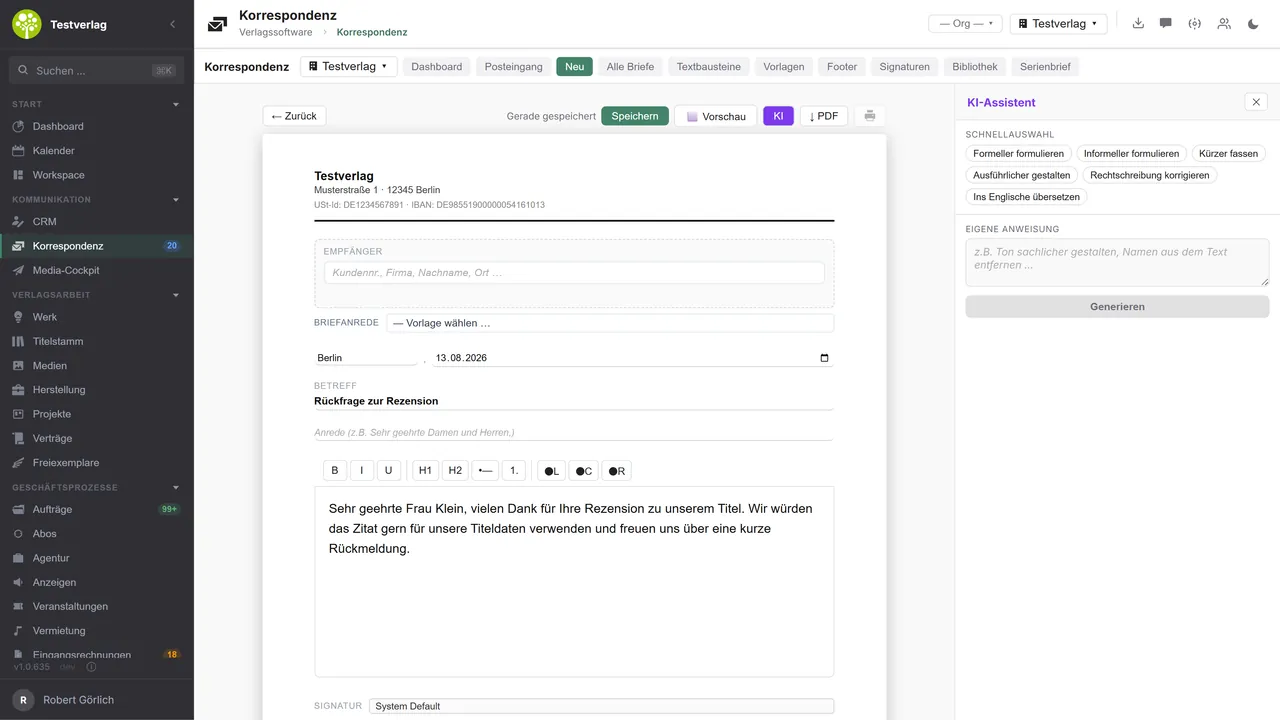
The AI assistant sits right beside the text: six presets cover the most common cases, more formal, more informal, shorter, more detailed, spelling or translation into another language, plus a field for your own instructions. The suggestion can be adopted straight into the letter if you wish.
Reusable building blocks sit centrally: templates with subject, content and a variable whitelist, text blocks with an approval workflow from private through tenant-wide to public, footers per language and personal and global signatures including a signature image. Added to that is an attachment library that every piece of correspondence can draw on.
For large mailings there is a five-step mail merge assistant. It leads through recipients, template, variables, preview and dispatch, optionally with a variable import by CSV and a preview based on sample recipients. The dunning run automatically creates graduated reminders from overdue invoices in Orders & invoices, with fees and deadlines of your own per tenant and observing a dunning block at the contact.
What happens afterwards stays visible: delivery, opening, clicks, bounces and errors appear as events at the case. Anyone who does not want that switches tracking off for a piece of correspondence. Delivery is then still logged; openings and clicks are not.
Which AI model does the work here is your decision: your own provider, your own key – or, if you prefer, a model on your own premises, in which case your texts never leave your network.One connection, three ways
Correspondence in the application.

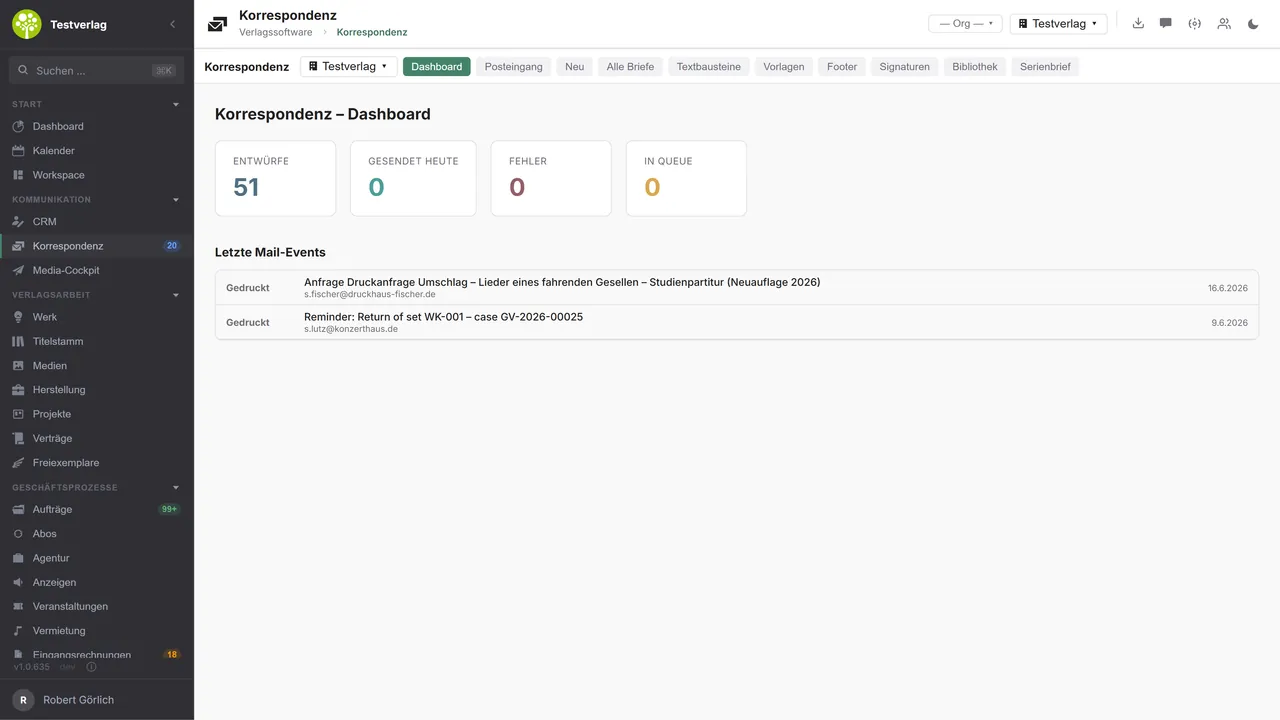

The state of things at a glanceDrafts, sent today, errors and the queue as key figures – beneath them the latest events with recipient, subject and kind: delivered, opened, clicked, printed.
Writing with a tailwindThe letter takes shape in the DIN layout with letterhead, salutation, subject and signature. On the right the AI assistant: more formal, shorter, corrected, translated – or whatever you ask of it.
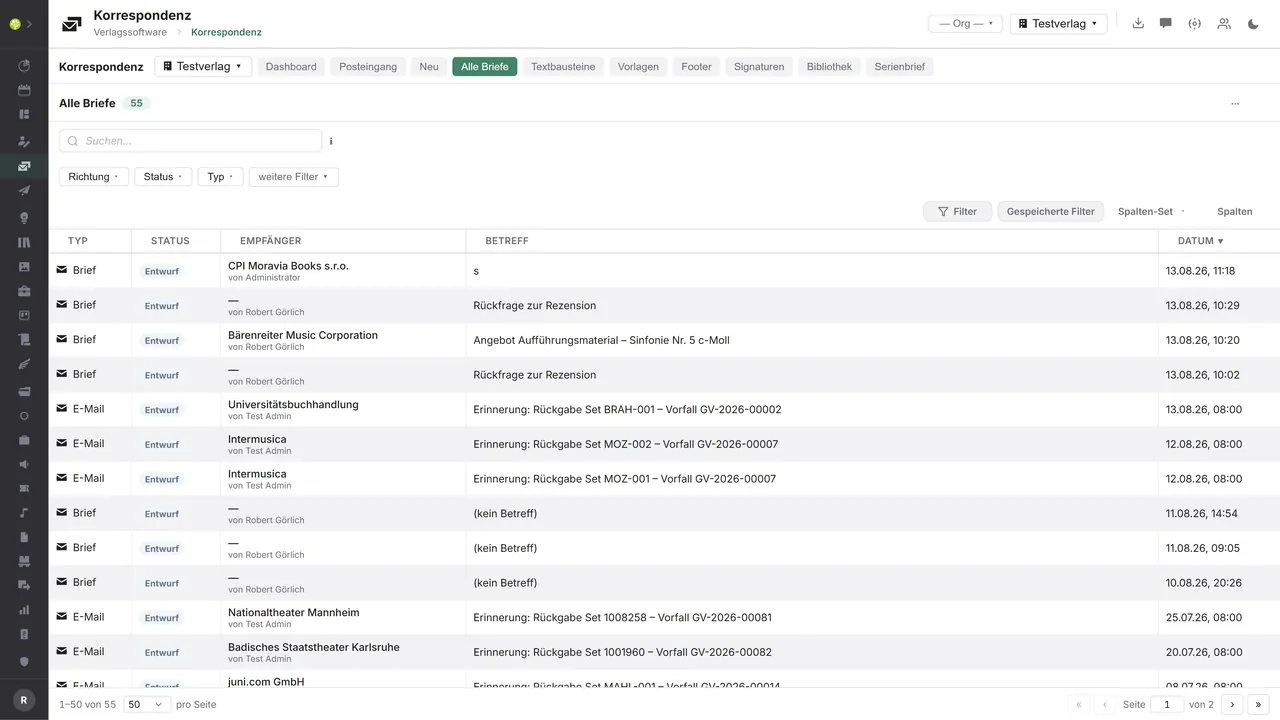
Every case stays findableLetters and e-mails in one list, filterable by direction, status and type – with saved filters and selectable columns, as in every list in the application.

See open.junixx at work. We show you on screen how the software fits your publishing workflows – with no obligation, and with time for your questions.
Book a demoImport and export through the API.
Correspondence lives on deliverability: reliable bulk dispatch with feedback, letters without a printer of your own, and an inbox that assigns replies to the right case.

Import – from external services
Data flowing into the module from outside:
- Delivery events from Mailgun, Postmark or SendGrid → status at the case
- Incoming e-mails by IMAP → an inbox with assignment to the contact
- Dispatch and delivery records from hybrid mail services → proof of status and postage costs
- Send and receive confirmations from fax services → the case log

Export – to external services
Data the module passes outward:
- Transactional and bulk mail through SendGrid, Mailgun, Postmark, Brevo or Mailjet
- The letter PDF plus the address to hybrid mail services → printing, enveloping and posting externally
- Fax documents to Retarus, Sipgate or simplefax
- Signed letter PDFs with metadata to an audit-proof archive or DMS
Today the module sends e-mails through your own accounts (SMTP) and fetches incoming messages by IMAP; the delivery webhooks of Mailgun, Postmark and SendGrid are connected, and letters are created as a DIN 5008 PDF with an archive hash. Hybrid letter dispatch, a fax gateway and DMS filing can be added through the central API.
More on the interfaces
Detailed overview from the interface analysis: sources for import and possible targets for export.
Import – from external services

| Source (external) | What is imported | Use in the module |
|---|---|---|
| Mailgun, Postmark, SendGrid (webhooks) | Delivery events: delivered, opened, clicked, bounce | Status and tracking at the case |
| IMAP mailbox | Incoming e-mails | Inbox, assignment to contact and case |
| Hybrid mail service | Dispatch and delivery confirmation, postage costs | Proof of status and posting of the costs |
| Fax service | Send and receive confirmation | A complete case log |
Export – to external services

| Purpose / trigger | External service (examples) | What is exported | Format / standard |
|---|---|---|---|
| Transactional and bulk mail | SendGrid, Mailgun, Postmark, Brevo, Mailjet | Recipient, subject, HTML, attachments | Provider API or SMTP |
| Hybrid letter dispatch | Deutsche Post E-POST/Printmailing, Pixelletter, LetterXpress, Binect | The letter PDF and the recipient's address → printing and posting | REST API, PDF |
| Fax dispatch | Retarus, Sipgate, simplefax | The fax document and the number | Provider API |
| Document archive / DMS | DATEV DMS, ELO, d.velop, audit-proof archive | A signed letter PDF with metadata | PDF/A, WebDAV or API |
Every feature of Correspondence.
You will find the complete list in our brochure
What you see above is an excerpt. Every feature of this module – and of all the others – is collected in the open.junixx brochure. We will gladly send it to you, in print or as a PDF. And if you would rather watch than read: we are happy to show you open.junixx live on screen.
Get the brochureParticularly strong for these kinds of publishers.
Anywhere a lot is written: post to authors and the press, quotes and reminders to business customers, letters to readers in series, and reminders about sheet music out on hire.



Connected to the publishing ecosystem
- VLB
- IDNV
- doctronic
- Amazon
- Bookwire
- Arvato / VVA
- Brocom
- Prolit
- Zeitfracht
- Magento
- WordPress /
WooCommerce - Shopify
- Shopware
- Wirth & Horn
- Diamant
- DATEV
- BMD
- Abacus
- DHL
- DPD
Get to know open.junixx.
Arrange an appointment with no obligation. We will show you how Correspondence fits into your publishing routine.