

Checked first, then an order.
Approval before the order book
App orders do not run straight into the order book but into a review state of their own. Only approval turns them into a confirmed order.
Price approval per item
Only items with special terms are marked and checked – a “€?” then stands at the order. The rest of the order carries on as normal.
Bulk approval for the rest
Whatever is outstanding and needs no price approval goes through in one step. Orders that cannot be approved are skipped and reported.
Feedback into the app
Approval, rejection and rework go as a push message to the rep's device – nobody has to chase it by phone.
An inbox between the field and invoicing.
The rep records out in the field, the office decides. Between the app and the order book lies an inbox, and with it an approval step that nobody gets past.
The inbox tab shows what is waiting: order, customer, sales rep, date, total and status, refreshed by itself every 60 seconds. Above it stand the quick counters for outstanding, price approval and rework. One click on them filters the list. One click on the row opens the detail panel with the items, the review note and the history. Customers and titles come from CRM and title data, which the app synchronizes in advance so that it can also record with no network.
If an order contains items with special terms, it goes into price approval. Only the lines affected are marked, and a “€?” appears at the order number. It can be approved, sent back for rework or rejected. Which path is open is governed by a status chain, and for rework and rejection the reason is a mandatory field. Every change lands in the history and in the log. After approval it is an ordinary order: the order confirmation and the invoice are created in Orders & invoices, from the same document generation as in the main window.
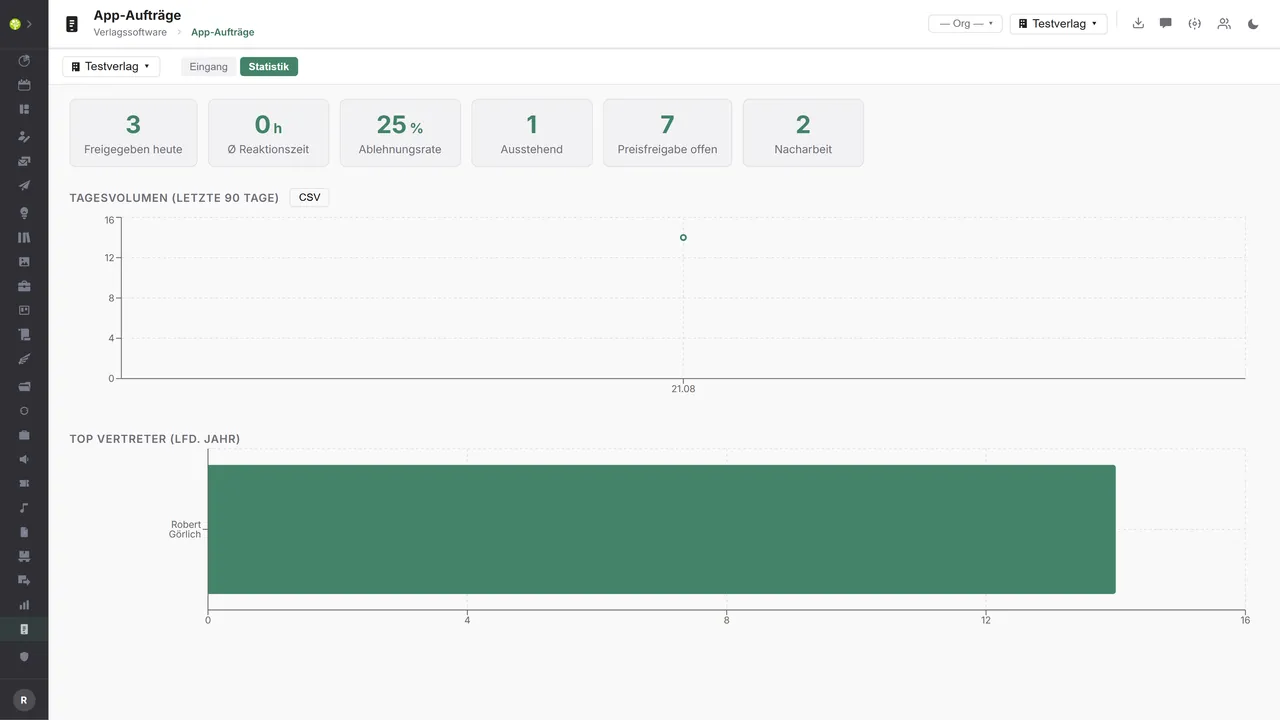
The statistics tab measures the gate itself: approved today, the average response time, the rejection rate, plus the daily volume of the last 90 days and the top sales reps of the year, and as CSV it can be analyzed outside the application too.
Who may see the inbox, approve in bulk or open the statistics stands in three separate permissions. The number of open orders is shown by a counter in the navigation, with a warning as soon as there are price approvals among them. And the tenant boundary applies strictly, in the app as in the house.
App orders in the application.

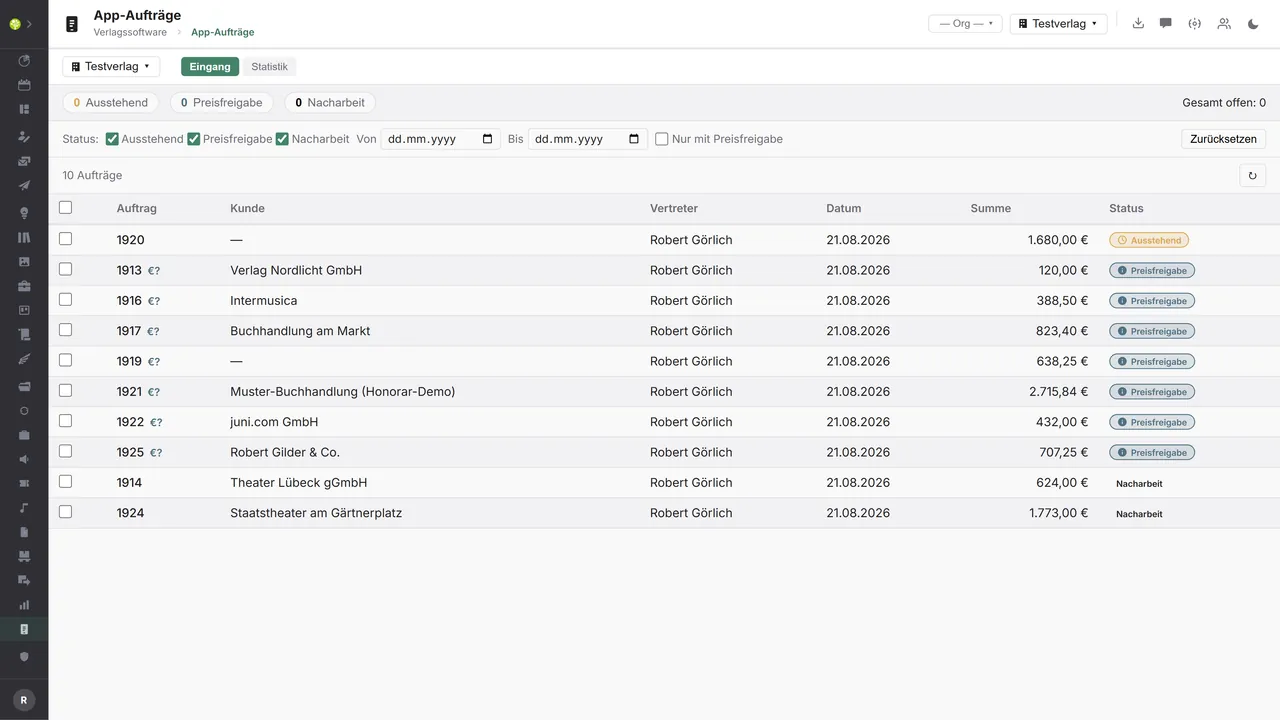

The inboxOrder, customer, sales rep, date, total and status – “€?” marks open price approvals. At the top the quick counters, beneath them the status filter, the period and the switch “With price approval only”.
The statisticsApproved today, average response time, rejection rate, outstanding, open price approvals and rework – plus the daily volume of the last 90 days and the top sales reps of the current year.

See open.junixx at work. We show you on screen how the software fits your publishing workflows – with no obligation, and with time for your questions.
Book a demoImport and export through the API.
The path to our own app is built: orders come in, the decision goes back as a push message. Facing outward there is room for further inbound channels.

Import – from external services
Data flowing into the module from outside:
- Orders, customer and price changes recorded offline in the rep app → they land in the inbox as “outstanding”
- Orders from other rep and field sales systems by EDI or API → further channels into the same review
- Collective orders from trading partners → B2B orders with a two-person approval instead of a direct posting
- Checked addresses from an address validation → correct wrong addresses from the field before approval

Export – to external services
Data the module passes outward:
- Approval, rejection and rework to the rep's device → feedback with no phone call
- The titles ordered on an approved order to a wholesaler and to distribution → approval pulls procurement along with it
- The order confirmation and the invoice as a PDF to the end customer → document delivery with no detour
- Approved orders per sales rep with revenue and commission → the basis of the rep settlement
What is built today is the path to our own app: orders come in through an offline sync, the decision goes back to the rep's device through the Expo push service, and the documents are created in the same generation as in the main window. An EDI order inbox for third-party systems, forwarding to a wholesaler and a second push channel do not exist today – they can be added through the central API.
More on the interfaces
Detailed overview from the interface analysis: sources for import and possible targets for export.
Import – from external services

| Source (external) | What is imported | Use in the module |
|---|---|---|
| Our own rep app | Orders, customer and price changes recorded offline | Orders land in the inbox as “outstanding” |
| Other rep and field sales systems | Orders by EDI or API | Further inbound channels into the same review inbox |
| Wholesaler and EDI order inbox | Collective orders from trading partners | B2B orders with a two-person approval |
| Trade fair and order form systems | Trade fair orders recorded | A collective import as reviewable cases |
| The push service return channel | Delivery receipts and invalid device tokens | Certainty of delivery and a maintained device list |
| Address validation | Checked customer addresses | Correct wrong addresses before approval |
Export – to external services

| Purpose / trigger | External service (examples) | What is exported | Format / standard |
|---|---|---|---|
| Feedback to the sales rep | Expo Push, Apple APNs, Firebase FCM | Approval, rejection, rework | Push API |
| Procurement after approval | KNV Zeitfracht, Libri, Umbreit | The titles ordered with ISBN, quantity and delivery destination | EDIFACT ORDERS |
| Document delivery to the customer | E-mail and messaging services | The order confirmation and the invoice as a PDF | PDF, REST API |
| Rep and commission settlement | Rep agencies, DATEV | Approved orders per sales rep with revenue and commission | CSV, DATEV EXTF |
| Analysis outside the application | A data warehouse and BI tools | Turnaround time, rejection rate, volume per sales rep | CSV, JSON |
Every feature of App orders.
You will find the complete list in our brochure
What you see above is an excerpt. Every feature of this module – and of all the others – is collected in the open.junixx brochure. We will gladly send it to you, in print or as a PDF. And if you would rather watch than read: we are happy to show you open.junixx live on screen.
Get the brochureFor publishers with field sales.
Anywhere reps take orders in the book trade, at schools or at trade fairs – the inbox pays off as soon as somebody records outside the house.




Connected to the publishing ecosystem
- VLB
- IDNV
- doctronic
- Amazon
- Bookwire
- Arvato / VVA
- Brocom
- Prolit
- Zeitfracht
- Magento
- WordPress /
WooCommerce - Shopify
- Shopware
- Wirth & Horn
- Diamant
- DATEV
- BMD
- Abacus
- DHL
- DPD
Get to know open.junixx.
Arrange an appointment with no obligation. We will show you how App orders fit into your publishing routine.