
Manuscript review
A publisher receives more manuscripts than it can read. Manuscript review screens them in advance – with a recommendation, a reasoned assessment, a fit against your list segments, and notes that editorial work can actually build on.

Pre-sorted, reasoned, traceable.
Two levels, one record
The quick check judges a text sample and answers the question of whether reading it is worthwhile. The full report processes the entire text chapter by chapter and extends that same record – no second run and no second version of the truth.
A fit with your list
A publishing profile describes one list segment: areas of focus, subjects sought and subjects ruled out, target readership, style, length range, taboos. Every manuscript is checked against all active profiles – the best one appears in the list.
Notes become editorial work
Every note carries a priority, a category, a location in the text, a quotation and an estimated effort – and is either ticked off or discarded. Selected notes move into the work's internal assessment, along with a pre-filled grade.
Part of it can be recalculated
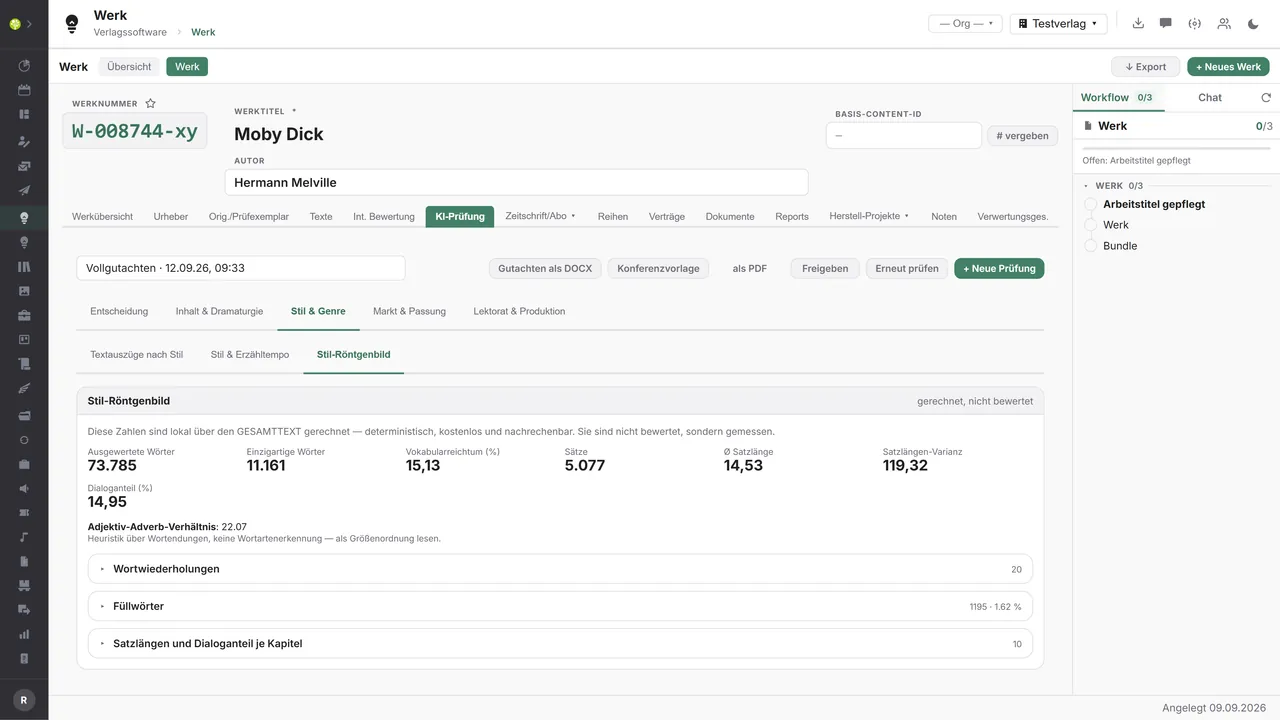
The style X-ray is produced without any model: vocabulary range, sentence length and its variance, the adjective-to-adverb ratio, repeated words, filler words and the proportion of dialogue per chapter – identical every time for the same text.
The stage before the decision.
The review is attached to the work, not to the title – that is where the editorial process lives anyway: how the manuscript arrived, the editor, the start and end of the review period, return postage, the internal assessment. The “AI review” tab sits in the work's detail view and is the machine-made precursor to exactly what the editorial team records there by hand today.
The second way in is the submissions list. It holds every review in the house with title and author, date received, editor, review deadline, status, recommendation, overall score, best profile, level, length and cost. Four key figures sit above it: open submissions and how many of them have no editor yet, reviews in progress and how many of those are full reports, deadlines falling within the next seven days, and what is waiting for the list meeting. An overdue review deadline shows in red in the row. A click leads into the work, not into a second detail screen – the result has exactly one home.
A review starts with four entries. The manuscript arrives as a file – PDF, DOCX, DOC, RTF or TXT, up to 200 MB – or from the media library, if the document is already held on the work. Then the publishing profiles to check against, pre-filled with the default profile. Then the scope: a quick check on a text sample or a full report on the entire text, each stating plainly what it is based on, how long it takes and what it is estimated to cost. And finally the language of analysis and your consent – a checkbox that names the provider. Without the checkbox nothing is transmitted and nothing starts. Before the run begins, the screen states the detected length in words and chapters; the cost estimate changes with every additional profile. The run works in the background with progress and a step description, and the screen may be closed.
The quick check result opens with the recommendation band: accept, consider or decline, an overall score from 0 to 100, the reasoning, and a sentence naming the profile the manuscript fits best. Below it, seven dimensions – hook and opening, style, reading appeal, tension, characters, plausibility and list fit – as stars, bars and a radar chart, each expandable with “What does this measure?” and the reasoning. Six cards summarize content and opening, setting and context, formal aspects, readership and market, quality and risks, and the selling point, right down to a pitch in seven words. The tension curve runs across the course of the manuscript, with average, peak and the share above six.
The full report extends that same record by five areas. Decision: overview, list-meeting paper and long-form report. Content and dramatic structure: summaries at four lengths – one sentence, one paragraph, one page, chapter by chapter – plot and dramatic structure with story arc and shape, the characters with role, goal, conflict, transformation and appearances, plus a manuscript bible with places, timeline, motifs, terms and a continuity check. Style and genre: extracts with quotation and explanation, a reading-appeal index, chapter analyses, slack passages and drop-off risks, plus the style X-ray. Market and fit: the ranking of profiles, reading level and genre conventions. Editorial and production: the notes, the estimated total effort and the next steps. If a single analysis step fails, the block concerned says so – the remaining values stand.
The fit is assessed in three stages. Profiles that fail on language, on the length range or on a ruled-out subject are set aside without any model run and remain visible together with the reason – which is already half of the rejection letter. The rest receive a coarse fit with a score and a brief verdict, and anyone who wants more detail requests the fine-grained fit for a single profile. It never starts by itself, because it costs the powerful model. Beneath the ranking it states how many profiles were checked and how many were excluded; profiles that were not checked are named rather than left out.
The editorial notes are the part that gets worked on: a list for notes, revisions, strengths, risks and sensitivities, sorted by priority from critical down to low, each entry with category, location in the text, quotation, reasoning, estimated effort and confidence. Every entry can be ticked off, discarded or reopened, with the person and the time recorded. A dialog moves recommendation, fit, open notes, strengths and key figures into the work's internal assessment – with a grade on the existing scale of 1 to 6, pre-filled and freely editable, with a source note and a text preview. After that, the text in the work is ordinary editorial work.
Several runs sit side by side as versions: “Request full report” extends the existing quick check, “Review again” starts a new run, with a different profile or a different model if you wish. The footer of every result states the model, the prompt version, the date of analysis and what the run cost. And every document the module produces carries the same sentence: an AI-supported decision aid that does not replace reading.
This is where other people's unpublished manuscripts go to an AI provider – hence three barriers, one behind the other: activation within the house, an approval logged with person and time, and for every run a checkbox naming the provider in plain words. Anyone who wants to hand out nothing at all runs a model on their own premises.One connection, three ways
The review in the application.

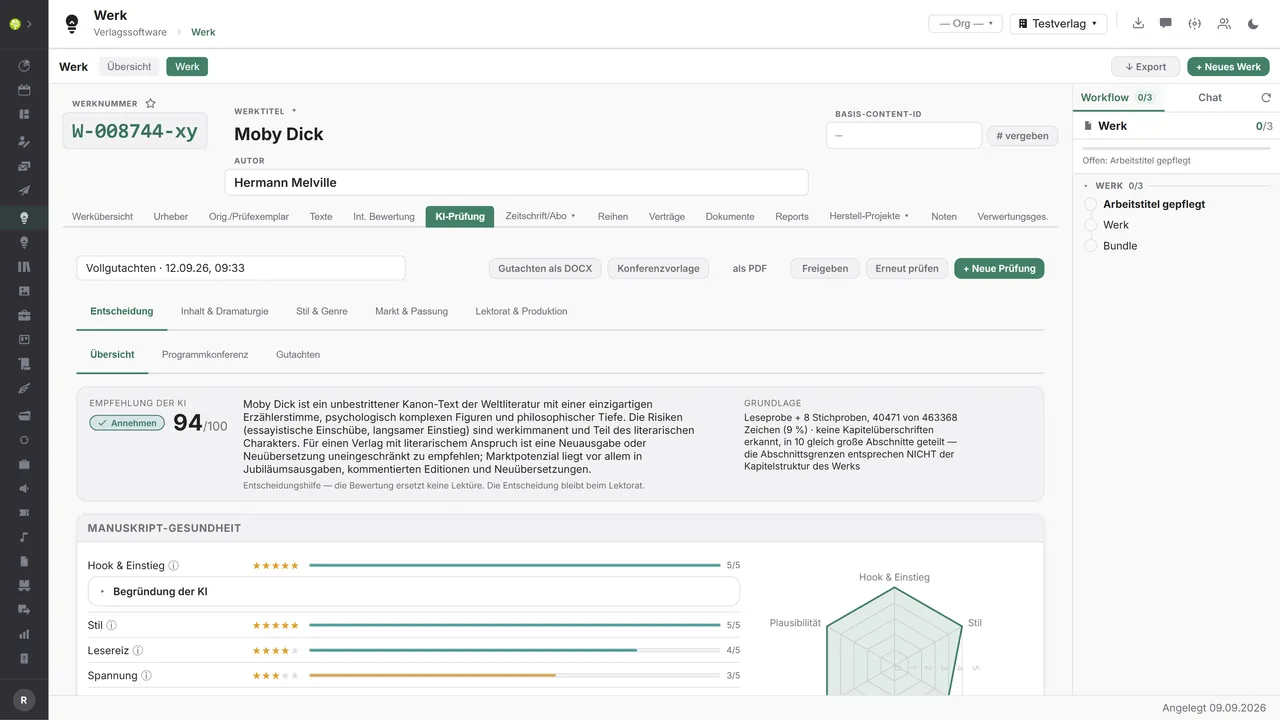

Recommendation, overall score, reasoningNext to it stands what they rest on: reading sample, spot checks and the characters evaluated. Below that the manuscript health – seven dimensions as stars, bars and a radar chart, each expandable with the AI’s reasoning.
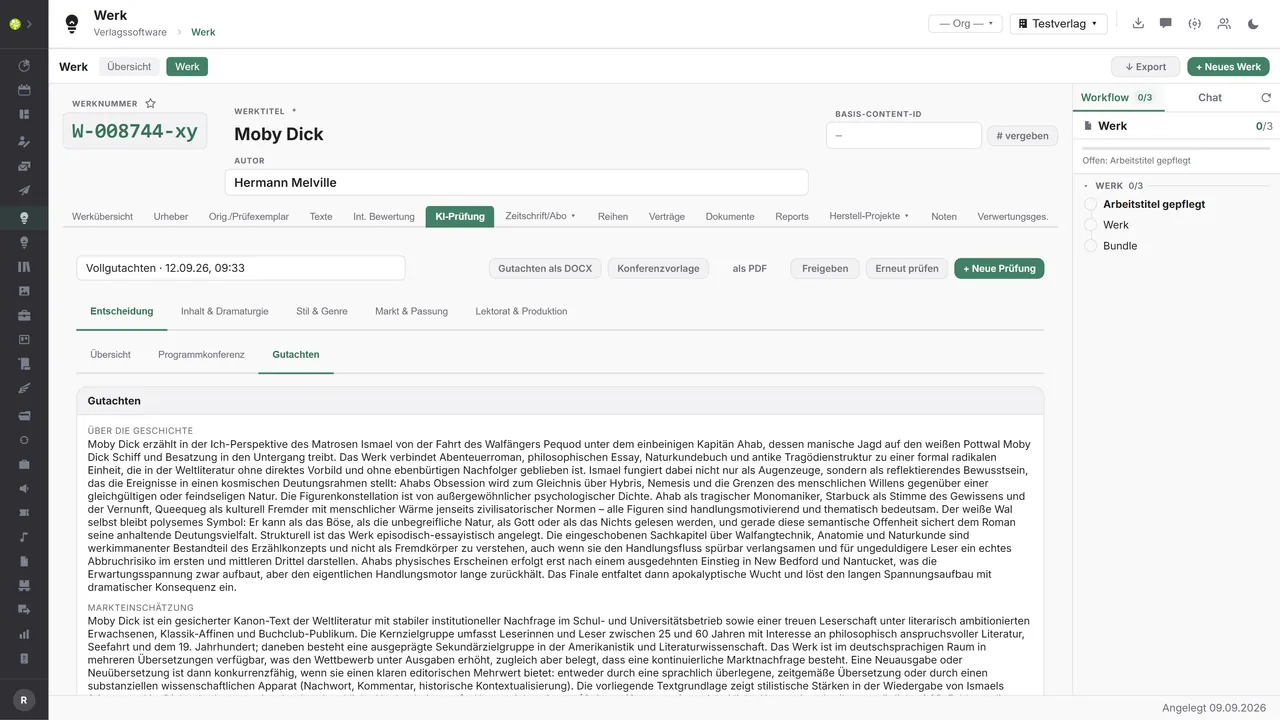
The report in full sentencesAbout the story, market assessment, dramatic structure, style and editorial notes – written out rather than bulleted. Output as DOCX, as a conference template or as a PDF.
Calculated, not judgedVocabulary richness, average sentence length and its variance, dialogue share, repeated words and filler words – calculated locally over the entire text and therefore verifiable.

See open.junixx at work. We show you on screen how the software fits your publishing workflows – with no obligation, and with time for your questions.
Book a demoWhere the text comes from – and where it goes.
Manuscript review brings no model access of its own. It takes the text from your repository, sends it to the provider you selected in the AI connection – to a model on your own premises if you prefer – and returns the result into your works, your templates and your files.

Input – where the manuscript comes from
What goes into the review:
- A file as PDF, DOCX, DOC, RTF or TXT up to 200 MB → length and chapters are detected
- An existing document of the work from the media library → no second upload, one repository
- Editor, review deadline and manuscript details from the work → responsibility and deadline are already set
- Your publishing profiles from the settings → a fit against your own list segments

Output – what the review passes on
What comes out of the review:
- The report as DOCX or PDF → for the file, the conversation and the reply to the author
- A list-meeting paper with core promise, fit, strengths and risks
- A combined document covering up to 50 reviews, with cover sheet and comparison table
- Selected notes and a grade into the work's internal assessment → with a source note
You choose provider and model in one place for all AI functions: Anthropic, OpenAI, OpenAI-compatible services, Hugging Face – or a model on your own premises, in which case no manuscript leaves your network. Screening and full report may use two different models. The cost of every run goes into the same log and the same monthly budget as any other AI function; the review's seven prompts sit in the prompt library and can be overridden per house.
More on the interfaces
Detailed overview: what goes into the review and what it passes on elsewhere.
Input – where the manuscript comes from

| Source | What comes in | Use in the review |
|---|---|---|
| File upload | PDF, DOCX, DOC, RTF, TXT up to 200 MB | Length, chapters and text sample are detected |
| Media library (Media/DAM) | An existing document of the work | No second upload, one repository |
| Work | Editor, review deadline, how the manuscript arrived | Responsibility and deadline in the submissions list |
| Publishing profiles (settings) | List segments with subjects, readership, length range, taboos | Fit and reasoned exclusion |
| AI connection | Provider, model, encrypted credentials | One choice of provider for all AI functions |
| Prompt library | The review's seven prompts, overridable per house | Editorial tuning without programming |
Output – what the review passes on

| Purpose / trigger | Target | What is passed on | Format |
|---|---|---|---|
| Issue the report | File, conversation, reply to the author | Quick check or full report including the provenance line | DOCX, PDF |
| List meeting | Meeting paper | Core promise, fit, strengths, risks, market snapshot | DOCX, PDF |
| Batch export | Comparison of several submissions | Up to 50 reviews with cover sheet and comparison table; skipped ones are counted | DOCX, PDF |
| Handover to editorial | The work's internal assessment | Grade 1–6, recommendation, fit, open notes, strengths, key figures | Text in the work |
| Pass on notes | Author, editorial team, external readers | The notes on display, with location and quotation | Clipboard |
| Cost recording | AI log and monthly budget | Model, consumption and cost per run | Usage display |
Every feature of Manuscript review.
You will find the complete list in our brochure
What you see above is an excerpt. Every feature of this module – and of all the others – is collected in the open.junixx brochure. We will gladly send it to you, in print or as a PDF. And if you would rather watch than read: we are happy to show you open.junixx live on screen.
Get the brochureParticularly strong for these kinds of publishers.
Anywhere more manuscripts arrive than can be read – and where a rejection has to be as well reasoned as an acceptance.


Connected to the publishing ecosystem
- VLB
- IDNV
- doctronic
- Amazon
- Bookwire
- Arvato / VVA
- Brocom
- Prolit
- Zeitfracht
- Magento
- WordPress /
WooCommerce - Shopify
- Shopware
- Wirth & Horn
- Diamant
- DATEV
- BMD
- Abacus
- DHL
- DPD
Get to know open.junixx.
Arrange an appointment with no obligation. We will show you how Manuscript review fits into your editorial routine.