

From the shelf bin to the valuation.
Stock down to the bin
Available, reserved, in picking and free – per title and per bin. The reorder point and the minimum and maximum stock levels come from title data.
Goods receipt by barcode scanner
One worksheet for four jobs: query stock, goods receipt, goods issue, stocktake. What is scanned is the ISBN or the bin code.
Returns processing in three stages
Goods receipt, visual inspection, completion. Every item is split into new stock, remainders and pulping – instead of being posted back as a lump.
Stocktaking at the lower of cost or market
Draft, count, check, posted. The lower of the carrying amount and the market value is applied; the count list and the valuation go out as PDF or Excel.
Every movement has a reason.
A carton only leaves the house once it is clear what is in it, where it came from and whether there was enough of it. The warehouse keeps stock bin by bin and logs every movement with a document, a reason and a user.
You lay out the structure yourself: warehouses by type (own, third-party, consignment, transit or virtual), with zones and individual bins inside them, with aisle, bay, level and compartment. Per warehouse you set the picking strategy (FIFO, LIFO, FEFO or manual), the valuation method, the barcode prefix and whether negative stock is allowed. Many bins at once come in by CSV, and the module prints their labels itself. And whatever carries stock or bins cannot be deleted by accident.
Movement happens in four ways: goods receipt, goods issue, transfer and return. Titles and ISBNs come from title data, reservations and the document reference from Orders & invoices, suppliers and dealers from the CRM. On issue the reason is fixed, a customer order, an author's or a legal deposit copy (see Complimentary copies), pulping or a manual withdrawal, for instance. Before the stock is written off there is a pick list with a target and an actual figure per bin.
What is not there is not forgotten. Open quantities stand as a backorder with customer, promised date and priority. When goods come in, the module clears them by FIFO on its own, or puts the assignment in front of you as a dialog first. Beside that, the dashboard shows what is pressing (negative stock, stock below the minimum level, open backorders), every tile a jump into the matching list, plus the receipts and issues of the last 14 days.
The stocktake runs in stages: draft, count, check, posted. Counting is against the book stock, valuation at the lower of cost or market. The lower of the carrying amount and the market value is applied. Posting is deliberately final, and it takes a permission level of its own. The count list and the valuation go out as PDF or Excel.
Two special cases stay in the same module instead of beside it. Stock held at trading partners is in the consignment overview, aggregated per warehouse and title, with the oldest date of storage and the time in stock including a warning threshold. And the dispatch of legal deposit copies to the deposit libraries is a goods movement like any other, with a status from outstanding through sent to confirmed.
The warehouse in the application.

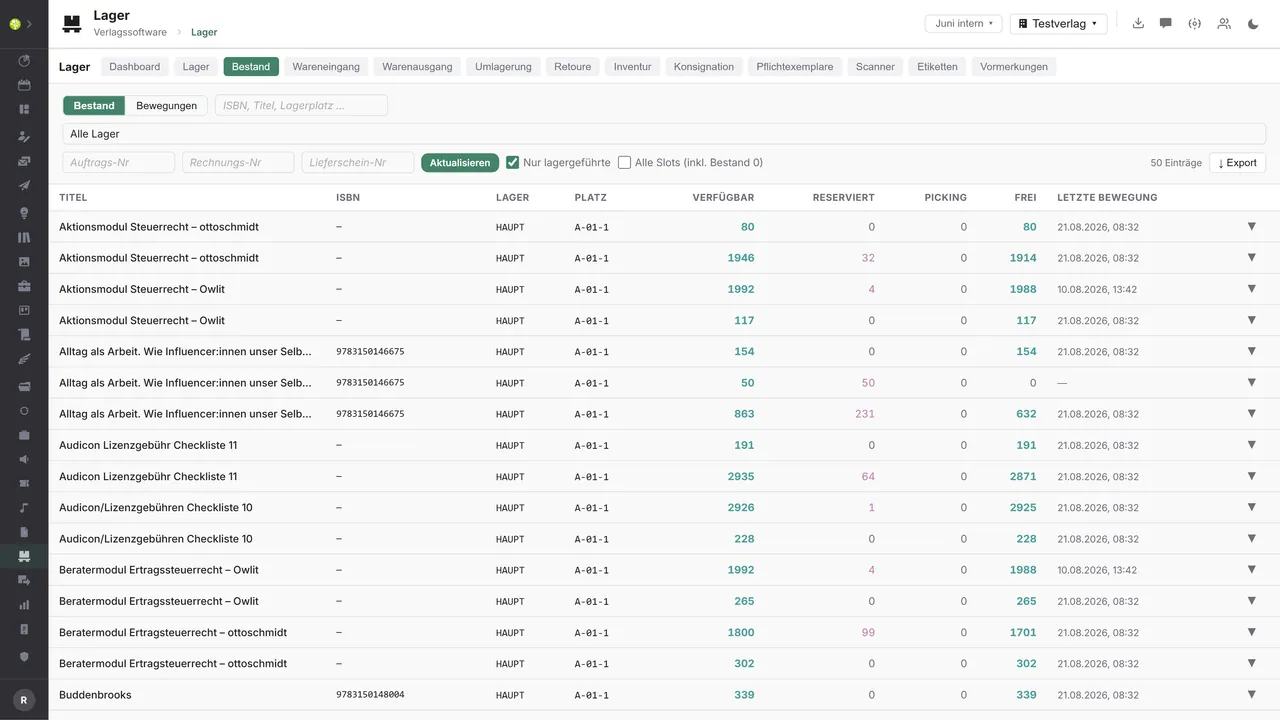

Stock per title and binAvailable, Reserved, Picking and Free with the last movement – filterable by ISBN, title and bin, by warehouse and by order, invoice or delivery note number. The list goes out as an export.
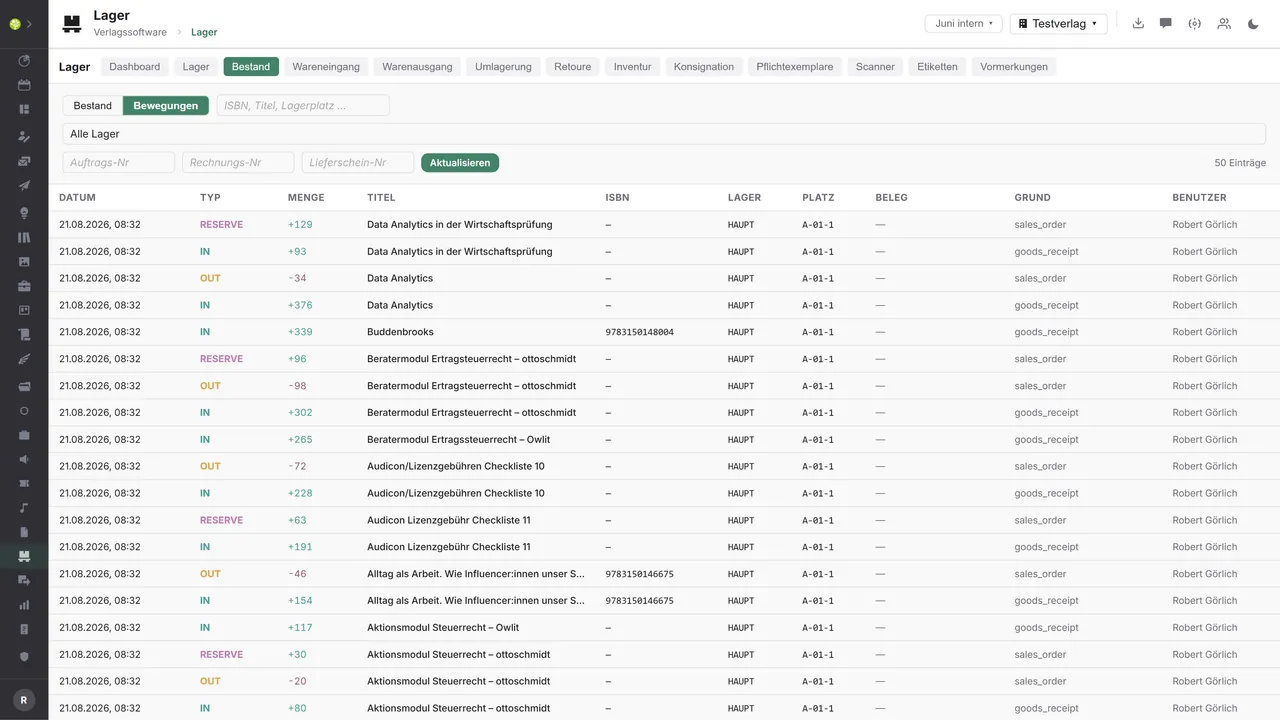
Every movement with a reasonDate, type, quantity, title, warehouse and bin – plus the document, the reason and the user. Receipt, issue and reservation stand in the same history.
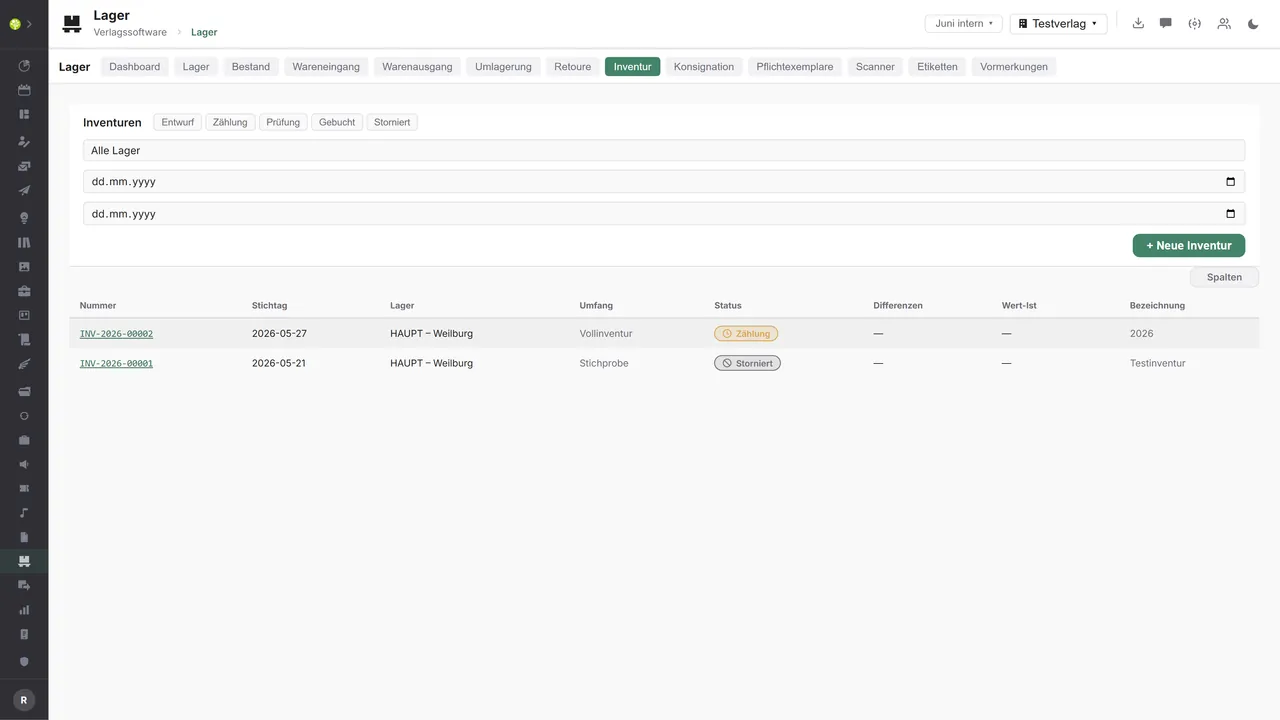
Stocktakes with a statusNumber, effective date, warehouse, scope and status – a full stocktake or a sample, from draft through count and check to posted, with differences and the actual value.

See open.junixx at work. We show you on screen how the software fits your publishing workflows – with no obligation, and with time for your questions.
Book a demoImport and export through the API.
Inside, the warehouse is fully wired up. Outside, the leverage lies in dispatch: labels and tracking, outsourced picking and stock reports to the trade.

Import – from external services
Data flowing into the module from outside:
- Scans from barcode handhelds as EAN or GS1 → goods receipt and stocktaking with no keyboard
- Stock and movement reports from an external warehouse or logistics provider → third-party and consignment stock stays in step
- Shipment status and delivery notification from the shipping provider → tracking at goods issue
- A receipt confirmation from the deposit library → proof at the legal deposit dispatch

Export – to external services
Data the module passes outward:
- The stock list per warehouse and bin as CSV or Excel → analysis outside the application
- The recipient's address and parcel data to the shipping provider → a shipping label at the press of a button
- Picking and dispatch orders to a distributor or logistics provider → outsourced logistics with no double entry
- Availability per ISBN to wholesalers and shops → the trade sees what is really available
Today the stock list goes out as CSV or Excel – as a scheduled run to a fixed destination if you wish – and the stocktake as PDF or Excel; bins come in by CSV. The scanner takes handhelds as keyboard input, and label printing runs through the browser. A carrier connection with labels and tracking, EDI messages to the distributor and the trade, a real barcode encoder for labels and the electronic delivery of legal deposit copies are not connected today – the anchor fields for them are in the data model, and additions come through the central API.
More on the interfaces
Detailed overview from the interface analysis: sources for import and possible targets for export.
Import – from external services

| Source (external) | What is imported | Use in the module |
|---|---|---|
| Scanner hardware and mobile capture devices | Scans as EAN or GS1 | Faster goods receipt and faster stocktaking |
| External warehouse or logistics provider | Stock and movement reports | Third-party and consignment stock in step |
| Carrier | Shipment status and delivery | Tracking at goods issue |
| Deposit library (DNB, regional state library) | Receipt confirmation for the legal deposit copy | Proof at the dispatch entry |
Export – to external services

| Purpose / trigger | External service (examples) | What is exported | Format / standard |
|---|---|---|---|
| Goods issue and dispatch | DHL, DPD, GLS, Deutsche Post | The recipient's address and parcel data | Carrier API, GS1 |
| Outsourced picking | KNV Zeitfracht, Libri, external warehouses | Picking and dispatch orders | EDIFACT DESADV, INSDES |
| Stock report to the trade | Wholesalers, shops | Availability and stock per ISBN | EDIFACT INVRPT, CSV |
| Delivery of the legal deposit copies | DNB, regional state libraries | Delivery data and quantity | ONIX, DNB interface |
| Labels and barcodes | Label service, label printer | Bin and item labels | ZPL, PDF, EAN-13, DataMatrix |
Every feature of the Warehouse.
You will find the complete list in our brochure
What you see above is an excerpt. Every feature of this module – and of all the others – is collected in the open.junixx brochure. We will gladly send it to you, in print or as a PDF. And if you would rather watch than read: we are happy to show you open.junixx live on screen.
Get the brochureWhere goods sit on a shelf, every bin counts.
Books, sheet music, issues, teaching material – as soon as something is printed it has to be stored, picked, returned and counted once a year.






Connected to the publishing ecosystem
- VLB
- IDNV
- doctronic
- Amazon
- Bookwire
- Arvato / VVA
- Brocom
- Prolit
- Zeitfracht
- Magento
- WordPress /
WooCommerce - Shopify
- Shopware
- Wirth & Horn
- Diamant
- DATEV
- BMD
- Abacus
- DHL
- DPD
Get to know open.junixx.
Arrange an appointment with no obligation. We will show you how the Warehouse fits into your publishing routine.