

From the quote to the hour paid for.
The quote straight into a project
An accepted quote becomes a project – with phases, rates and time tracking. No copying out, no second document.
Time tracking with approval
Hours per project and activity, approved one by one. Only approval makes them the basis of an invoice and an analysis.
Fixed prices & retainers
Not every service goes by the hour. Fixed-price items and recurring allowances run in the same project alongside billing by time.
WIP, utilization & profitability
What has been delivered and not yet billed, how full the weeks are, which project pays for itself – each over a period you choose.
When the publisher is a service provider too.
Many publishers sell not only titles but also work, design, campaigns, websites or annual reports, for instance. That needs a different kind of invoice from a book, one built from hours, fixed prices and expenses. That is exactly what this module does, in the same system as the rest.
At the beginning stands the quote. It is not a text field but structured, with sections and line item rows that can be reordered by dragging, an introduction and a closing text in the editor with placeholders, and items from a service catalog. The status carries it from draft through sent to accepted or rejected; attachments can be added, duplicating works, archiving too. And an accepted quote becomes a project at the press of a button. That is the point at which things are otherwise copied out by hand.
The project is the control view, with phases, hourly rates of its own, a budget in euros and in hours, and a status from active through paused to completed. The customers for it come from the CRM. From here the path leads into the times and into project invoicing.
Recording happens per project and activity. What separates this from a timesheet is the approval. A time entry only counts once it is approved, and then for the invoice and for the analysis alike. Where a task system is in use, nothing has to be recorded twice. Projects can be connected to bryve, and the times booked there come in through a secured return channel.
Not every service fits into hours. That is why fixed-price items and retainers sit beside them in the project, with their periods and the recurring allowance that carries many an agency relationship. Expenses come in as a third element, and not by retyping. An existing incoming invoice can be pulled into the project directly from Incoming invoices as a billable expense.
It all comes together in the project's invoicing cockpit, as a summary of times, fixed prices, expenses and retainer, from which order line items with an account assignment are created. From there it is a normal case in Orders & invoices, e-invoice and DATEV included. So that nothing is left lying around, a module-wide inbox collects the open billing cases, and at every order line item it can be traced which agency service it came from.
Four analyses keep an eye on the business: WIP, the work already delivered but not yet billed, shows the position separately for times, fixed prices and expenses. Utilization shows how full the weeks are. Profitability shows which project pays for itself. And the timesheet is the record you can put in front of the customer.
The Agency in the application.

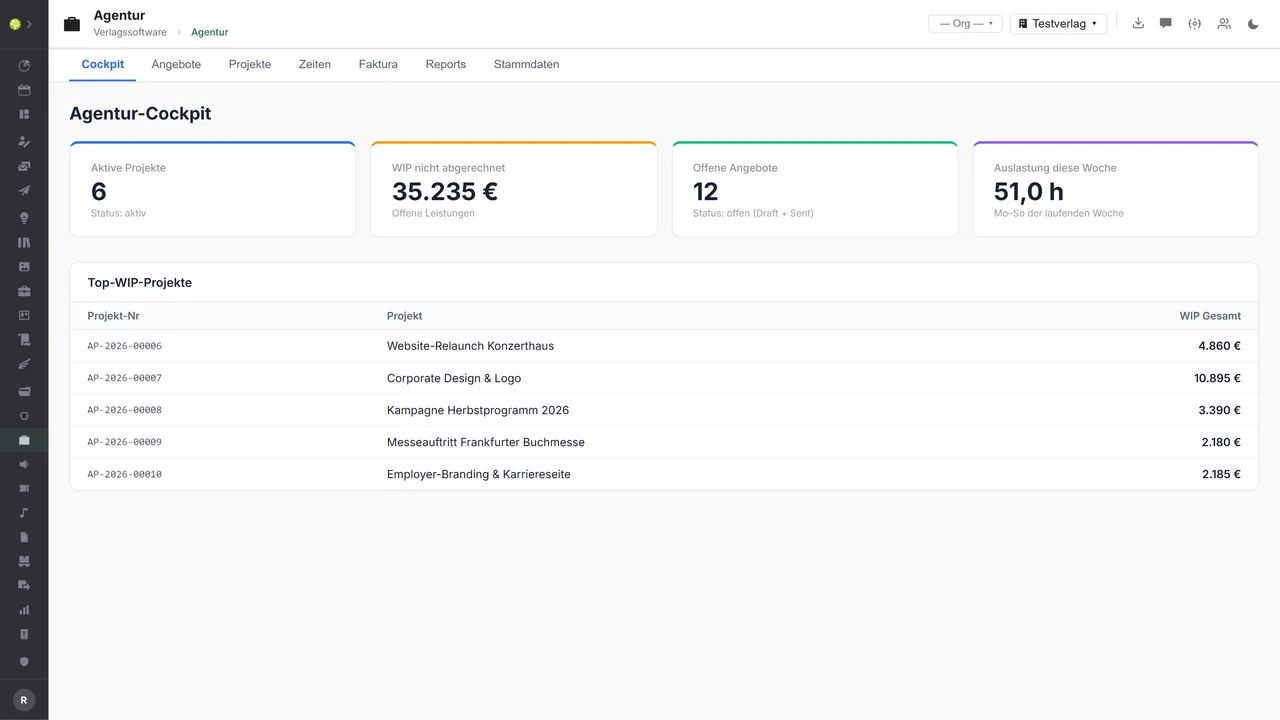

The cockpitActive projects, unbilled services in euros, open quotes and the utilization of the current week – beneath them the projects with the highest unbilled balance.
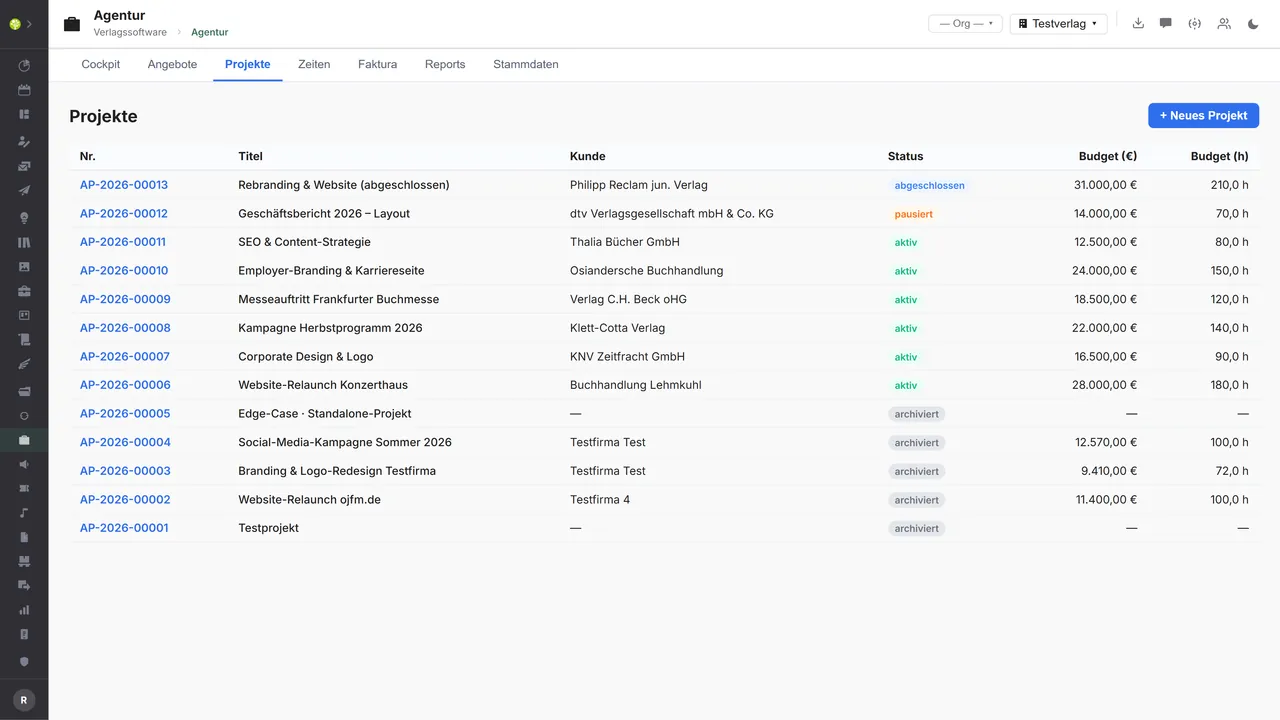
Projects with a budget in euros and hoursNumber, title, customer and status from active through paused and completed to archived – beside them the budget in euros and in hours.
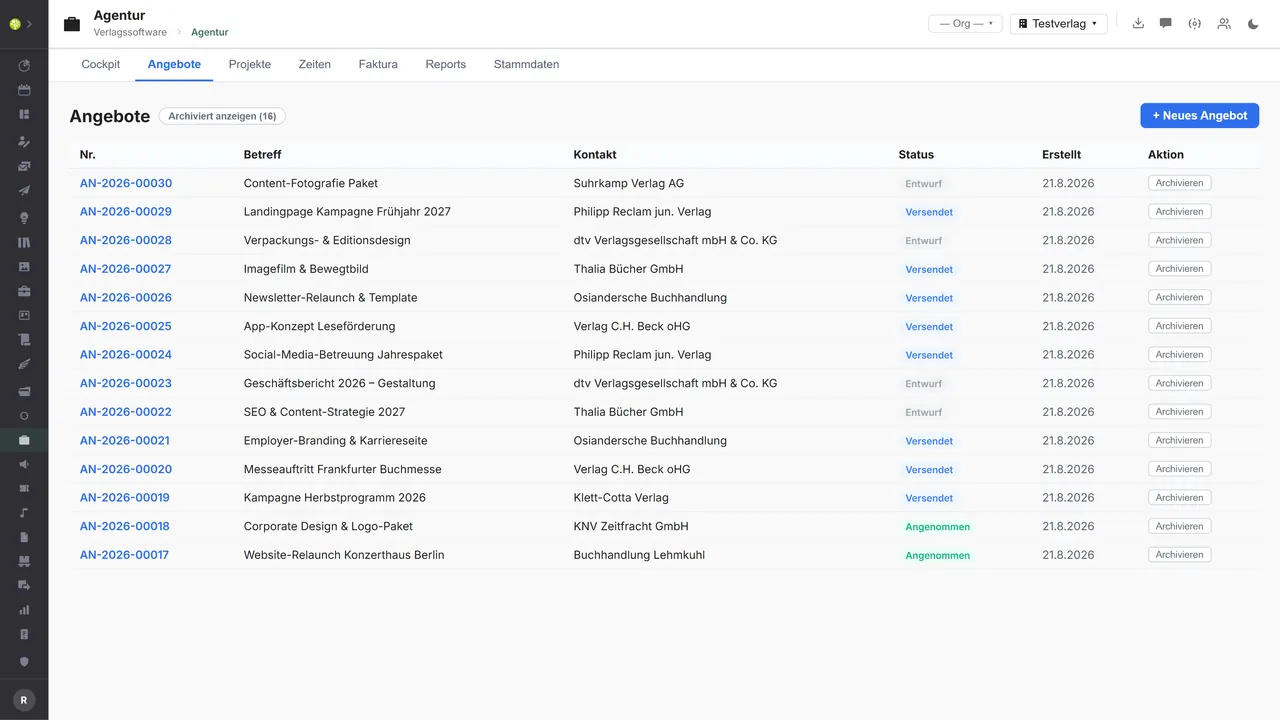
Quotes in their status flowNumber, subject, contact and status: draft, sent, accepted. Archived ones can be shown; an accepted quote becomes a project.
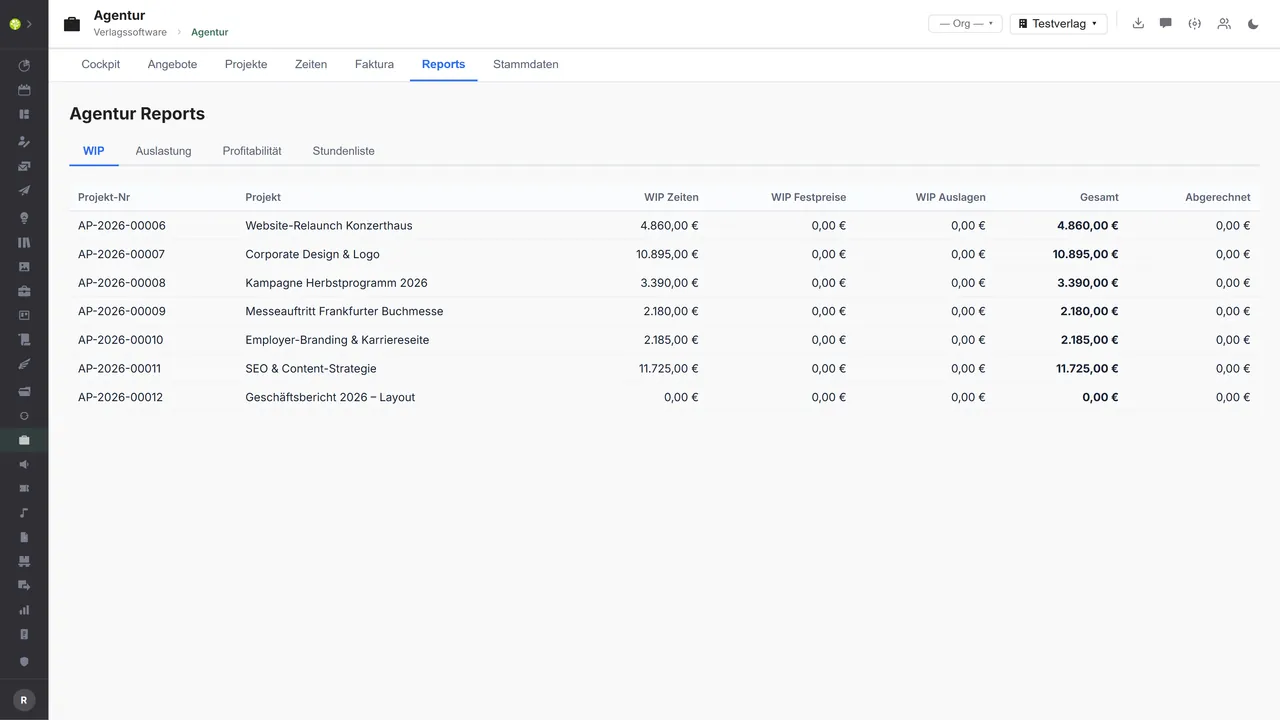
WIP per projectUnbilled services, separated into times, fixed prices and expenses, with a total and the share already billed – beside them the tabs for utilization, profitability and the timesheet.
See open.junixx at work. We show you on screen how the software fits your publishing workflows – with no obligation, and with time for your questions.
Book a demoImport and export through the API.
One real connector is already there: the link to bryve, in both directions. Facing outward, what is mainly missing is the signature under the quote and further sources of time.

Import – from external services
Data flowing into the module from outside:
- Time entries from bryve, created, changed and deleted → recorded there, calculated here
- Times from other time tracking tools → a broader basis where the team works in a mixed way
- Signed quotes from an e-signature service → the quote jumps to accepted by itself
- Meeting times from a calendar or conference system → derive times from appointments

Export – to external services
Data the module passes outward:
- Projects, phases, budgets and tasks to bryve → one project, two tools, one state
- The quote as a PDF, in German or English → ready to send with no intermediate step
- The quote PDF to an e-signature service → signing instead of printing
- The timesheet as CSV to the customer or to controlling → the record you can present
What is built today is the link to bryve – in both directions: projects, phases and budgets go out, time entries come in through a cryptographically signed return channel, and the credentials lie encrypted. The module also produces the quote as a PDF (German or English) and the timesheet as CSV. Not connected are an e-signature for quotes, other time tracking tools and a general file import; the module needs no DATEV path of its own – billing runs through invoicing, and there an e-invoice and DATEV are available platform-wide.
More on the interfaces
Detailed overview from the interface analysis: sources for import and possible targets for export.
Import – from external services

| Source (external) | What is imported | Use in the module |
|---|---|---|
| bryve (in place) | Time entries: create, change, delete | Time tracking with no double entry |
| Time tracking tools (Toggl, Harvest, Clockify) | Times and services | A broader basis for time tracking |
| E-signature service | Signed quotes | The quote sets itself to accepted |
| Calendar or conference system | Meeting times | Derive times from appointments |
Export – to external services

| Purpose / trigger | External service (examples) | What is exported | Format / standard |
|---|---|---|---|
| Project and task reconciliation (in place) | bryve | Projects, phases, budgets, tasks | bryve API |
| Send the quote (in place) | E-mail, customer | The quote as a PDF, German or English | |
| The quote for signature | DocuSign, FP Sign, Skribble | The quote PDF | E-signature API |
| Proof of services (in place) | Customer, controlling | Timesheet | CSV |
| Accounting through invoicing | DATEV | Items billed | DATEV EXTF |
Every feature of the Agency.
You will find the complete list in our brochure
What you see above is an excerpt. Every feature of this module – and of all the others – is collected in the open.junixx brochure. We will gladly send it to you, in print or as a PDF. And if you would rather watch than read: we are happy to show you open.junixx live on screen.
Get the brochureFor publishers who also sell work.
Design, campaigns, websites, annual reports – where your own capacity works for third parties, billing goes by the hour, by a fixed price or by an allowance.



Connected to the publishing ecosystem
- VLB
- IDNV
- doctronic
- Amazon
- Bookwire
- Arvato / VVA
- Brocom
- Prolit
- Zeitfracht
- Magento
- WordPress /
WooCommerce - Shopify
- Shopware
- Wirth & Horn
- Diamant
- DATEV
- BMD
- Abacus
- DHL
- DPD
Get to know open.junixx.
Arrange an appointment with no obligation. We will show you how the Agency fits into your publishing routine.