

Everything for sending out copies.
Cases with a delivery note
Record every dispatch as a case with recipient, items and purpose, and output it as a delivery note PDF.
A clear status workflow
Draft → approved → sent, with an address snapshot on approval and items write-protected afterwards.
Recipients from the CRM
A contact search, quick create and address transfer straight from the case – or a manual recipient as a fallback.
Purposes & text blocks
Fixed purposes plus reusable headers and footers with a default per purpose.
The dispatch from the draft to the document.
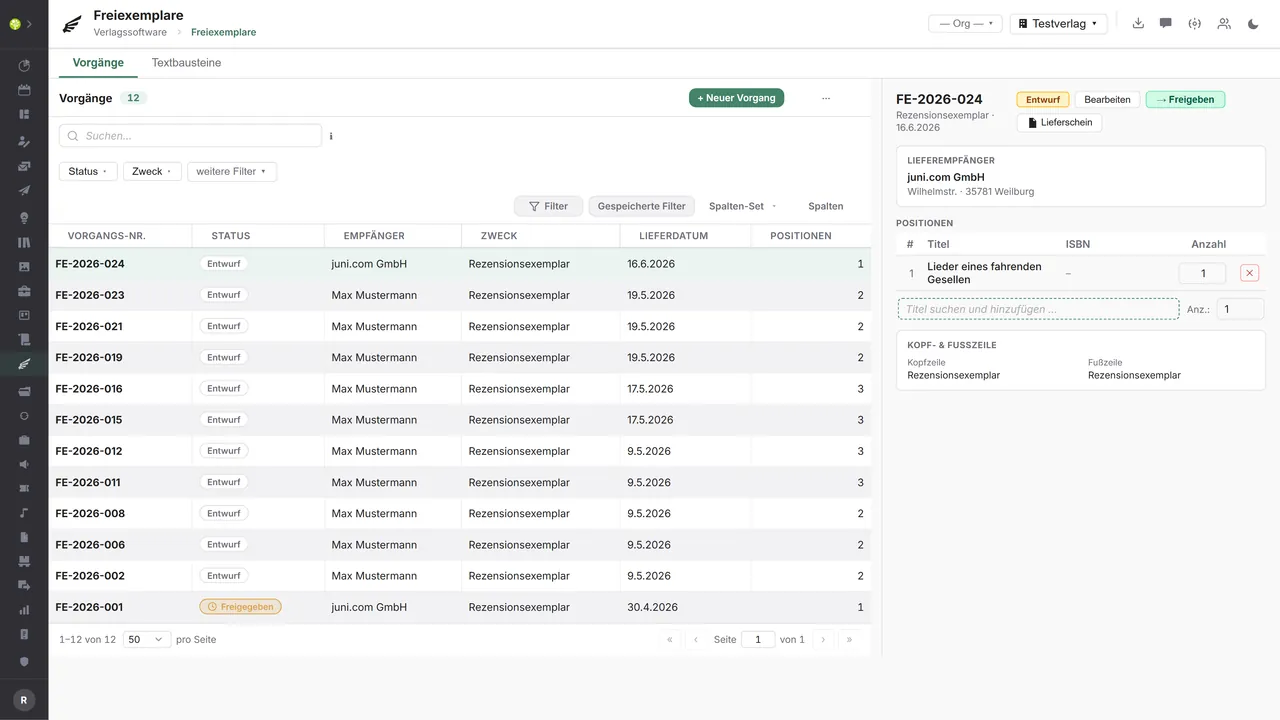
The Complimentary copies module maps the complete path of a copy dispatch, from recording a case through assembling the titles to approval and marking it as sent. The view is built as master-detail: on the left the case list with filters, on the right the detail view of the case chosen.
Every case runs through a three-stage status workflow (draft → approved → sent). On approval the recipient's address is held as a snapshot, so that later changes to the CRM contact no longer alter a document already approved. Items can only be edited in the draft.
Recipients are preferably taken from the CRM, with a contact search and quick create straight from the case; alternatively a manual recipient name is enough. Titles are added as items through a title search including the ISBN and are saved as a snapshot.
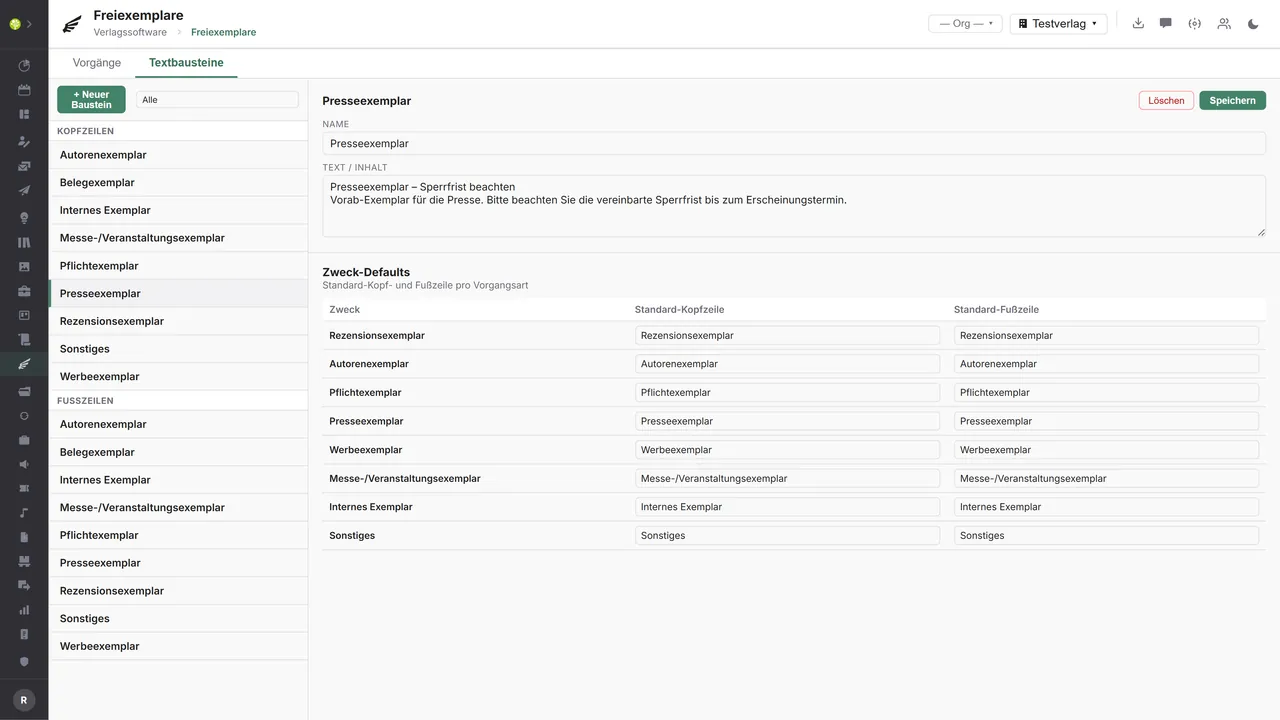
Headers and footers for the delivery note are maintained through reusable text blocks. A default header and footer can be set per purpose, which is applied automatically to new cases; a text of its own can be used per case instead.
Complimentary copies in the application.

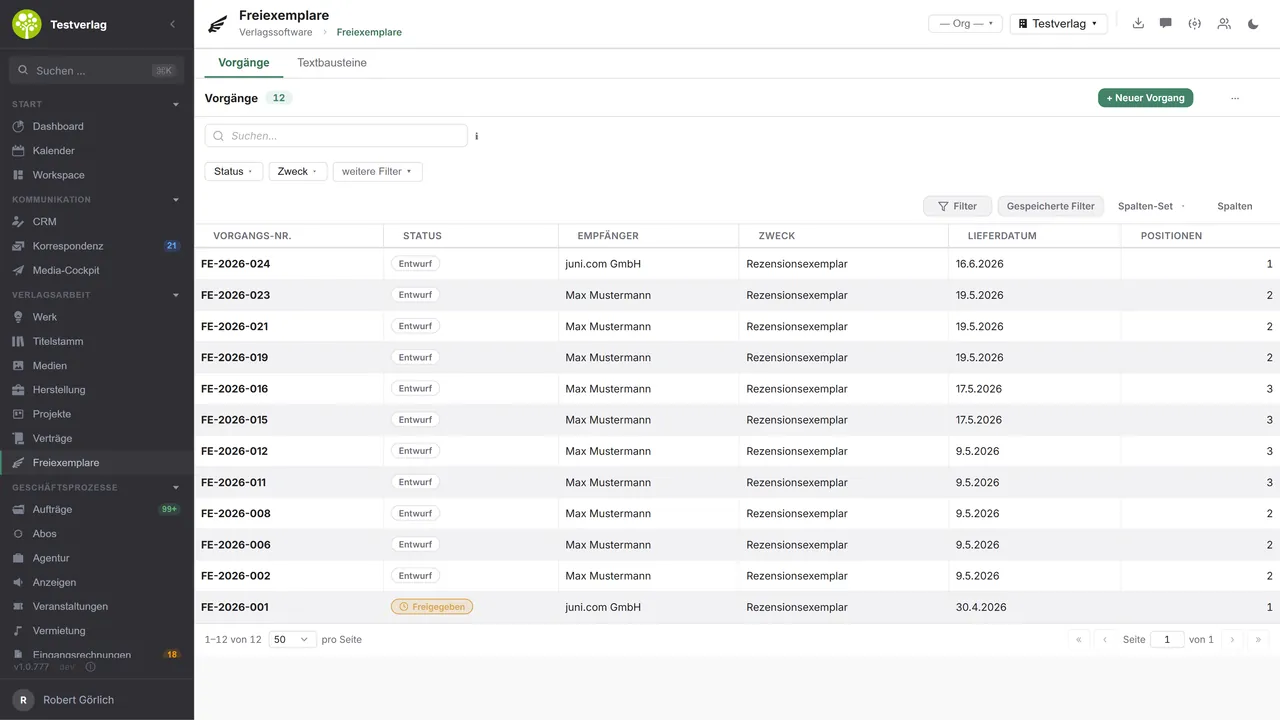

Every case at a glanceThe overview shows the status, recipient, purpose and delivery date of every dispatch – filterable by status and purpose.
Edit a caseA master-detail view: on the left the list, on the right the case opened, with the delivery recipient, the items and a header and footer.
Maintain text blocksReusable headers and footers, each with a default per purpose for new cases.

See open.junixx at work. We show you on screen how the software fits your publishing workflows – with no obligation, and with time for your questions.
Book a demoImport and export through the API.
Every purpose has a different external addressee – from a review portal through parcel services to the national library. Through the central open.junixx API, Complimentary copies can therefore be connected in a purpose-driven way: export cases outward and import the responses back.

Import – from external services
Data that flows back into the module from outside:
- Review requesters from portals such as NetGalley or vorablesen.de → new cases as a draft
- The tracking number & delivery status from parcel services (DHL, DPD, GLS)
- ISBN metadata from VLB/MVB and the DNB → fill the items automatically
- Receipt confirmations from the DNB and libraries → proof that the obligation is met

Export – to external services
Data the module passes outward:
- Dispatch orders to publishers' distributors (KNV Zeitfracht, Libri, Umbreit) by EDIFACT
- Shipping labels through parcel service APIs (DHL, DPD, GLS)
- DNB delivery lists for legal deposit copies (ONIX)
- The value of the complimentary copies to DATEV / accounting (supply free of charge)
Today the module produces covering letters and delivery notes as PDF and exports case data by CSV; the external connectors can be added – purpose-driven, depending on the recipient – through the central API.
More on the interfaces
A detailed overview from the interface analysis: sources for import and possible targets for export – depending on the purpose.
Import – from external service providers

| Source (external) | What is imported | Use in the module |
|---|---|---|
| Review platforms (NetGalley, vorablesen.de, LovelyBooks/Lesejury, blogger portals) | The requester of a review copy (name, address, title wanted) | Create new cases/items automatically as a “draft” |
| Media monitoring/clipping (Landau Media, PMG Presse-Monitor, Ausschnitt) | Published reviews/clippings (outlet, date, link) | A feedback loop: link the review copy → the actual review at the case (proof of ROI) |
| Parcel services (DHL/DPD/GLS) | Tracking number + delivery status | Status “sent” → “delivered”, tracking at the case |
| The publisher's distributor | Dispatch/stock confirmation (DESADV) | Confirmation of delivery; the stock issue |
| DNB / libraries | Receipt confirmation of the legal deposit | Proof at the case that the obligation is met |
| Media and journalist databases (Zimpel/Cision) | Press and journalist contacts | Maintain recipient suggestions and distribution lists |
| Metadata services (VLB/MVB, DNB via SRU/OAI-PMH) | ISBN metadata (title, author, format) | Fill and validate items automatically by ISBN |
| Address validation (Deutsche Post Direkt, Uniserv) | Checked and standardized addresses | Avoid returns caused by wrong addresses |
Export – to external service providers

| Purpose / trigger | External service provider (examples) | What is exported | Format / standard |
|---|---|---|---|
| Physical dispatch (every purpose) | Publishers' distributors and wholesalers: KNV Zeitfracht, Libri, Umbreit, GVA, Prolit, Sigloch | A picking/dispatch order: ISBN, quantity, delivery address, case no. | EDIFACT ORDERS/DESADV, BWA, CSV |
| Direct dispatch (review, promotional, author's copy) | Parcel services: DHL, DPD, GLS, Deutsche Post | The recipient's address + parcel data → generate a shipping label | The carriers' REST API, GS1 |
| Legal deposit copy | The German National Library (DNB) + the state and regional libraries responsible | A delivery list/note: title, ISBN, publication data, quantity | DNB delivery, ONIX, MARC21 where applicable |
| Review copy (digital) | NetGalley, Edelweiss+ (Above the Treeline) | Title metadata + release of digital reading copies, distribution lists | ONIX for Books, CSV, partner API |
| Press copy | Press distribution/PR: news aktuell/Zimpel, Cision | A press distribution list (recipient, title, embargo) | CSV, partner API |
| Tax/accounting (supply free of charge) | DATEV / financial accounting | The value of the complimentary copies (quantity × valuation price) for VAT & cost accounting | DATEV format (CSV/EXTF) |
| Reporting/BI | A data warehouse, BI tools | Case and item data for analyses | CSV, JSON, OData |
Every feature of Complimentary copies.
You will find the complete list in our brochure
What you see above is an excerpt. Every feature of this module – and of all the others – is collected in the open.junixx brochure. We will gladly send it to you, in print or as a PDF. And if you would rather watch than read: we are happy to show you open.junixx live on screen.
Get the brochureParticularly strong for these kinds of publishers.
Where review, press and legal deposit copies are part of the daily round, the module saves the most work – anywhere a distribution list and a deposit obligation follow a book product.




Connected to the publishing ecosystem
- VLB
- IDNV
- doctronic
- Amazon
- Bookwire
- Arvato / VVA
- Brocom
- Prolit
- Zeitfracht
- Magento
- WordPress /
WooCommerce - Shopify
- Shopware
- Wirth & Horn
- Diamant
- DATEV
- BMD
- Abacus
- DHL
- DPD
Get to know open.junixx.
Arrange an appointment with no obligation. We will show you how the Complimentary copies module fits into your publishing routine.