

Advertising space, sold and billed.
From booking to invoice
An advertiser books an ad slot on an object in a given format and issue – on invoicing, the order is created by itself, complete with the account assignment.
The price from the rate card, the discount from the scale
Base price, position and color surcharge or a millimeter rate – above them discounts with a priority, a tie to an object and stackability. The annual tier per advertiser is worked out by the module itself.
Formats with measurements and a preview
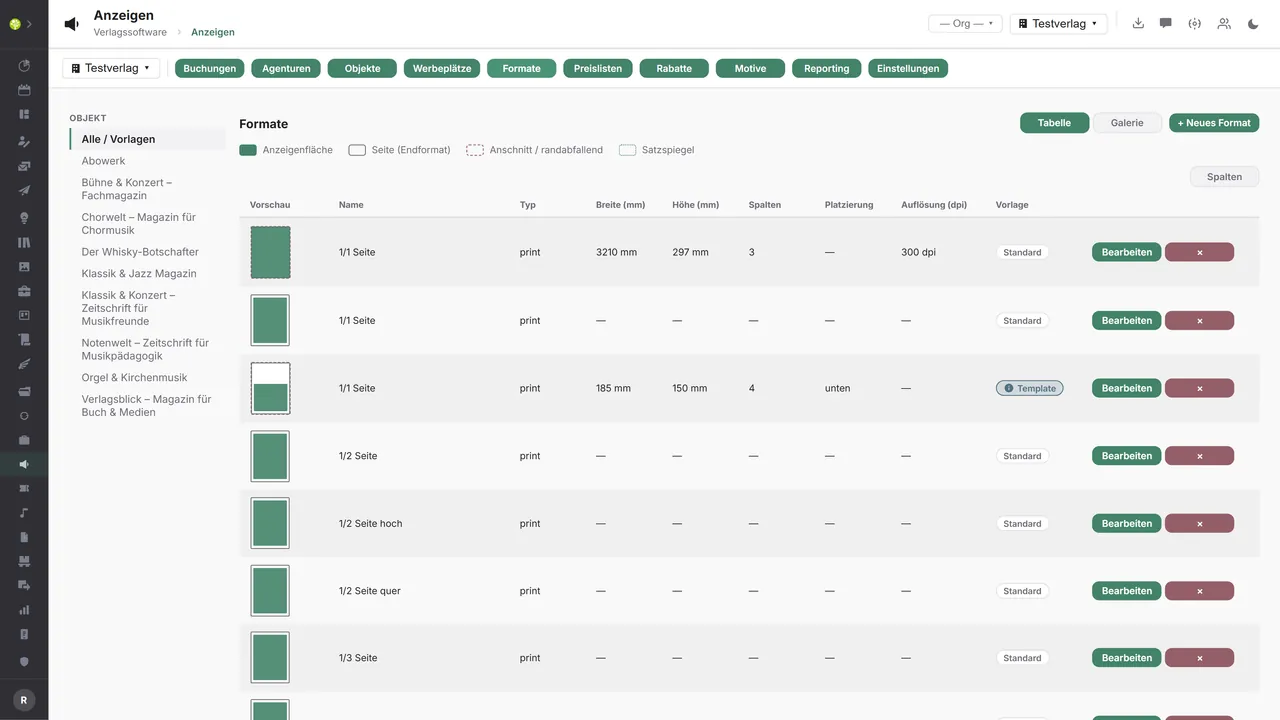
Width, height, columns, bleed, placement, resolution and pixel dimensions, plus the permitted file types and a maximum file size – with a preview of the ad area and the type area.
Print artwork, versioned and approved
Upload, version and approve artwork per advertiser and format – approved artwork goes into the printer's hot folder.
One booking, one continuous case.
The advertising module markets advertising space: an advertiser books an ad slot on an object (a periodical, a magazine, a yearbook) in a particular format and issue. Objects and issues hang on the works and titles from Work and Title data, advertisers and agencies come from the CRM.
A booking follows a clear path: draft, quote, reserved, confirmed, artwork outstanding, approved for print, published, invoiced, closed, with cancellation and complaint as special cases. For every booking the list shows customer, agency, product and object, the net price and the status; the next step sits beside it as a button.
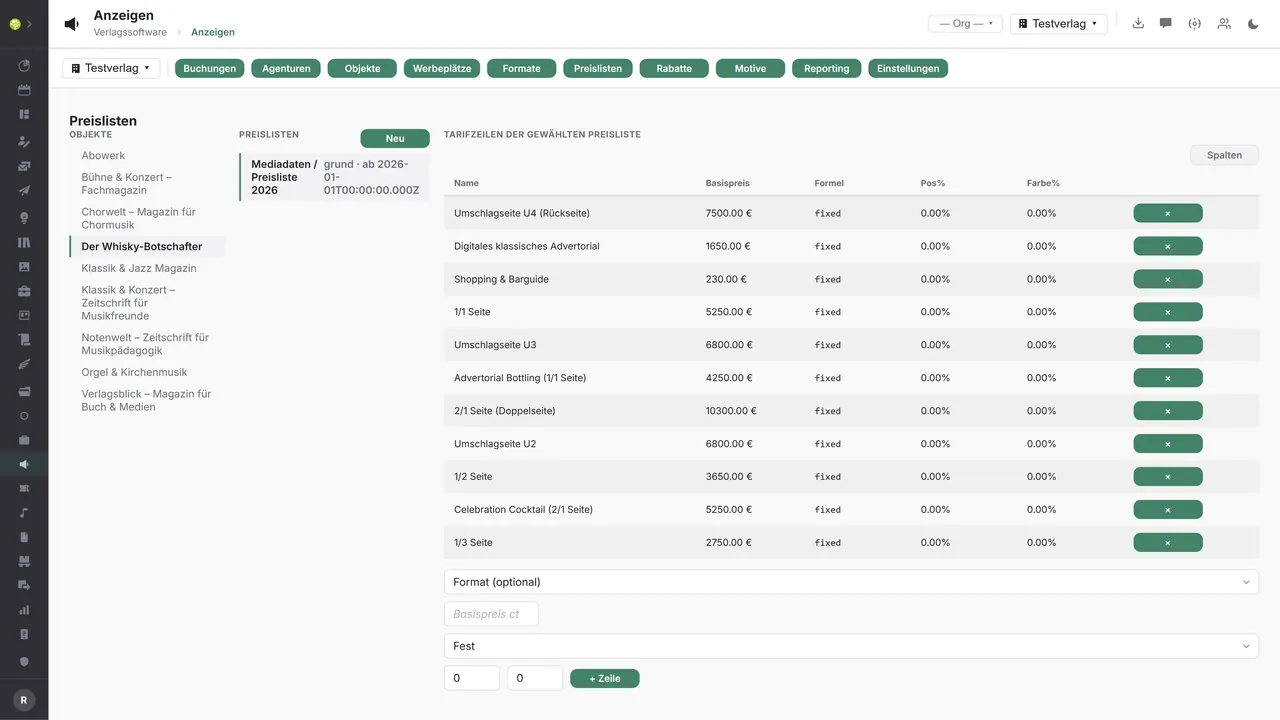
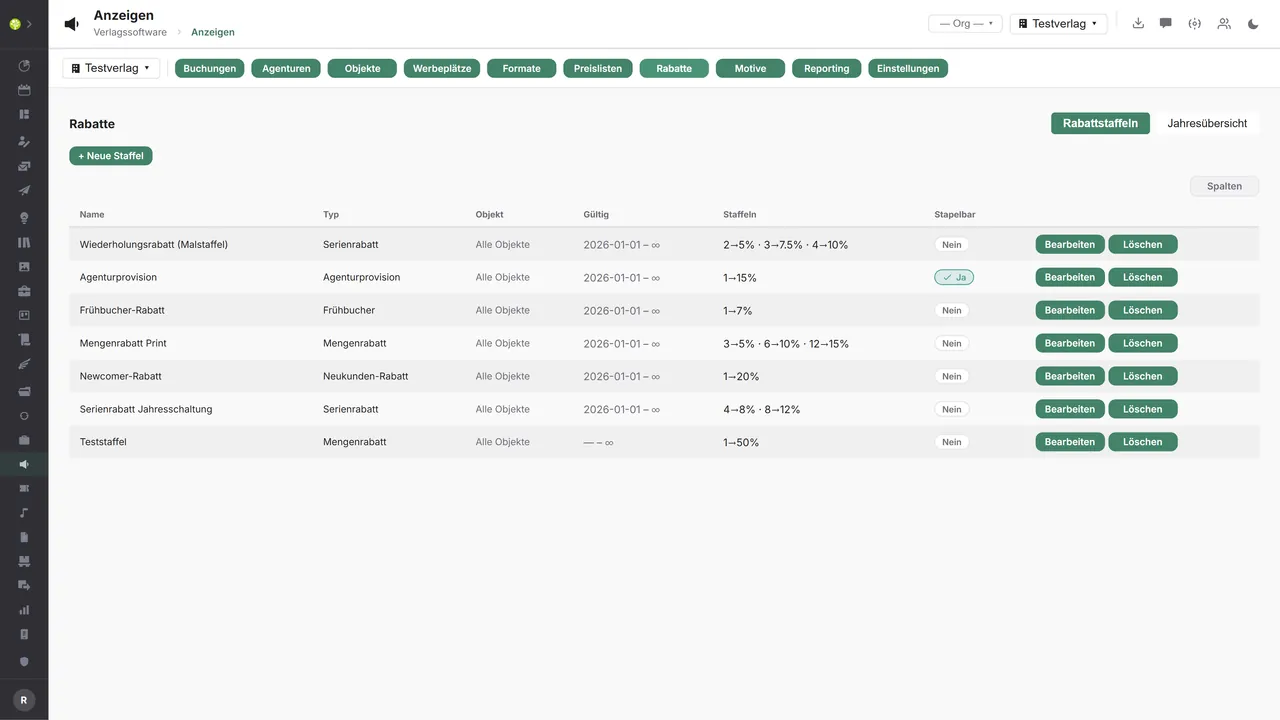
The price comes from the object's rate card, with a base price per ad slot, a position and color surcharge or a millimeter rate, valid from a given date. Above that sit the discounts (series, volume, early booking and new customer discount, agency commission) with a priority, a tie to an object, a period of validity and the question of whether they stack. The scale takes effect at threshold values; the annual overview shows revenue, bookings and the volume tier reached for each advertiser.
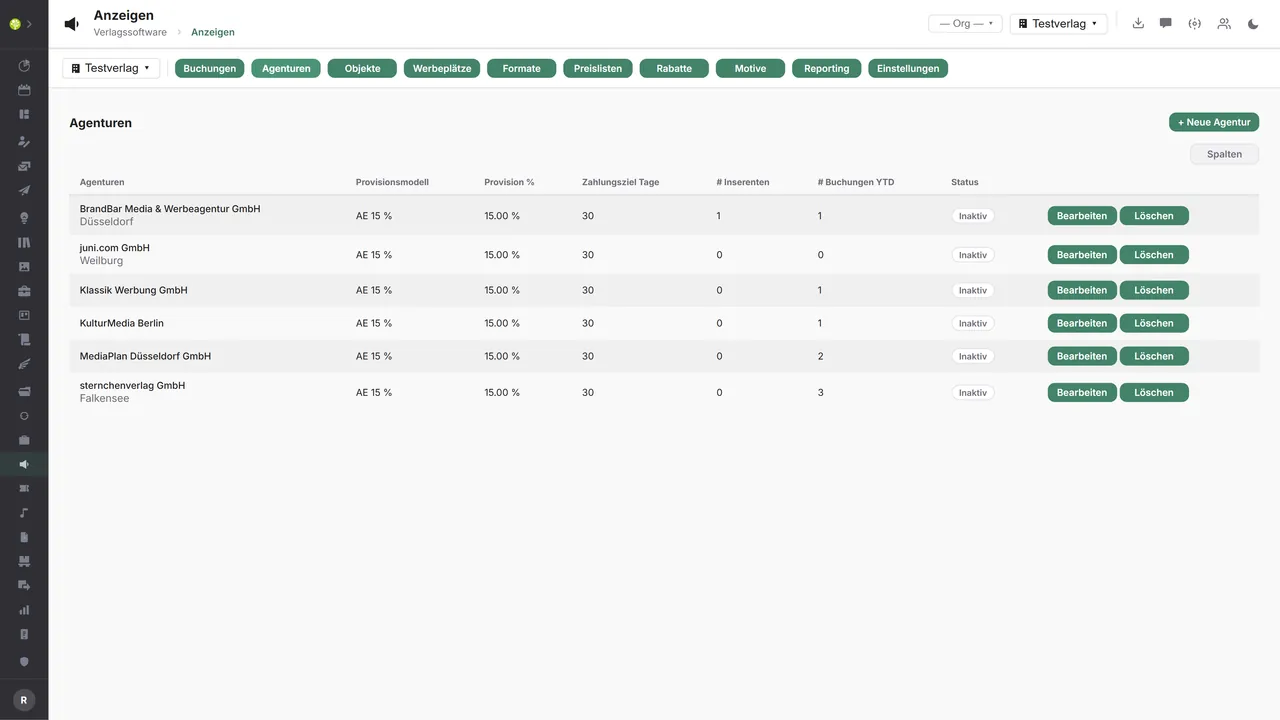
Formats carry their measurements with them, for print as for digital, and the preview lays the ad area, trim size, bleed and type area on top of one another. The print artwork itself sits per advertiser and format as versioned pieces with a status from draft through approved to archived. Agencies bring rules of their own (commission model, commission rate, payment period), and beside them stands which agency works for which advertiser.
Once a booking is invoiced, the order is created by itself, with the ad slot's account assignment, that is cost center, cost unit and tax product group. From there everything takes the usual path through Orders & invoices; cancellation and credit note act back on the order. At the same time the advertising dates appear in the Media Cockpit on the same timeline as posts, press and publication dates.
Formats stay easy to picture. Each one shows its area as a scaled thumbnail in relation to the full page, in the list, in the gallery and live in the editor. “1/3 page landscape” no longer has to be pieced together from millimeter figures.
And the analysis keeps up: net revenue over the period, grouped by month, object, advertiser, agency or status, plus the pipeline of active bookings, the fill rate per object and the agency commissions with a total and a paid and an outstanding share.
Advertising in the application.

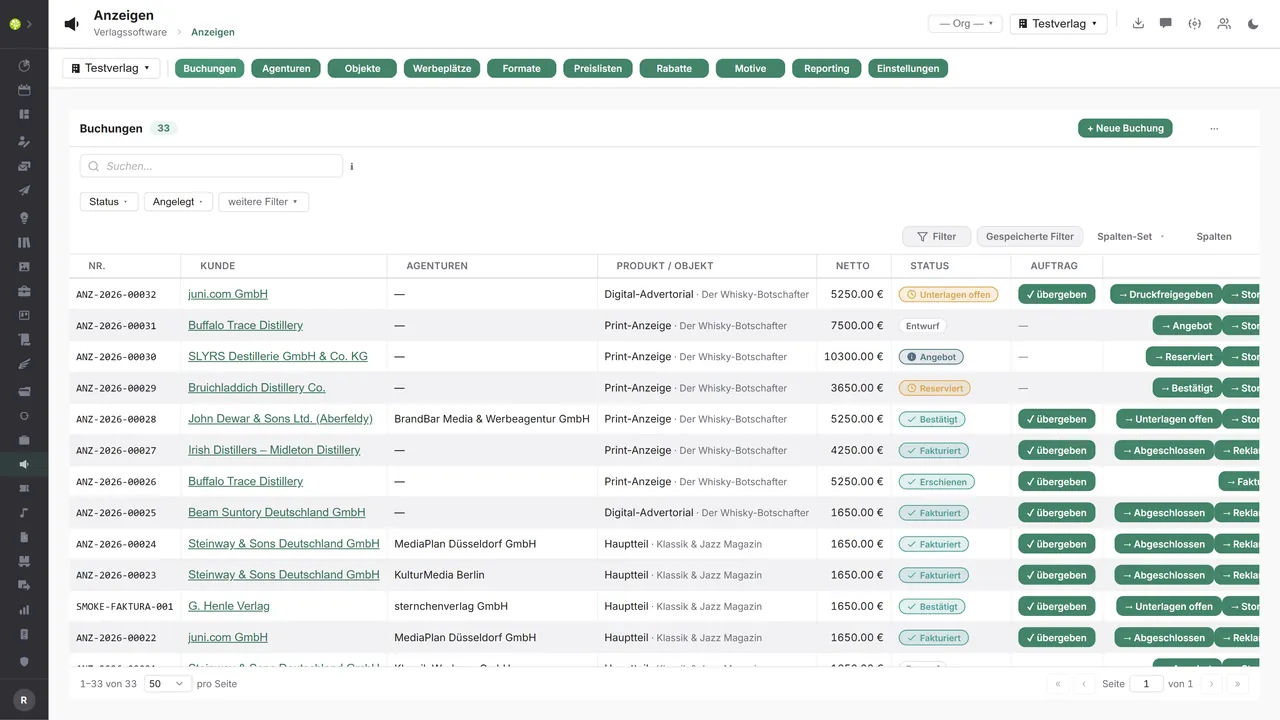

Every booking with its next stepNumber, customer, agency, product and object, net price and status – on the right the button for the next step: quote, reserved, confirmed, approved for print, invoiced.
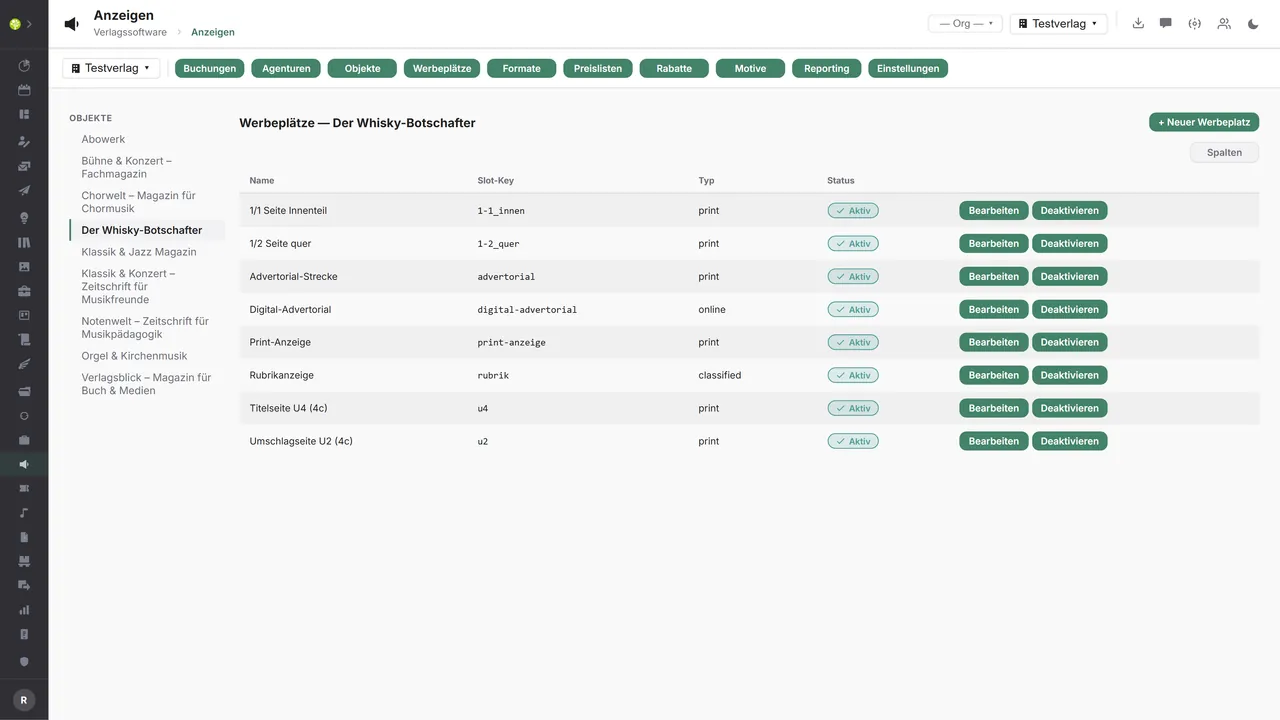
Ad slots per objectFor every object the slots with name, slot key and type – print, online or classified –, each one activatable on its own. On the left the tenant's objects.
Formats with measurements and a previewWidth, height, columns, placement and resolution – plus the preview with ad area, trim size, bleed and type area. Standard, or as a template for every tenant.
The rate card and its rate linesOn the left the rate card with its validity, on the right the lines: base price per ad slot or format, a fixed formula or a millimeter rate, position and color surcharge.
Discounts and their scalesSeries, volume, early booking and new customer discount as well as agency commission – with type, tie to an object, validity, the tiers and whether they stack.
Agencies with commissionCommission model, commission rate and payment period per agency – beside them the number of assigned advertisers and of bookings in the current year.

See open.junixx at work. We show you on screen how the software fits your publishing workflows – with no obligation, and with time for your questions.
Book a demoImport and export through the API.
Advertising opens on three sides: to prepress for the artwork, to the ad server for online delivery, and to accounting for revenue and commission.

Import – from external services
Data flowing into the module from outside:
- Impressions, clicks and costs from the ad server → key figures on the campaign
- A PDF/X check report from the preflight service → check artwork for content, not just file type and size
- Bookings, artwork and box number inquiries from advertisers and agencies → incoming orders with no data entry
- Incoming payments from the payment service provider → mark self-service ads as paid

Export – to external services
Data the module passes outward:
- Approved artwork with its placement into the printer's hot folder
- Campaign, targeting and creative to the ad server
- Revenue and agency commission to accounting
- Rates, formats and dates as a media kit to the website and portals
Today the module accepts artwork up to 200 MB – PDF, JPG, PNG, PostScript, ZIP and HTML –, versions it, approves it and sends approved artwork into the hot folder. Revenue and commission go out through the accounting templates for DATEV, BMD, Lexware, Sage and Diamant, and an event outbound queue reports confirmed, published and canceled bookings. The PDF/X preflight check and a production ad server connection can be added through the central API.
More on the interfaces
Detailed overview from the interface analysis: sources for import and possible targets for export.
Import – from external services

| Source (external) | What is imported | Use in the module |
|---|---|---|
| Ad server (Google Ad Manager and others) | Impressions, clicks, costs | Key figures for the online campaign |
| Preflight service (callas pdfToolbox, Enfocus) | PDF/X check report | Check artwork for content |
| Agency and advertiser (self-service) | Bookings, artwork, box number inquiries | Incoming orders with no data entry of your own |
| Payment service provider | Incoming payments for self-service ads | Status paid and published |
Export – to external services

| Purpose / trigger | External service (examples) | What is exported | Format / standard |
|---|---|---|---|
| Artwork delivery for print | The printer's hot folders and portals | Approved artwork with its placement | PDF/X, hot folder |
| Online delivery | Google Ad Manager, media sales houses | Campaign, targeting, creative | Ad server API |
| Accounting and commission | DATEV, BMD, Lexware, Sage, Diamant | Revenue and agency commission | DATEV EXTF, CSV |
| Media kit and rate cards | Website, media kit portals | Rates, formats, dates | CSV, JSON, PDF |
| Proof of publication | Advertiser and agency | A voucher copy as proof | PDF, address |
Every feature of the Advertising module.
You will find the complete list in our brochure
What you see above is an excerpt. Every feature of this module – and of all the others – is collected in the open.junixx brochure. We will gladly send it to you, in print or as a PDF. And if you would rather watch than read: we are happy to show you open.junixx live on screen.
Get the brochureParticularly strong for these kinds of publishers.
Anywhere your own objects carry advertising space – periodicals and magazines, professional titles, yearbooks, program booklets and festival catalogs.



Connected to the publishing ecosystem
- VLB
- IDNV
- doctronic
- Amazon
- Bookwire
- Arvato / VVA
- Brocom
- Prolit
- Zeitfracht
- Magento
- WordPress /
WooCommerce - Shopify
- Shopware
- Wirth & Horn
- Diamant
- DATEV
- BMD
- Abacus
- DHL
- DPD
Get to know open.junixx.
Arrange an appointment with no obligation. We will show you how the Advertising module fits into your publishing routine.