

From quote to payment.
The whole life cycle in three phases
Approval, delivery and invoicing run as traceable phases with a process tracker and a “next action” bar – delivery status and invoicing status kept separately.
E-invoicing to XRechnung and ZUGFeRD
Pre-check, assembly, revalidation and output as XML or as a hybrid PDF are all part of the module – routing ID and validation included.
Pricing you can explain
Customer price, tiered price, volume discount, customer discount, campaign or header discount: every calculation can be traced back to its source through the discount rule trail.
Open items, payments, revenue
Overdue invoices with totals, recording a payment and printing a reminder from the same list – plus invoice journal and DATEV posting batch.
One document, one continuous path.
The order is the publisher's financial hub: this is where the receivable arises, where delivery happens, where payment comes in. The module carries quotes and orders from draft through approval, delivery and invoicing to payment and dunning, with customer, address and tax data from the CRM and title, price and stock data from title data.
The order list shows what needs doing first. Above the table sit key figures in two groups: counts for today's orders, drafts and partial deliveries, and revenue for the month, 30 days and the year; beside them, open deliveries, open invoices and the number of invoiced orders at a glance. From there you go into the order, whose three phases run along as a process tracker; the system checks whether a status change is permitted, and several orders can change status together.
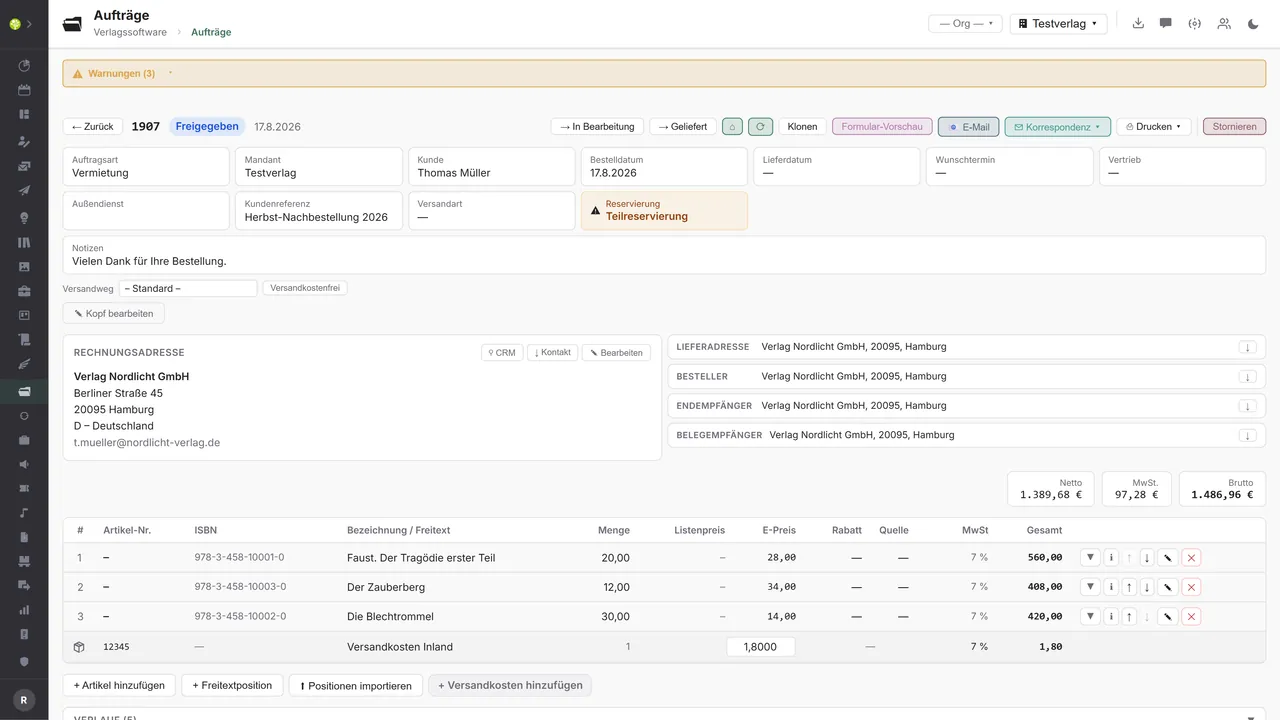
A line item knows where it comes from: from sales, from rental, from an event, from a subscription, an advertisement or as a contribution from production. Each source brings tabs of its own – hire period and performances, date and attendees, delivery rhythm and notice period, or format and publication period. Line items can also come from Excel or CSV: the assistant resolves them by ISBN, EAN or item number and asks when something is ambiguous.
Prices and discounts are worked out by the pricing engine itself, and it discloses where a discount comes from; overriding by hand is possible but stays visible. Titles held in stock are reserved. Where stock does not cover the order, backorders arise with an event history of their own, and partial delivery offers the choice between a follow-up order, splitting and holding. Stock levels and movements come from the warehouse.
The tax rate is a result, not an entry: it follows from the tax case (domestic, EU with and without a VAT identification number, export, country of destination under the One-Stop Shop) and appears as a preview in the quote already, not only on the invoice. Deviating deliberately remains possible, but is shown as a deviation rather than silently accepted; the tax total is grouped by rate, not by code.
A bundle from title data is entered as a single line item and resolves into its components. Individual parts can be deselected while entering, and every component carries its own price, its own tax and its own reservation. The order binds the version of the bundle it was created with: if the parts list is changed later, a new version arises and the existing order stays as it was.
Invoicing runs with a preview, an approval and a check of the accounting period; credit notes can cover the whole document or single lines. The e-invoice is produced as XRechnung or ZUGFeRD, as XML or as a hybrid PDF, with a pre-check and validation. The documents (order confirmation, invoice, delivery note, reminder) come from the tenant's layout and go out as a draft into correspondence or directly by email.
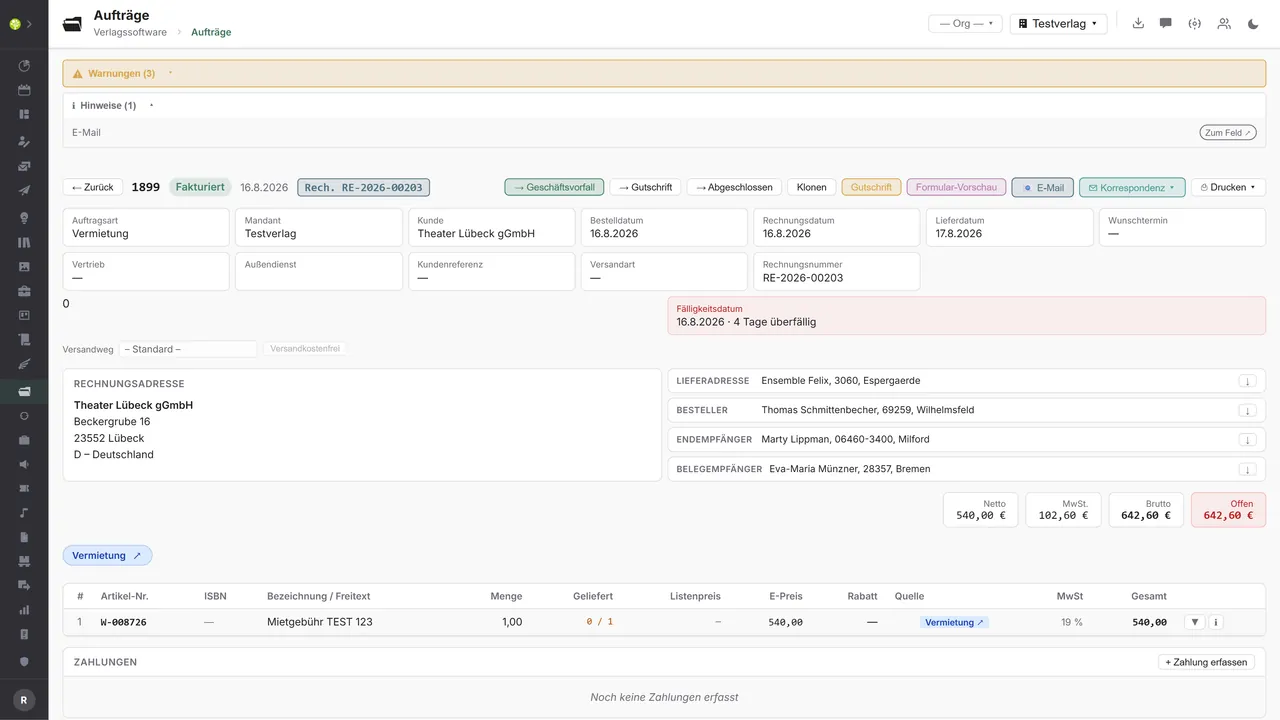
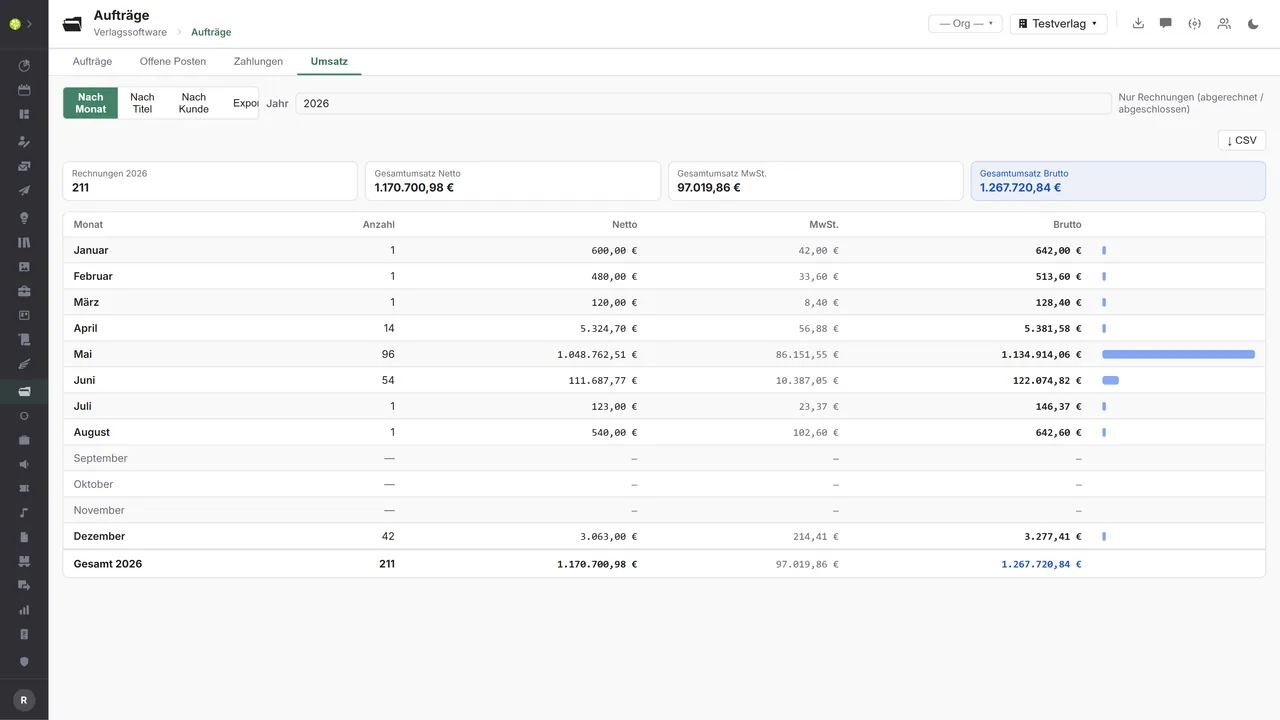
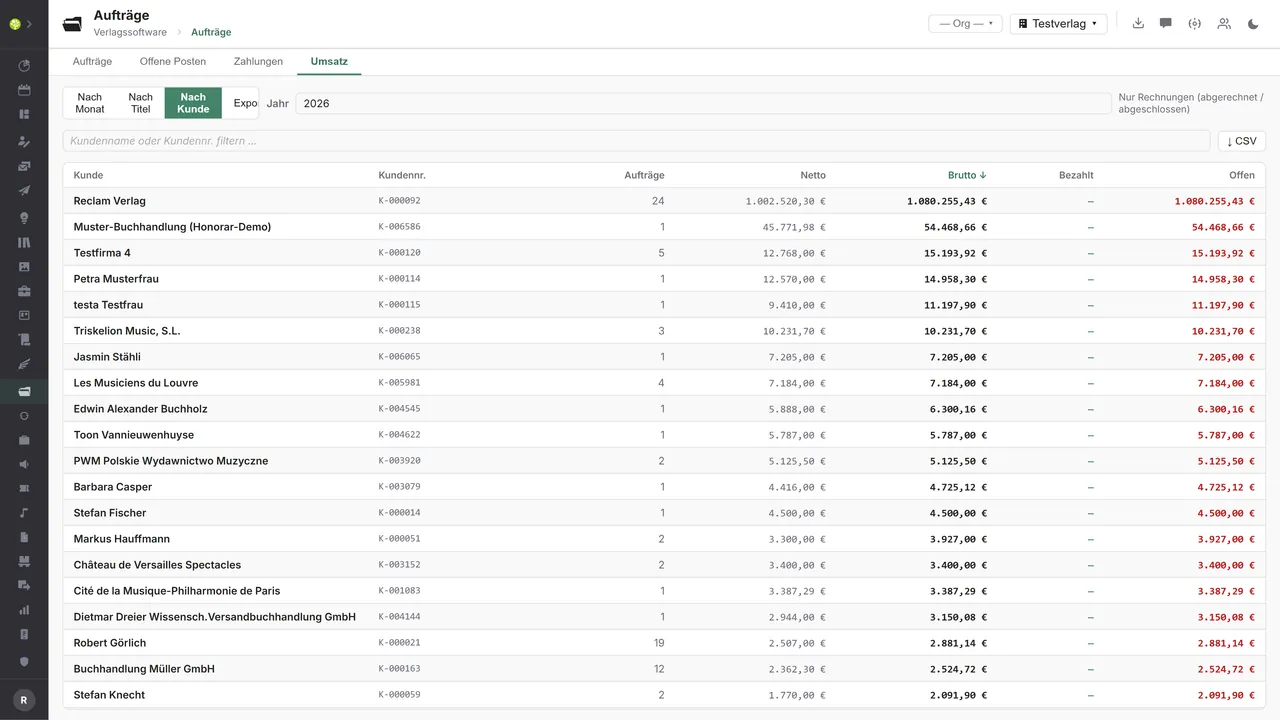
Whether payment has come in is shown by the open items. Overdue invoices appear there with totals; a payment can be recorded and a reminder printed in one step, with dunning levels from a friendly reminder up to the fourth notice. The payment overview filters by payment method and totals up; the revenue view calculates by month, title and customer, as CSV, as an invoice journal or as a DATEV posting batch for the accountants.
Orders in the application.

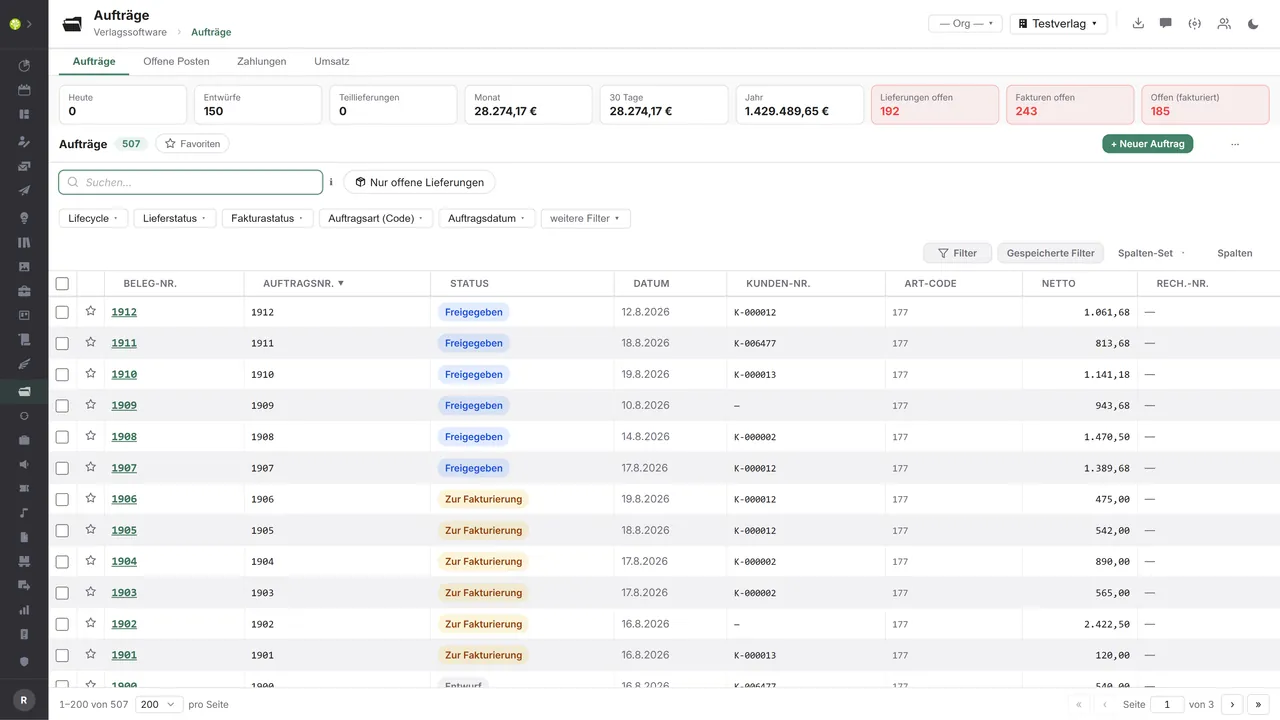

Every order with its key figuresAt the top the counts – today, drafts, partial deliveries – and the revenue for the month, 30 days and the year, beside them open deliveries and invoices. The list filters by life cycle, delivery and invoicing status, order type and date – with multiple selection for changing status in bulk.
The order with its line itemsHeader data, all four addresses taken over from the CRM, net, VAT and gross – and below them the line items with quantity, unit price, discount, source and tax rate, plus shipping costs and line item import.
Invoiced, with the due date in viewInvoice number and date, the due date as a warning, the outstanding amount beside net, VAT and gross – and the payments recorded directly below.
Revenue by monthThe year's invoices, total revenue net, VAT and gross – and below them every month with counts and amounts. As CSV, as an invoice journal or as a DATEV posting batch.
Revenue by customerThe same analysis sorted by customer: number of orders, net, gross, paid and outstanding – filterable by name or customer number.

See open.junixx at work. We show you on screen how the software fits your publishing workflows – with no obligation, and with time for your questions.
Book a demoImport and export through the API.
The document life cycle shows where the outside benefit lies: create, transmit, get paid, post. E-invoicing and the DATEV export are in place – the route to Peppol, the bank and the payment provider closes the circle.

Import – from external services
Data flowing into the module from outside:
- Incoming payments from payment providers → post payments and close open items
- Account transactions from your bank → automatic matching by invoice number
- Incoming XRechnung and ZUGFeRD documents → order or credit note as a draft
- Order confirmation, delivery note and availability from the wholesaler → clear backorders

Export – to external services
Data the module passes outward:
- Finished XRechnung to Peppol access points and the public sector portals
- ZUGFeRD and Factur-X hybrid PDFs to business customers
- Outgoing invoices as a DATEV posting batch to the accountants
- SEPA direct debit and payment link to the bank and the payment provider
Today the module produces the e-invoice entirely in-house: XRechnung 3.0, ZUGFeRD and Factur-X, as XML and as a hybrid PDF, with internal and KoSIT validation – and it reads other parties' e-invoices just as well. Add to that the DATEV posting batch, the invoice journal, the CSV exports and the recorded payments. Transmission routes such as Peppol and connections to banks and payment providers can be added through the central API.
More on the interfaces
Detailed overview from the interface analysis: sources for import and possible targets for export.
Import – from external services

| Source (external) | What is imported | Use in the module |
|---|---|---|
| Payment providers (Stripe, Mollie, PayPal, GoCardless) | Incoming payments, webhooks for paid, failed, refunded | Post payments automatically, close open items |
| Your bank (HBCI/FinTS, camt.053) | Account transactions with payment reference | Automatic matching against the invoice number |
| Incoming e-invoices | Another party's XRechnung or ZUGFeRD → line items and amounts | Create an order or credit note as a draft |
| Wholesaler and distributor | Order confirmation, delivery note (DESADV), availability | Procurement status, stock receipt, clearing of backorders |
| Shop systems and marketplaces | New orders with customer, line items and payment method | Order creation from the online channel |
| Credit reference (Creditreform, SCHUFA, CRIF) | Credit index, credit limit | Control payment method and limit when the order is created |
Export – to external services

| Purpose / trigger | External service (examples) | What is exported | Format / standard |
|---|---|---|---|
| E-invoicing to public authorities | Peppol access points, federal and state portals | Finished XRechnung including the routing ID | Peppol BIS Billing 3.0, XRechnung 3.0 |
| E-invoicing to business customers | Email, customer portals, EDI networks | Hybrid PDF or pure XRechnung | EN 16931, ZUGFeRD 2.x, Factur-X |
| Handover to accounting | DATEV, tax advisers and firms | Outgoing invoices as a posting batch | DATEV EXTF (CSV) |
| Collection of payments | Stripe, Mollie, PayPal, GoCardless | The receivable as a payment link or direct debit mandate | The provider's REST API |
| SEPA and bank transfer | Your bank via HBCI/FinTS | Direct debit batches and credit transfers | SEPA pain.008, pain.001 |
| Procurement of goods | KNV Zeitfracht, Libri, Umbreit, GVA | Purchase order from open line items | EDIFACT ORDERS |
| Shop and marketplace reconciliation | Shopware, WooCommerce, Amazon, Genialokal | Invoice, delivery and payment status | REST API, EDIFACT INVOIC |
Every feature of Orders & invoices.
You will find the complete list in our brochure
What you see above is an excerpt. Every feature of this module – and of all the others – is collected in the open.junixx brochure. We will gladly send it to you, in print or as a PDF. And if you would rather watch than read: we are happy to show you open.junixx live on screen.
Get the brochureEvery publisher writes invoices.
Only the line items differ: books and non-book, subscriptions, advertising, performance material, events – all of them run through the same document.






Connected to the publishing ecosystem
- VLB
- IDNV
- doctronic
- Amazon
- Bookwire
- Arvato / VVA
- Brocom
- Prolit
- Zeitfracht
- Magento
- WordPress /
WooCommerce - Shopify
- Shopware
- Wirth & Horn
- Diamant
- DATEV
- BMD
- Abacus
- DHL
- DPD
Get to know open.junixx.
Arrange an appointment with no obligation. We will show you how Orders & invoices fits into your publishing routine.