

Costing, production, carbon footprint.
Every production stage in one project
Typesetting, layout, paper/print, proofing, repro, binding, packaging, print run, digital and POD as tabs of their own – values from paper/print are inherited, stay marked as such and can be reset to their origin.
Costing in versions, not in spreadsheets
Several costing runs per project, pre-filled from the project data, with a royalty scale by copies sold – and the carbon figure right beside it.
Carbon footprint to ISO 14067
The product carbon footprint is built from the consumption figures recorded: a selectable system boundary, a breakdown by life cycle stage, and versions that can be finalized.
A unit cost that stops moving
Unit cost snapshots per print run, freezable and thereby unchangeable, with a planned/actual analysis against the incoming invoices and inventory valuation of the stock.
One project, the whole production.
A production project gathers everything that belongs to producing a title, from the first costing to the carbon-accounted print run. Every project carries a production number, is linked to one or more titles from title data and takes its defaults from there.
The central working surface is the project list, with full-text search across title, production number and ISBN, a status filter from “in planning” to “archived”, cover preview, columns for print run number, print count and dates, plus favorites and export. The detail view is divided into the tab navigation on the left (grouped into production, contributions, planning, communication and tasks), the tab area in the middle, and the dynamic workflow panel on the right.
The general details hold subtitle, medium, extent and delivery status, the prices for Germany, Austria and Switzerland with their tax rate, the ABC classification, publication and delivery dates, and the markers for climate-neutral, CE logo and budget-relevant. Then come the technical tabs: typesetting with basic setup, styling and delivery dates per partner; paper/print with a paper picker per component; proofing stages with comments; repro, binding and packaging from maintained lists of values; delivery address; digital and POD.
What is recorded in the paper/print tab does not have to be entered twice. Values are inherited into other tabs – into consumption, for instance – are marked there as inherited and can be reset to their origin. Consumption itself collects paper, ink and energy quantities and is thus the basis of the carbon footprint.
The print run tab brings together the planned print runs and those from the title data, along with production batches, parts lists and the split into sales, complimentary, author and voucher copies as well as spoilage. Costing happens in versions: the entries are pre-filled from the project data, the calculation engine delivers the results, the royalty scheme grades by copies sold, and every costing shows total PCF, PCF per copy, credits and carbon costs alongside. The templates behind it are themselves versioned: draft, preview, publish.
The unit cost is created as a snapshot per print run and can be frozen; after that it is unchangeable. The planned/actual analysis runs against it: lines from incoming invoices are assigned to the project, and the stock is valued for inventory through write-down profiles.
The carbon footprint is calculated to ISO 14067 and ISO 16759 from the consumption figures and maintained emission factors. System boundary, scopes, reference year, country, printing process and energy mix are selectable; the result is broken down by life cycle stage and marked as primary data, proxy or credit. Versions can be recalculated and finalized; the final footprint freezes the set of factors. Add to that the data sheet PDF, the export for the digital product passport and CSRD reports, and comparison calculations – print run against reprint, say, or print against print-on-demand against e-book. The paper master data carries carbon attributes too, with factor, source, validity, recycled content and certification to FSC, PEFC, Blauer Engel or recycling.
And the project stays connected to the other areas. Partners, contributors and delivery addresses come from the CRM; a contribution becomes an order in Orders & invoices; inquiry and order letters create a draft in correspondence; and the tasks tab hangs the production workflow on bryve, with a work lead, a production group and standard tasks from the template. A project with contributions, snapshots or incoming invoices cannot be deleted by accident – the system names exactly what is still attached to it.
Production in the application.
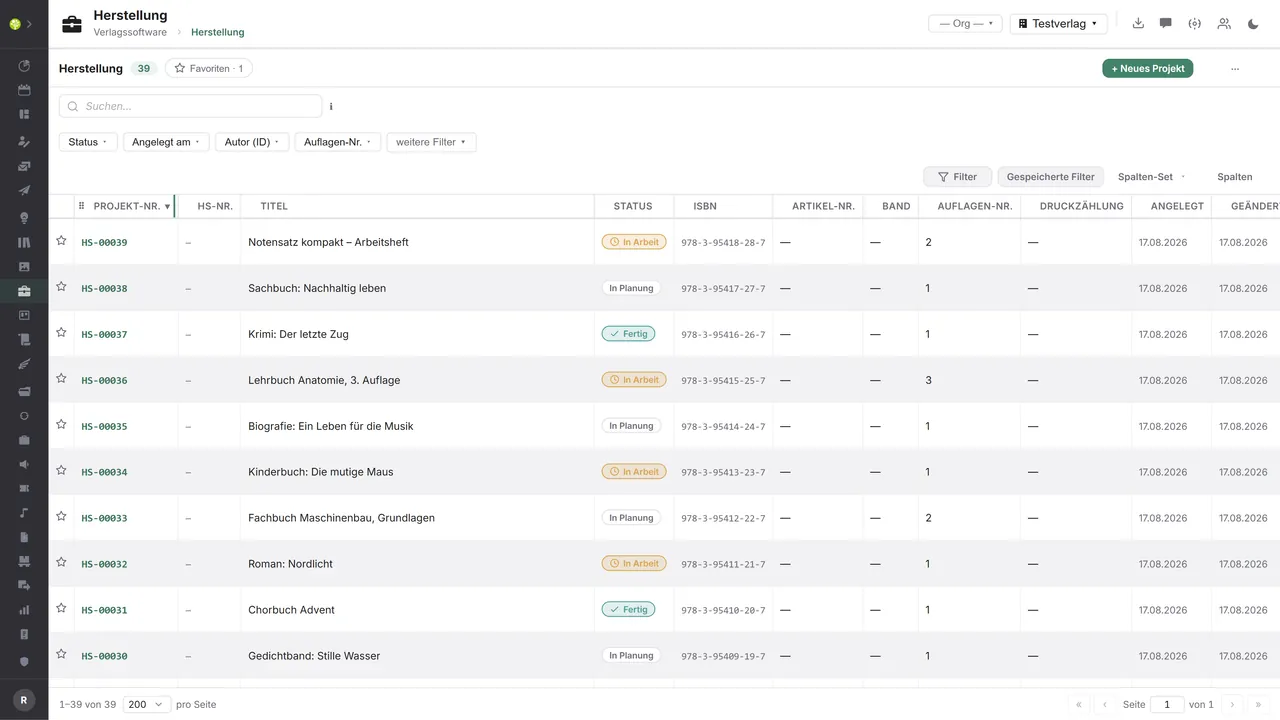

Every project in one listSearch across title, production number and ISBN, filters for status, date created, author and print run number – plus favorites, saved filters, column sets and the export.
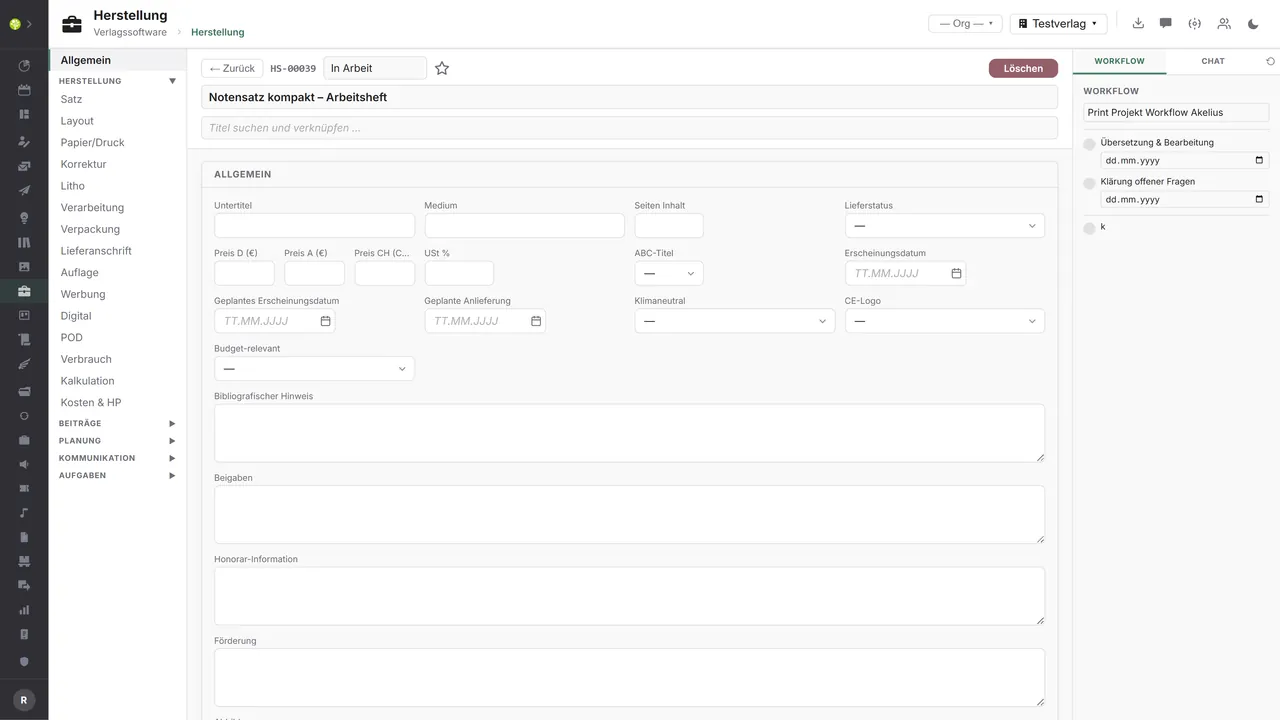
The project with all its tabsOn the left the tabs from typesetting through paper/print to “costs & unit cost”, in the middle the general details with prices, dates and markers – on the right the project's dynamic workflow.
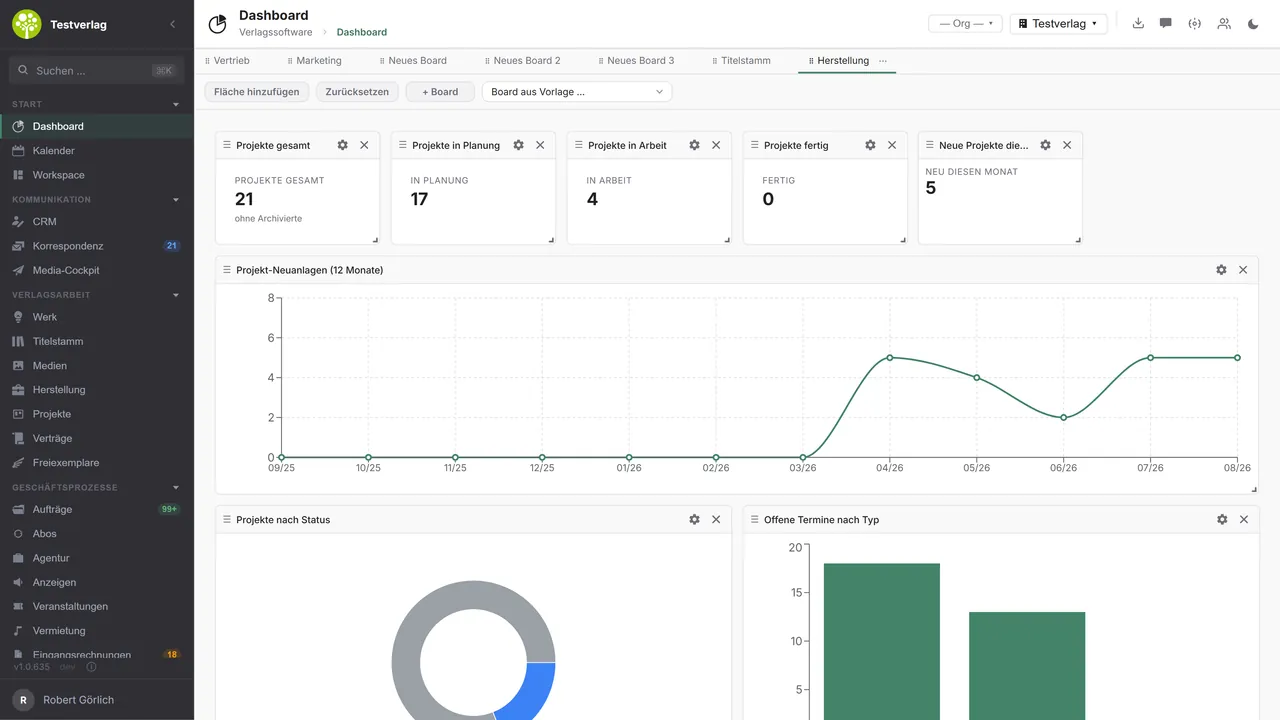
Key figures across all projectsA board of its own for production: projects in total, in planning, in progress and finished, new projects in a 12-month trend, distribution by status, and open dates by type.

See open.junixx at work. We show you on screen how the software fits your publishing workflows – with no obligation, and with time for your questions.
Book a demoImport and export through the API.
Production means working with others: printers, paper wholesalers and POD providers hang on the project – and a carbon footprint that holds up needs emission factors from outside.
Import – from external services
Data flowing into the module from outside:
- Quotes, order confirmations and production status from printers → inquiry, order and progress in one flow
- Paper master data, prices and certificates (FSC, PEFC) from paper suppliers → an up-to-date choice of paper and costing
- Validated emission factors from carbon factor databases → footprints you can cite
- POD status, sales figures and ASIN from POD providers → control over reprints and availability
Export – to external services
Data the module passes outward:
- Print inquiry and print order to printers and POD providers – print run, extent, paper, binding, dates
- Print files into the printer's hot folders and portals – as PDF/X
- Paper requirements and specification to paper wholesalers
- Carbon data sheet and footprint to the digital product passport, to CSRD reporting and climate service providers
Today, inquiries and orders go to printers and suppliers as PDF correspondence, the carbon footprint is available as a data sheet PDF and as a JSON or CSV export for the digital product passport, and the production costs per title leave the module as CSV. Structured print data exchange to JDF/JMF, the connection to paper suppliers and external factor sources can be added through the central API.
More on the interfaces
Detailed overview from the interface analysis: sources for import and possible targets for export.
Import – from external services
| Source (external) | What is imported | Use in the module |
|---|---|---|
| Printers (offset, digital, POD) | Quotes, order confirmation, production status | Inquiry → order → progress on the project |
| Paper suppliers and wholesalers | Paper master data, prices, certificates (FSC, PEFC) | Paper selection and costing stay up to date |
| Carbon factor databases (Ecoinvent, DEFRA, UBA/ProBas, Paper Profile, ClimateCalc) | Validated emission factors | A product carbon footprint that holds up |
| POD providers (BoD, Amazon KDP, KNV) | POD status, sales figures, ASIN | Control over reprints and availability |
| ONIX code lists (EDItEUR) | Product form characteristics, paper types | Technical details stay standard-compliant |
Export – to external services
| Purpose / trigger | External service (examples) | What is exported | Format / standard |
|---|---|---|---|
| Print inquiry and print order | Printers, POD (BoD, Amazon KDP, KNV) | Print run, extent, paper, binding, dates | PDF correspondence, JDF/JMF, XML/CSV |
| Delivery of print files | The printer's hot folders and portals | Typesetting and print PDF | PDF/X-1a, PDF/X-4 |
| Procurement of materials | Paper wholesalers (Igepa, Papyrus, Antalis) | Paper requirements and specification | EDIFACT ORDERS, CSV/API |
| Proof of sustainability | Digital product passport, CSRD reporting, climate service providers | PCF per copy, the complete footprint | Data sheet PDF, JSON/CSV |
| Reconciliation of costing and costs | ERP and financial accounting | Production costs per title | CSV |
Every feature of Production.
You will find the complete list in our brochure
What you see above is an excerpt. Every feature of this module – and of all the others – is collected in the open.junixx brochure. We will gladly send it to you, in print or as a PDF. And if you would rather watch than read: we are happy to show you open.junixx live on screen.
Get the brochureParticularly strong for these kinds of publishers.
Anywhere printing happens and production costs, print run planning and the carbon footprint have to stand up to scrutiny – from the first print run to the reprint.
Connected to the publishing ecosystem
- VLB
- IDNV
- doctronic
- Amazon
- Bookwire
- Arvato / VVA
- Brocom
- Prolit
- Zeitfracht
- Magento
- WordPress /
WooCommerce - Shopify
- Shopware
- Wirth & Horn
- Diamant
- DATEV
- BMD
- Abacus
- DHL
- DPD
Get to know open.junixx.
Arrange an appointment with no obligation. We will show you how Production fits into your publishing routine.