

One set of contact data for the whole house.
Four roles, one record
Group of companies, company, contact person and private customer – roles can be converted with a preview and a blocker check, hierarchies moved through the company no.
Everything documented at the contact
Contact channels, bank details with an IBAN check, an activity timeline, notes and the correspondence history – in one place.
Your own fields, your own reports
User-defined fields in 13 data types with no programming, with validation and field permissions; analyses can be saved and scheduled.
Clean data that holds up legally
Consents, an erasure check and anonymization right at the contact; duplicates are detected and merged field by field.
One address that every module uses.
CRM stands for customer relationship management. With us, the CRM is the central address and contact administration of the whole application. It makes looking after, organizing and analyzing all contacts easier. Orders, production, royalties, rental and correspondence therefore all access the same record. If an address changes, that applies everywhere at once, without anyone having to enter it again by hand.
Every contact carries one of four roles: group of companies, company, contact person or private customer. Every company automatically receives a company no. of its own; its contact persons are kept beneath it and take on the company's address data. If a contact later changes role, the system checks beforehand whether that is possible and shows a preview before the change is confirmed. What is visible at a contact is governed by the contact type. It can be defined freely and is given its own color, its own icon and the extensions that suit it.
The master data includes the address with a calculated mailing address and a print note, several delivery addresses, language, status and customer group. The company name can be checked against the commercial register and adopted as the official name. Planned changes to the master data take effect automatically on the date recorded. Contact channels and bank details with an IBAN check are available too. Notes and activities record what was discussed, and so stay in the house even when the person responsible leaves the company.
Contacts can be sorted through categories in five types and through tags with bulk assignment. Anyone wanting to record additional information creates fields of their own: 13 data types are available, from text and amount to contact link and file. Every field can be validated and given role-based permissions. A filter becomes a list if you wish, static or dynamic, and pipelines show the sales stages with the revenue expected from them. Column sets, saved filters and a report builder with scheduled analyses turn the data into figures you can rely on.
In substance the CRM goes beyond addresses: invoicing and tax data, including tax determination and an e-invoicing profile, travel into the documents of Orders & invoices. Author data for the collecting societies VG Wort and VG Bild flows into the royalty statement. Projects go into Production, sheet music rental into Rental and written communication into Correspondence. Press and book trade data such as biography, outlet, review copy, BAG no., right of return and sales rep sit at the same contact. In this way a complete picture of the whole business relationship builds up at the individual contact.
To keep the data clean, the module checks for duplicates as soon as a contact is created and merges contacts if you wish. Where values differ, it is decided field by field which one is kept. Consents, the erasure check and anonymization belong to the contact itself, not to an add-on solution. GDPR access requests and evidence are therefore a matter of minutes.
The CRM in the application.

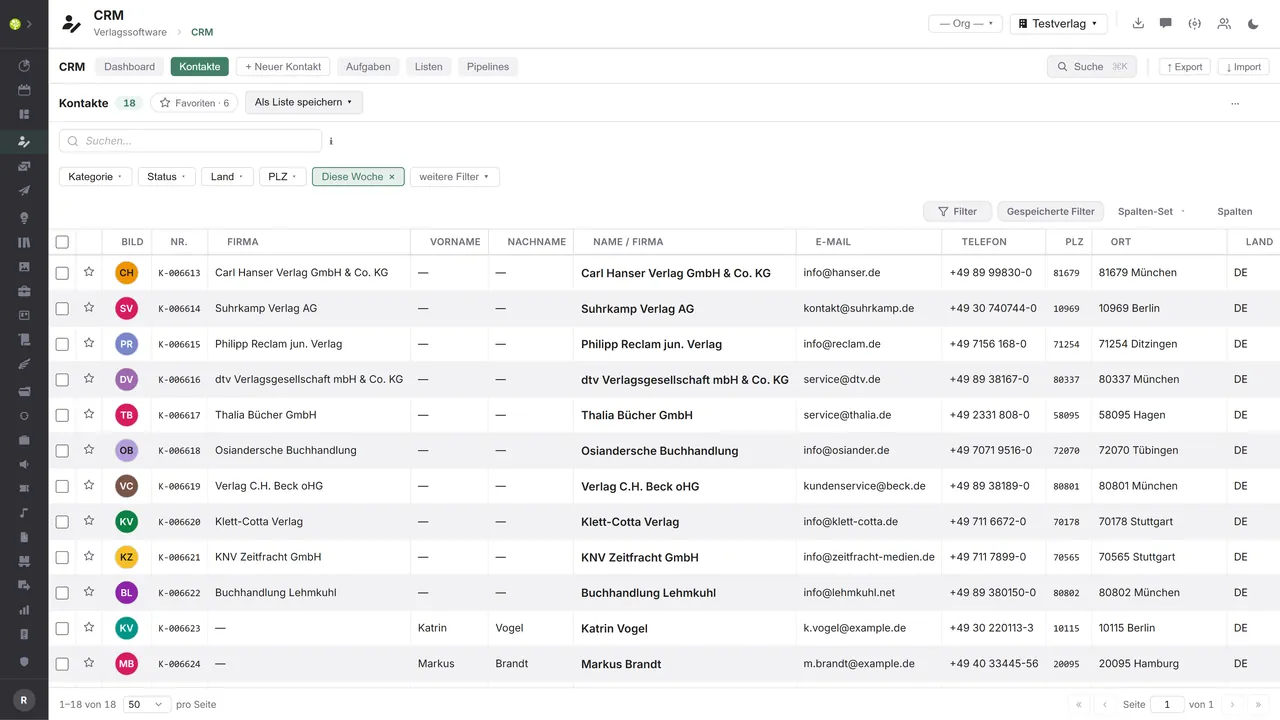

Every contact in one listFull-text search, quick filters for category, status, country and postcode, saved filters and selectable column sets – one click turns a filter into a list.
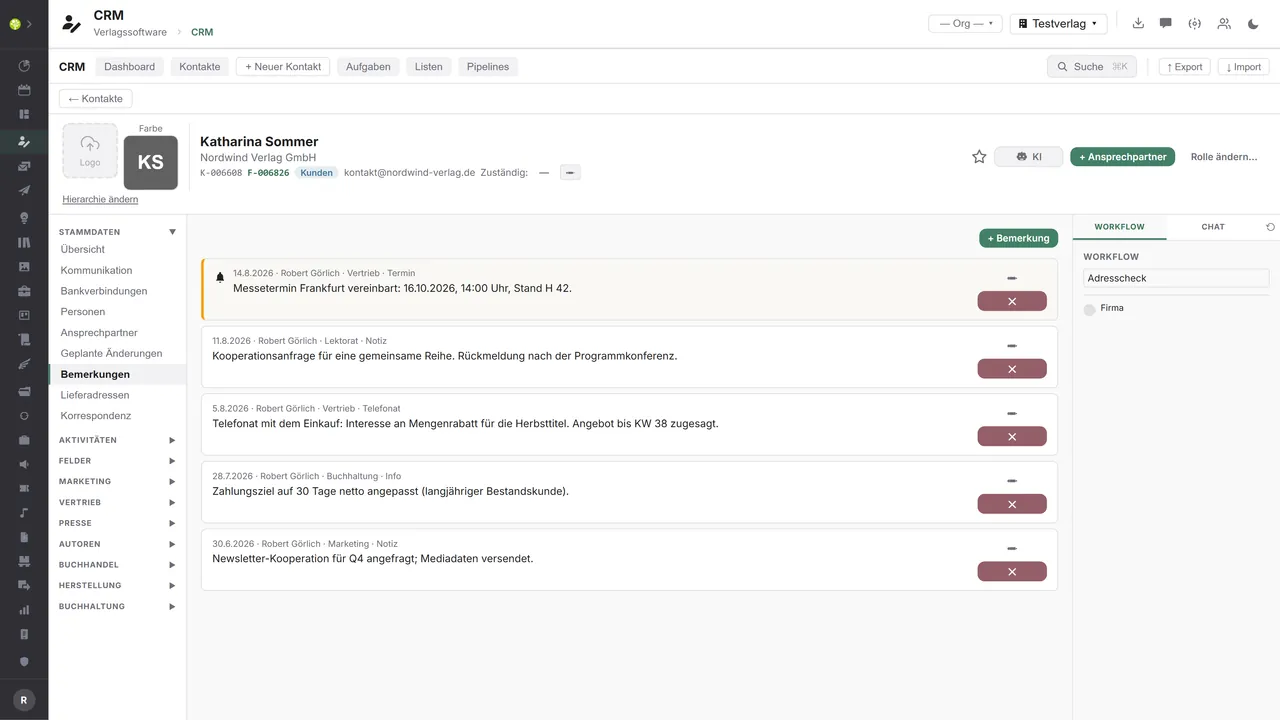
One contact, every sectionOn the left the side navigation – master data, communication, bank details, people, contact persons, delivery addresses, correspondence, plus marketing, sales, press, authors, book trade and accounting; it shows only what belongs to the contact type. On the right the working area, here the notes with date, author and department.
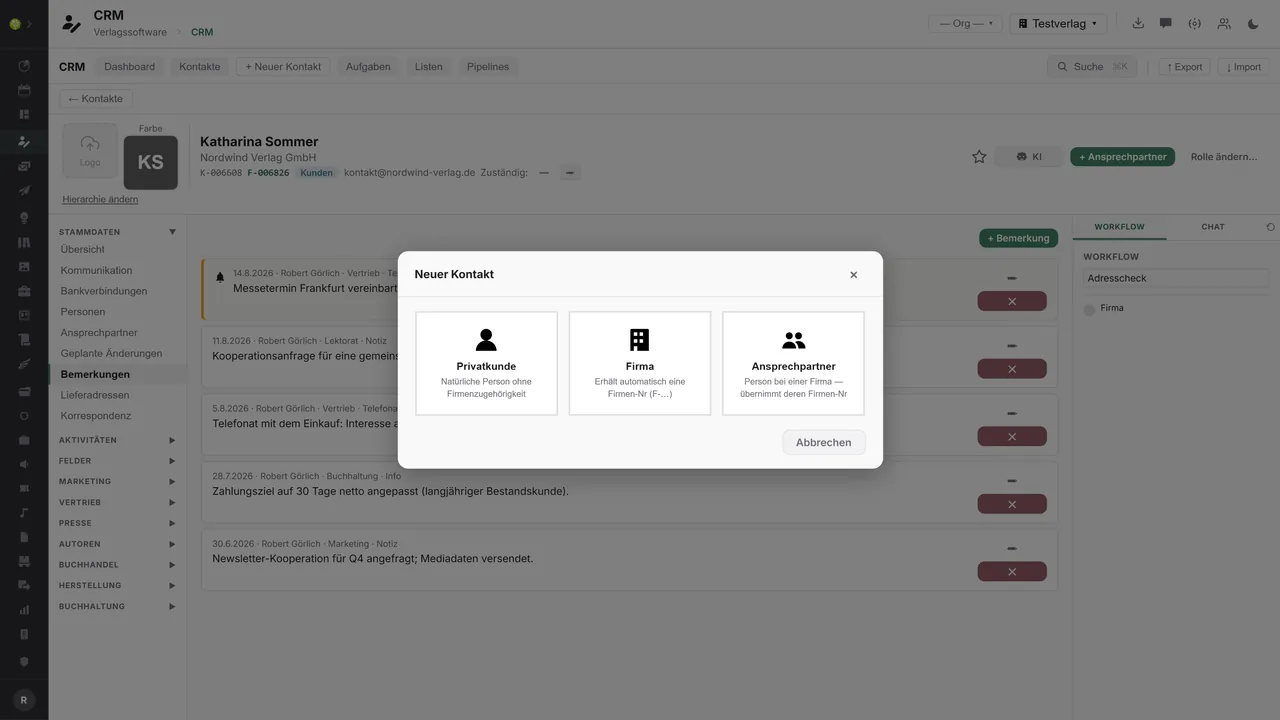
Three kinds of contactWhat a contact is decided when it is created: a private customer with no company affiliation, a company with an automatic company number, or a contact person who takes on the company number of their own house. The fourth role, the group of companies, arises through the role change.

See open.junixx at work. We show you on screen how the software fits your publishing workflows – with no obligation, and with time for your questions.
Book a demoImport and export through the API.
Contact data is where external services make the biggest difference: checking, enriching and mirroring into the marketing tools. That is why the CRM connects at both ends.

Import – from external services
Data flowing into the module from outside:
- A VAT ID check through VIES → the mandatory check for EU business customers
- Contacts by CSV or Excel → with field mapping, validation and a log
- Checked and standardized addresses from address services → fewer returns
- Newsletter engagement from Mailchimp or Brevo → segments and consents

Export – to external services
Data the module passes outward:
- Contacts with marketing consent to Mailchimp or Brevo, including the list assignment
- Contact, task and list events by webhook to Zapier, Make or your own systems
- Tasks as a calendar subscription for Google, Outlook and Apple (iCal/ICS)
- Contact data and analyses as CSV, Excel or PDF
The newsletter reconciliation with Mailchimp and Brevo, outbound webhooks with an HMAC signature, calendar feeds for tasks, the VIES check and the import from CSV and Excel with a color-coded log belong to the module. Further services – address validation or business credit information, for instance – can be added through the central API.
More on the interfaces
Detailed overview from the interface analysis: sources for import and possible targets for export.
Import – from external services

| Source (external) | What is imported | Use in the module |
|---|---|---|
| VIES (EU VAT check) | Validity and company name for the VAT ID | The mandatory check for EU business customers |
| Address validation (Deutsche Post Direkt, Uniserv, Loqate) | Standardized and checked addresses, autocompletion | Avoid returns and duplicates |
| Business credit information (Creditreform, commercial register/Bundesanzeiger) | Company data, creditworthiness, confirmation from the commercial register | Set a credit limit, enrich the company data |
| Newsletter engagement (Mailchimp, Brevo) | Opens, clicks, unsubscribes | Segmentation and the return flow of consents |
| Contact files (CSV, Excel, vCard) | Individual contacts and whole data sets | Import with no retyping, with a duplicate check |
Export – to external services

| Purpose / trigger | External service (examples) | What is exported | Format / standard |
|---|---|---|---|
| Newsletter / marketing | Mailchimp, Brevo; Rapidmail, CleverReach, HubSpot | Contacts with marketing consent, list assignment | Partner API |
| Events to third-party systems | Freely configurable webhooks (Zapier, Make, your own systems) | Contact, task and list events | HTTP + HMAC (JSON) |
| Appointment and task subscription | Google Calendar, Outlook, Apple Calendar | Tasks as a calendar feed | iCal/ICS (webcal) |
| Contact and report export | BI tools, tax advisers, data warehouse | Contact data, aggregated key-figure reports | CSV, Excel, PDF |
| Handing addresses to the mailing house | Lettershop, postal and letter service providers | Mail-merge addresses for mailings | CSV |
Every feature of the CRM.
You will find the complete list in our brochure
What you see above is an excerpt. Every feature of this module – and of all the others – is collected in the open.junixx brochure. We will gladly send it to you, in print or as a PDF. And if you would rather watch than read: we are happy to show you open.junixx live on screen.
Get the brochureParticularly strong for these kinds of publishers.
The biggest difference is made by the extensions at the contact – authors and press, business customers with invoicing, subscribers and advertising customers, hirers and sales reps.




Connected to the publishing ecosystem
- VLB
- IDNV
- doctronic
- Amazon
- Bookwire
- Arvato / VVA
- Brocom
- Prolit
- Zeitfracht
- Magento
- WordPress /
WooCommerce - Shopify
- Shopware
- Wirth & Horn
- Diamant
- DATEV
- BMD
- Abacus
- DHL
- DPD
Get to know open.junixx.
Arrange an appointment with no obligation. We will show you how the CRM fits into your publishing routine.